[Pricing] Strapi Pricing: Free Means Self-Hosted, So Is Cloud Worth It?
- Free tier: Yes
- Cheapest paid plan: US$35/mo and up
- Free quota: Community open‑source self‑hosted version is completely free (MIT …
- Last checked: 2026-11-19
Article last updated: 2026-11-17



Strapi is an open-source headless CMS. That means a content system with no built-in website: you write and store content in it, and your site or app pulls that content through an API (a way for software to request data from other software). Strapi also offers AI and MCP integrations, MCP being a standard that lets AI tools connect to outside apps.
Here’s our angle. “Is Strapi free?” has two honest answers, and most people only hear one. The software is free. The hosted service is not. Pick the wrong one and you either pay for something you could run yourself, or run something you never wanted to maintain.
Free means self-hosted, and nothing else
Strapi’s free option is the Community edition. It’s open source under the MIT license, one of the most permissive licenses around. Per the data, it has no cap on the number of records and no cap on API calls.

Illustration: The free edition requires maintaining your own server, while the paid cloud has no free tier and sleeps when idle.
The catch is plain. You run it. You rent or own a server, set up a database, apply updates and keep backups. Strapi doesn’t do any of that for you.
Strapi Cloud, the company’s hosted service, has no free plan. There is no trial tier in the data we verified. The cheapest way to get Strapi hosted by Strapi is a paid subscription.
So “Strapi free tier” really describes a different product from the three paid ones below. It’s the same software, but you take on the operations work. We have no figure for what a server and database would cost you, so we won’t pretend to compare it with Cloud prices.
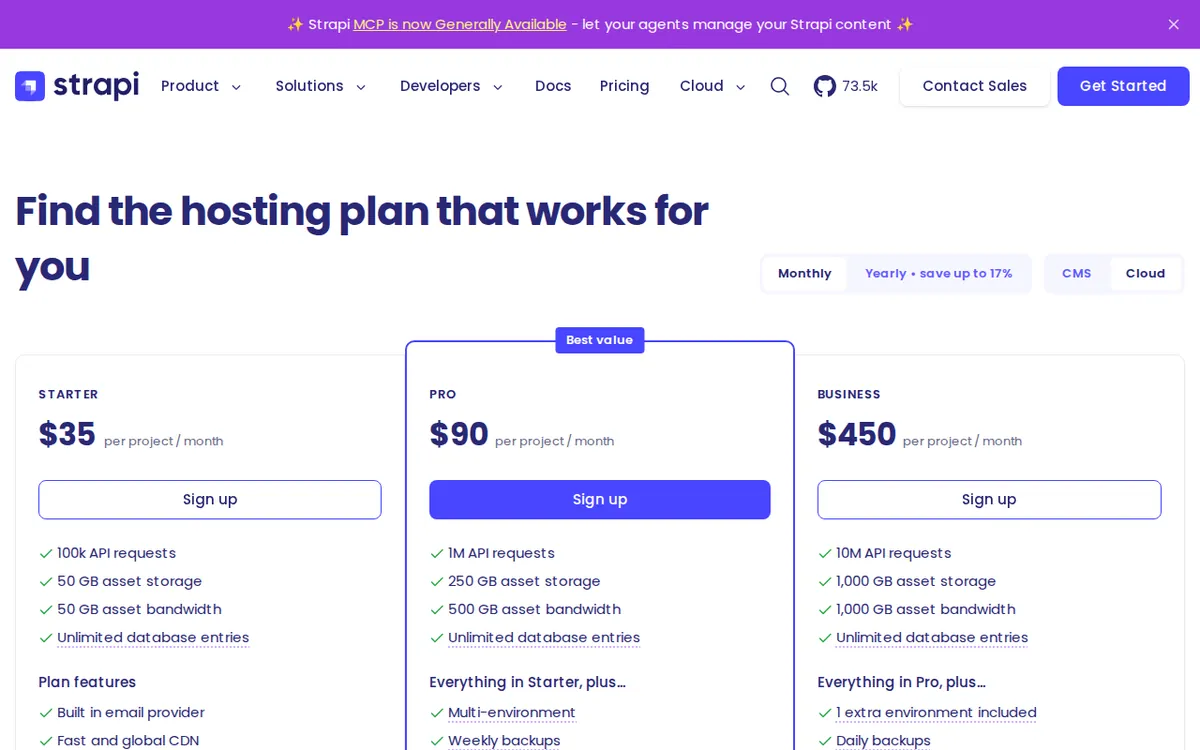
Figure: strapi.io official pricing page, captured 2026-11-17.
The three Cloud plans
All three are billed monthly and per project. If you run two separate Strapi projects, expect two subscriptions. We found no yearly price in the data, and no annual discount. If one exists, the pricing page will say so. We won’t guess.
Cloud Starter: US$35 per month.
- 100k API requests (each time your site or app asks Strapi for content counts as one)
- 50 GB storage and 50 GB bandwidth (bandwidth is the data sent out to your visitors)
- Unlimited database entries
- It sleeps when idle, and there are no automatic backups
Cloud Pro: US$90 per month.
- 1M API requests
- 250 GB storage and 500 GB bandwidth
- Always on, no sleeping
- CRON jobs (tasks that run on a schedule)
- Weekly backups
- Support for multiple environments (separate copies such as staging and production). An extra environment costs +US$60 per month.
Cloud Business: US$450 per month.
- 10M API requests
- 1,000 GB storage and 1,000 GB bandwidth
- Two environments included
- Daily backups
- A 99.9% uptime SLA (a written promise about how often the service stays up)
Where the real differences sit
The request counts grow a lot from tier to tier, but they aren’t the main story. The operational features are.
Starter sleeps when idle. A sleeping server needs a moment to wake up, so the first visitor after a quiet spell may wait. For an internal tool or a side project, that’s fine. For a public site that matters to your income, it’s a real compromise. Starter also has no automatic backups. If you break your content model or delete the wrong thing, there is no safety net in the plan as listed.
Pro fixes both. It stays on, and it adds weekly backups. It also adds CRON jobs and multi-environment support, which are the features teams need once more than one person is shipping changes. The +US$60 per month for an extra environment is worth planning for early. A common setup is one live environment and one for testing. Budget for that before you pick a plan, because the add-on is priced separately from the base.
Business is where the uptime guarantee, daily backups and two included environments arrive. The data doesn’t say who the plan is for beyond that. Judge it by the SLA and the backup cadence. If nobody in your company would ask for a written uptime promise, you probably don’t need it.
The cheapest upgrade path is short: self-hosted for free, then Starter at US$35. There is no step in between. If Starter’s sleeping is a dealbreaker, the next stop is Pro at US$90, and that jump is the one most production sites will face.
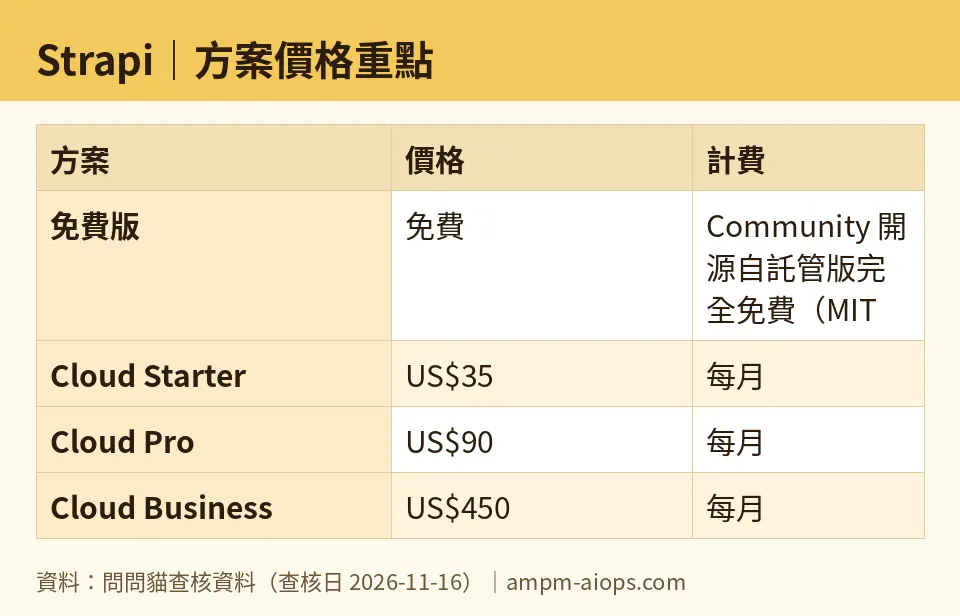
Figure: compiled by AMPM from its verified data (last verified 2026-11-16).
🔍 AMPM exclusive check
Nothing differed from the official page this time; every number above matches it, checked 2026-11-16.
Some context on how solid that is. This entry came in as a challenger candidate. The numbers were read from Strapi’s site and pricing page in one pass. They have been re-confirmed daily by automated checks from 2026-11-10 through 2026-11-16, with no changes. We have not yet cross-checked them by hand against several independent sources. So treat the free-tier terms and the commercial-use conditions as something to confirm on Strapi’s pricing page before you commit.
One more point the vendor page makes easy to miss. The free option and the Cloud plans are not one ladder. The free tier has no hosting at all, and Cloud has no free rung. If you came looking for a free hosted plan, there isn’t one in what we verified.
☀️ AMO, the budget-minded cat

AMO’s question is simple: is free enough, and is paying worth it?
Free is enough if you can run a server. The Community edition has no record cap and no API call cap, so the software itself will never be the limit. The limit is your time. If you already host other apps and have a database running, adding Strapi costs you little beyond effort. For a personal blog, a portfolio, a prototype or a client demo, free is the right answer. AMO would not pay for Cloud here.
Paying starts to make sense when maintenance costs more than the fee. Cloud Starter is US$35 per month for 100k API requests, 50 GB of storage and 50 GB of bandwidth. That buys you a hosted setup without server chores. But read the fine print. It sleeps when idle and has no automatic backups. For a budget-minded person, that means you are paying US$35 and still keeping your own backup habit.
Cloud Pro at US$90 per month is the first plan that behaves like a real production host. It stays on, runs CRON jobs and keeps weekly backups, with 1M API requests and 250 GB of storage. If your site earns money and downtime costs you customers, AMO says this is the tier where paying is easiest to defend. Remember the extra environment at +US$60 per month if you want a separate staging copy.
Business at US$450 per month is for teams that need daily backups, two environments and the 99.9% SLA. AMO would skip it unless someone is demanding that guarantee.
AMO’s rule: self-host until the server work annoys you. Then jump to Pro, not Starter, if the site matters.
Verdict: who should use it, who should skip it
Use the free self-hosted version if you can run a server and database, you want no limits on records or API calls, and you don’t mind doing updates and backups yourself. Hobby projects, internal tools and learning setups fit well.
Use Cloud Starter if you want someone else to host a small project, and a sleeping server and no automatic backups are acceptable. It suits low-stakes sites and tests.
Use Cloud Pro if the site is live and matters. Always-on hosting, weekly backups, CRON jobs and multi-environment support are what separate it from Starter. Plan for the extra-environment fee if you need staging.
Use Cloud Business if you need daily backups, two environments included and a written 99.9% uptime promise. Most small teams won’t.
Skip Cloud entirely if you only wanted a free hosted plan. It doesn’t exist. Skip Starter if sleeping would hurt your visitors. And skip any paid plan if you already run servers and just need the software.
There is no yearly price in the data, so we can’t say whether paying annually saves anything. Check the pricing page for that.
Written: 2026-11-17 Price last verified: 2026-11-16 Tool last health-checked: 2026-11-17
🔗 Related on AMPM
📎 Sources
All prices and quotas in this article come from AMPM’s verified dataset for Strapi (last verified 2026-11-16); primary sources:
🐾 Meet the cats: AMO and PIMI
AMPM is a Taiwan-based AI-tool pricing watchdog. Our motto: ask before you subscribe. Two cats argue every tool from two sides:
- ☀️ AMO — the budget-minded cat. Always asks: is the free tier enough, and is paying actually worth it?
- 🌙 PIMI — the performance-minded cat. Cares about whether it works well, fast, and gets your job done.
When they are done arguing, you know whether to pay. Every number is checked by us, with the verification date at the end.
🐾 Our sister sites also checked
Read next
- Strapi Full breakdown: pricing, features and real-world limits
- Strapi Is the free quota enough?
- Strapi Alternatives
- Free plan limits for every AI tool we track
