[How-to] Stockimg AI free vs paid: can you actually use that logo commercially?
- Free tier: Yes
- Cheapest paid plan: US$12/mo and up
- Free quota: The free plan offers 1 generation credit, enabling you to try image …
- Last checked: 2026-11-19
Article last updated: 2026-10-23



Stockimg AI does one job and aims to do it well: turn a text prompt into logos, illustrations, and cover art. That makes it tempting for anyone who needs a brand mark today and doesn’t want to hire a designer. The free plan lets you try it. But there’s a catch, and it isn’t the quota running out. It’s whether you’re actually allowed to use what the free plan makes.
This guide walks a first-timer through what the free tier can do, how far each paid tier’s quota stretches, and the one line on the pricing page that decides whether you should pay before you publish anything.
What the free plan actually gives you
Sign up and you land on the free tier. It costs nothing — no line item at all, just free, no card asked up front.
What you get is one credit. A credit is a single point you spend each time you generate an image. One credit means one generation. That’s it. Think of the free plan as a demo seat, not a workspace.
Inside that single shot, you can still touch the real toolkit:
- Basic generation — type a prompt, get an image.
- Background removal — strip the background out so a logo sits clean on any color.
- 4x upscale — enlarge an image to four times its size without it turning to mush.
Here’s the concrete path for a beginner:
- Create an account on stockimg.ai.
- Write a tight prompt. Name the style, the subject, and the use — “flat minimalist coffee-cup logo, two colors, white background” beats “a nice logo.”
- Generate once. That spends your credit.
- Run the result through background removal and the 4x upscale to see the output quality at full size.
The most common blocker is obvious: one credit disappears on your first prompt, and AI image tools rarely nail the brief on attempt one. You don’t get a second free roll of the dice. So treat that single generation as a quality test, not a production run. If the output looks good enough to build on, you’ve learned what you need. If it doesn’t, you’ve learned that too — for free.
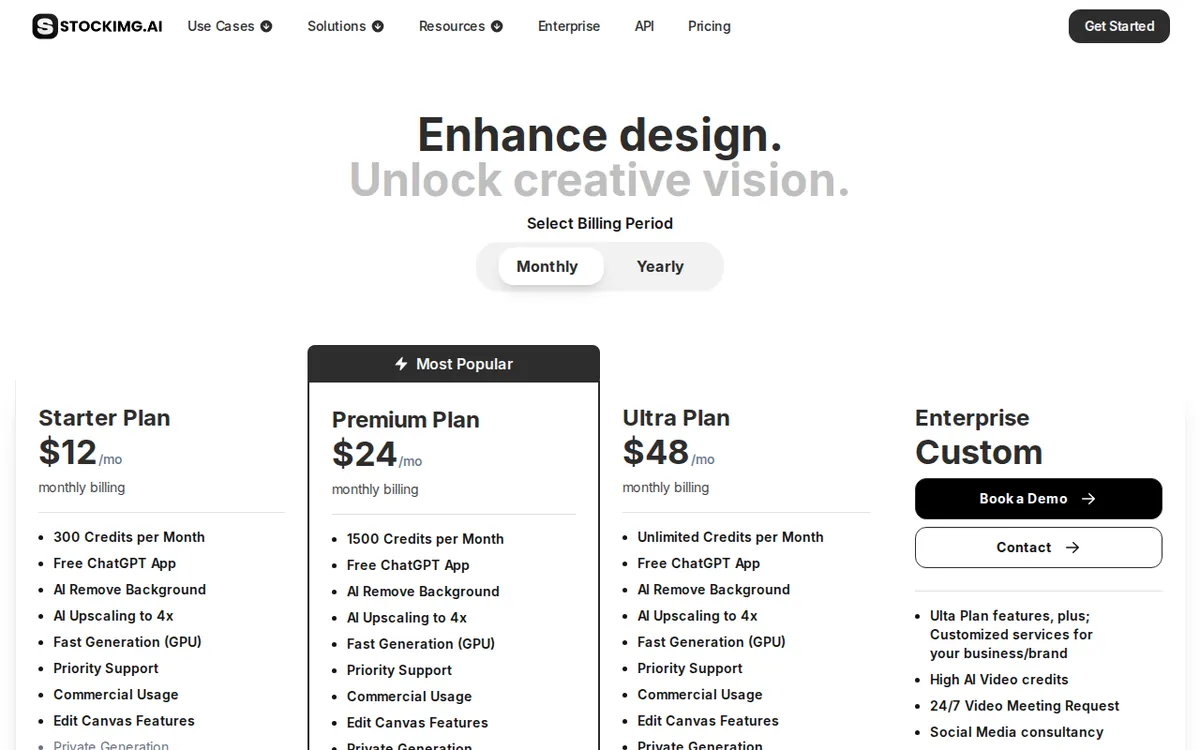
Figure: stockimg.ai official pricing page, captured 2026-10-23.
The credit math: how far 300 or 1,500 goes
Once the free credit is gone, there are three paid tiers. All are monthly subscriptions, meaning you pay each month and the credits reset. Prices vary by country; we checked from Taiwan.
Starter Plan — US$12 a month. You get 300 credits a month. That’s 300 generations. It adds GPU fast generation (GPU is the chip that renders the image; “fast” means less waiting), plus the same 4x upscale and background removal from the free tier, and a single-user commercial use license. Hold that last phrase — it’s the whole point of this article, and we’ll come back to it.
Premium Plan — US$24 a month. Stockimg marks this as its most popular plan. You get 1,500 credits a month. The features are the same as Starter; you’re buying five times the generations for twice the price. The logic is simple: if you blow through 300 credits regularly, the per-image cost on Premium is lower.
Ultra Plan — US$48 a month. Aimed at people producing visuals constantly — heavy content creators and small marketing teams. (More on the exact credit count below; it matters.)
How to pick, in plain terms:
- Making one or two logos and a few covers a month? 300 credits on Starter is already generous, because real image work is iterative — you regenerate a lot before one image lands.
- Running a blog, a store listing, or social posts that need fresh art most days? 1,500 credits on Premium is the sweet spot the “most popular” label is chasing.
- Pumping out visuals at volume for clients or a team? That’s what Ultra is sold for.
There are no annual prices in the data we verified. If you’re hoping for a discounted yearly rate, the figures above are the monthly ones we can confirm; check the live page for any annual option, because we can’t quote one we didn’t see.
The license is the real upgrade trigger
Now the catch. The free plan’s description lists features — background removal, 4x upscale, basic generation. It does not say anything about commercial use. The word that matters, “commercial use license,” first appears on the Starter plan, as a “single-user commercial use license.”
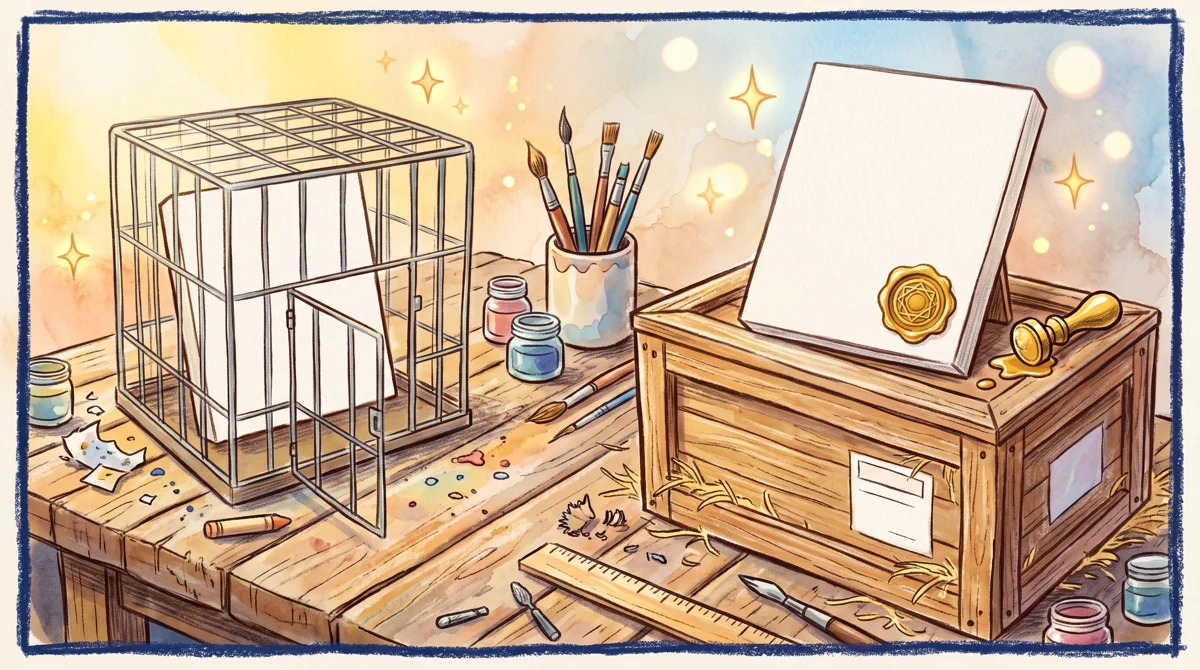
Illustration: Generating an image does not grant selling rights until an upgrade unlocks the official commercial seal.
A commercial use license is permission to use the image in work you make money from: a logo on a product you sell, a cover on a paid course, art in a client’s campaign. Without it spelled out, you’re guessing — and guessing about image rights is how people end up with takedown notices or worse.
So the practical rule for a beginner is this. Use the free credit to test quality. But if the logo or cover is going on anything commercial — a real brand, a product, a paying client — the US$12 Starter plan is the first tier that actually puts the commercial license in writing. The upgrade isn’t about running out of credits. It’s about running out of rights.
This flips the usual free-vs-paid question. Most tools make you pay when you hit a quota wall. Here, you may need to pay before you’ve hit any wall at all — the moment your use turns commercial.
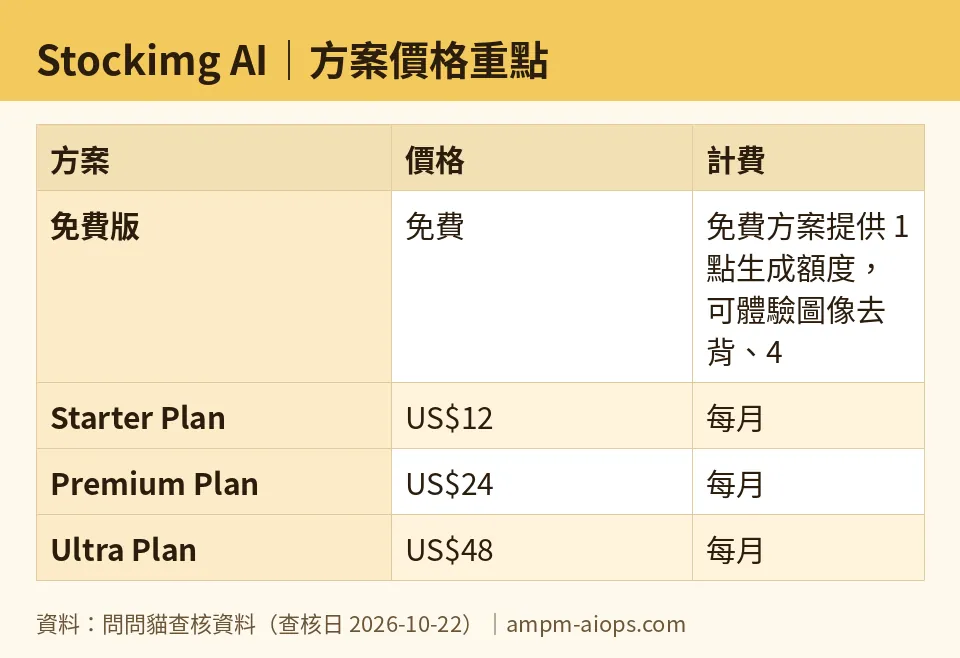
Figure: compiled by AMPM from its verified data (last verified 2026-10-22).
🔍 AMPM exclusive check
Two things we checked that the pricing page does not make obvious:
One, the free plan never says “commercial.” The vendor lists the free tier’s features but stays silent on usage rights. “Single-user commercial use license” only appears once you reach the US$12 Starter plan. A beginner reading quickly could easily assume the free output is theirs to sell. The page doesn’t say that. We’re flagging the silence because silence on rights is not the same as permission.
Two, we could not confirm Ultra’s exact credit count. For Starter and Premium, the site gives hard numbers — 300 and 1,500 credits. For the US$48 Ultra plan, the figure we pulled was described only as a high monthly allowance, with no specific number in what we verified. So we’re not quoting one. If you’re considering Ultra specifically for its credit ceiling, confirm the exact figure on the live pricing page before you subscribe.
One honesty note on method: Stockimg AI entered our tracker as a challenger candidate and has been through a single verification pass, not our usual multi-round cross-check. The prices and quotas above match the official site as read on 2026-10-22. Because the commercial-license wording is the deciding factor here, open the live page and confirm the license line yourself before you publish anything for money. Nothing we found contradicted the official page — the gap is what the page leaves unsaid, not an error in it.
Verdict: who should use it, who should skip it
Use the free plan if you just want to see whether Stockimg AI’s logo and cover output is good enough for you. One credit is enough to judge quality, and the background-removal and upscale tools are right there to test.
Pay for Starter (US$12/month) if you’re putting the output to commercial use — any logo, cover, or illustration tied to a brand, product, or client. This is the cheapest tier that states the commercial license outright. Don’t publish commercial work on the free credit on the assumption that it’s covered. It isn’t spelled out.
Pay for Premium (US$24/month) if you generate often. At 1,500 credits versus Starter’s 300 for twice the price, it’s built for people who iterate daily, and it’s the plan Stockimg itself pushes hardest.
Consider Ultra (US$48/month) if you produce visuals at high volume for a team or client roster — but confirm the exact credit number first, since we couldn’t.
Skip it entirely if you need a one-off logo and already have rights-clear art elsewhere, or if you’re not ready to pay for a commercial license and your use is commercial. In that case the free plan can show you quality, but it can’t give you the permission you’d need to ship.
The short version: the free tier answers “is this any good?” The US$12 Starter answers “can I legally use it?” Make sure you know which question you’re actually asking before you build a brand on a free credit.
Written: 2026-10-23 Price last verified: 2026-10-22 Tool last health-checked: 2026-10-23
🔗 Related on AMPM
📎 Sources
All prices and quotas in this article come from AMPM’s verified dataset for Stockimg AI (last verified 2026-10-22); primary sources:
🐾 Meet the cats: AMO and PIMI
AMPM is a Taiwan-based AI-tool pricing watchdog. Our motto: ask before you subscribe. Two cats argue every tool from two sides:
- ☀️ AMO — the budget-minded cat. Always asks: is the free tier enough, and is paying actually worth it?
- 🌙 PIMI — the performance-minded cat. Cares about whether it works well, fast, and gets your job done.
When they are done arguing, you know whether to pay. Every number is checked by us, with the verification date at the end.
🐾 Our sister sites also checked
Read next
- Stockimg AI Full breakdown: pricing, features and real-world limits
- Stockimg AI Is the free quota enough?
- Stockimg AI Alternatives
- Free plan limits for every AI tool we track
