[Pricing] Is Sprout Social Worth It? The Tier Where the Inbox Finally Shows Up
- Free tier: No
- Cheapest paid plan: US$99/mo and up
- Free quota: No permanent free plan; offers a 30-day full-feature free trial (no …
- Last checked: 2026-11-19
Article last updated: 2026-11-15



Sprout Social sells social media management software built for companies. It schedules posts, collects replies, tracks brand mentions and reports on results. It has no permanent free plan. So the real question is which of four paid tiers you need, and where the extra spend stops buying anything useful.
My angle: the plan names hide the one jump that matters. Most people assume the cheapest tier is “the product, but smaller.” It isn’t. The cheapest tier is a scheduler. The inbox, which is what many teams actually come for, starts one step up.
Prices vary by country; we checked from Taiwan, and every figure below is in US$ as listed.
No free plan, one 30-day trial
Sprout Social has no free tier. What it offers instead is a 30-day free trial with all features unlocked. No credit card is needed to start it.
That is a better deal than the usual “enter your card, forget to cancel” trial. It also means you can test the top-end features before you decide what to buy. Use that. Connect your real accounts, run a real week of posts and replies, and see which features you touched.
Thirty days is short, though. If your busy season is not in that window, you will judge the tool on a quiet month. Start the trial when you have something to publish and people writing to you.
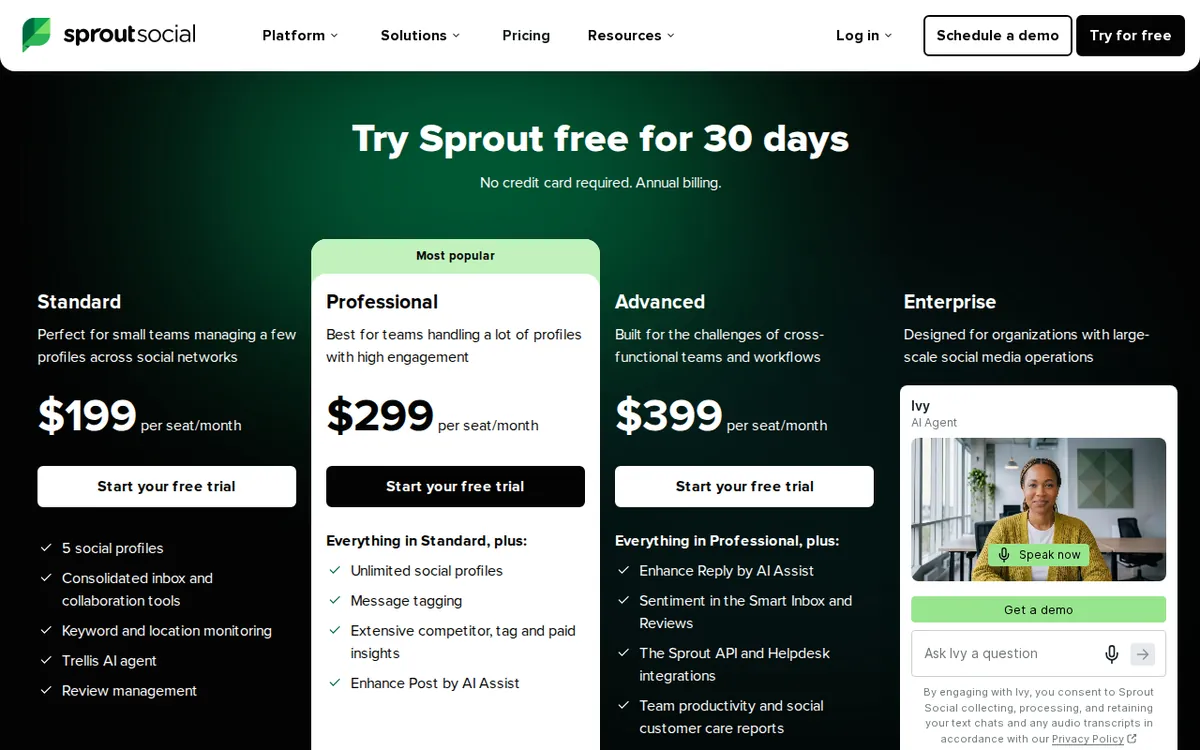
Figure: sproutsocial.com official pricing page, captured 2026-11-15.
The four plans: what each one adds
Every plan is priced per seat. A seat is one person’s login. Add a teammate and you pay the per-seat rate again for that person.

Illustration: The entry plan sends scheduled posts out, but the unified inbox stays locked until you pay for an upgrade.
| Plan | Monthly billing, per seat | Annual billing, per seat per month |
|---|---|---|
| Essentials | US$99 | US$79 |
| Standard | US$249 | US$199 |
| Professional | US$399 | US$299 |
| Advanced | US$499 | US$399 |
The data lists no single yearly price for any plan. It gives only the per-month rate when you commit to annual billing. It does not say how that commitment is charged, such as upfront or monthly. Check the checkout page before you sign.
Essentials. You can connect up to 5 social accounts. You get post scheduling, a content calendar, and suggestions for the best times to post. Reporting covers individual profiles and individual posts. You also get 100 Trellis AI credits per seat per month. Credits are points that the AI assistant spends each time you ask it to do something. The one thing Essentials leaves out is the all-in-one smart inbox.
Standard. This is where the inbox arrives. It gathers messages and comments from all your accounts into one place and adds collaboration tools. It also adds keyword and location monitoring, comment management, and 90 days of saved conversation history. It stays at 5 social accounts and 100 Trellis AI credits per person per month.
Professional. The data calls this the most popular plan. It removes the cap on connected social accounts. It adds message approval workflows, bulk scheduling, post tags and saved quick replies. It also adds reports that compare you with competitors and measure paid-ad results, plus Enhance Post, an AI helper that generates post text. You also get full history.
Advanced. Everything in Professional, plus AI auto-replies for customer service, sentiment analysis in the inbox, access to the Sprout API, a helpdesk integration, and alerts when message volume spikes. An API is a way for your own software to talk to Sprout’s. Sentiment analysis labels messages as positive, negative or neutral.
One gap in the data: it gives the 100-credit allowance for Essentials and Standard only. It does not say how many credits Professional or Advanced seats get. Ask before you assume.
The cheapest upgrade path
Start by asking whether you need the inbox. That decides everything.
If you only publish, with no need to manage a flood of replies, Essentials covers it. It handles up to 5 accounts, a calendar, scheduling and basic reports.
If people write to your brand and you need to answer them as a team, move to Standard. That is the first plan with the inbox, comment management and monitoring. For many small teams it is the real entry point, and Essentials is a trial lane.
Move to Professional only when a specific limit hits you. The clear triggers are more than 5 social accounts, an approval step before posts go live, or competitor and paid-ad reports your boss keeps asking for. Without one of those, Professional is paying for rooms you will not enter.
Advanced is for support teams. If you are not answering customers at volume, the AI auto-replies, sentiment labels, API and helpdesk link are unlikely to earn their price.
Annual billing lowers the per-seat monthly rate on every plan. If you are sure you will keep the tool, it is the cheaper route. If you are not sure, pay monthly for the first stretch and switch once you have proof.
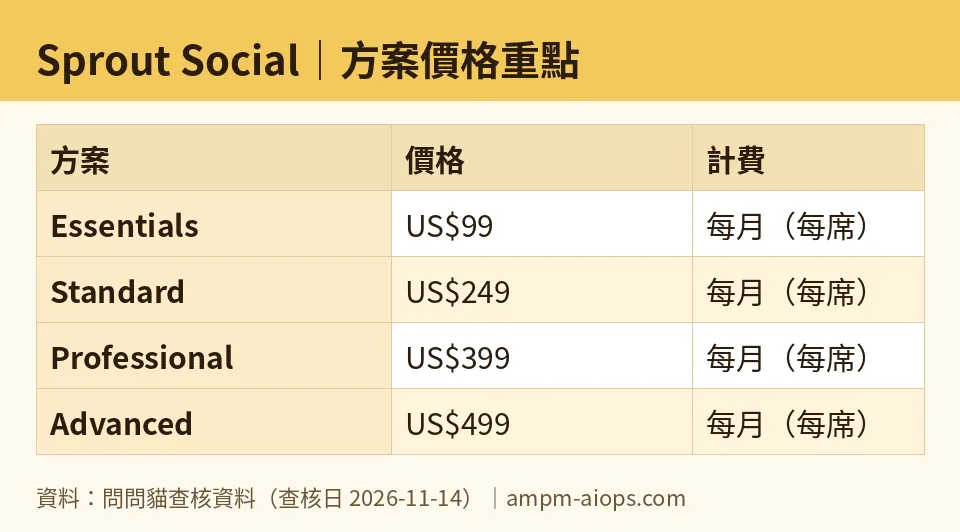
Figure: compiled by AMPM from its verified data (last verified 2026-11-14).
When paying is not worth it
- You post a few times a week from one or two accounts. A free-tier scheduler elsewhere may do the job. Sprout is built for teams with workflow, not for a solo posting habit.
- You buy Essentials hoping for the inbox. It is not there. You will outgrow the plan quickly.
- You have many seats. Per-seat pricing multiplies with every person. Give seats only to people who log in daily.
- You want the AI features badly. The data shows a 100-credit monthly allowance on the lower plans. Test how fast your real work uses it during the trial.
🔍 AMPM exclusive check
Nothing differed from the official page this time. Every number in this article matches it, checked 2026-11-14.
Two caveats are worth stating. First, this entry has had one round of checking, not our full three-source manual cross-check, so treat the plan contents as accurate but less tested than our older entries. Second, the data does not cover trial terms in detail, free-trial limits beyond the 30 days and no card requirement, or commercial-use terms. Confirm those on Sprout’s pricing page before you commit a team.
☀️ AMO, the budget-minded cat

AMO’s first question is simple: is free enough? Here, no. Sprout Social has no permanent free plan. The only free thing is the 30-day trial, with every feature on and no credit card asked. That makes the trial a test drive, not a place to live.
The second question is whether paying is worth it. It depends on what you pay for. Essentials costs US$99 per seat per month on monthly billing, or US$79 on annual billing. For that you get scheduling, a calendar and basic reports for up to 5 accounts. If that is all you need, plenty of cheaper tools do it, so this is the plan where AMO would hesitate most.
Standard is US$249 on monthly billing and US$199 on annual billing. It is a big step up, but it is the first plan where Sprout does something many rivals charge extra for: one inbox for every message, with comment management and 90 days of history. AMO’s rule is to skip Essentials and go straight to Standard if replies matter, or leave if they do not.
Professional at US$399 monthly or US$299 annual, and Advanced at US$499 monthly or US$399 annual, are for larger teams with approvals, unlimited accounts or customer-support volume. A budget cat does not buy these on hope. Buy them the week a real limit blocks you.
AMO’s tip: run the trial on the plan you think you need, then check whether you actually opened the features that plan adds.
Verdict: who should use it, who should skip it
Use it if you are a team that answers customers on social media and needs one shared inbox. Standard is the plan to test first. Use it too if you run many accounts, need approvals before posting, or must report on competitors and paid ads. That points to Professional. Support teams that want AI replies and API access are the audience for Advanced.
Skip it if you are a solo creator, a tiny brand, or anyone who just schedules posts. Essentials is the cheapest door in, but it is the plan without the inbox, which is the main reason to pick Sprout. Skip it, too, if you cannot spare a month to test it properly, or if you plan to buy many seats and only a few people will use them.
Start the free trial when you have real work to run through it. Decide on what you used, not on what the feature list promised.
Written: 2026-11-15 Price last verified: 2026-11-14 Tool last health-checked: 2026-11-15
🔗 Related on AMPM
📎 Sources
All prices and quotas in this article come from AMPM’s verified dataset for Sprout Social (last verified 2026-11-14); primary sources:
🐾 Meet the cats: AMO and PIMI
AMPM is a Taiwan-based AI-tool pricing watchdog. Our motto: ask before you subscribe. Two cats argue every tool from two sides:
- ☀️ AMO — the budget-minded cat. Always asks: is the free tier enough, and is paying actually worth it?
- 🌙 PIMI — the performance-minded cat. Cares about whether it works well, fast, and gets your job done.
When they are done arguing, you know whether to pay. Every number is checked by us, with the verification date at the end.
🐾 Our sister sites also checked
Read next
- Sprout Social Full breakdown: pricing, features and real-world limits
- Sprout Social Is the free quota enough?
- Sprout Social Alternatives
- Free plan limits for every AI tool we track
