[Pricing] Is the Spikes Studio Free Plan a Trial in Disguise?
- Free tier: Yes
- Cheapest paid plan: US$32.99/mo and up
- Free quota: Basic plan: up to 30 minutes of video processing per month, exports …
- Last checked: 2026-11-19
Article last updated: 2026-11-16



Spikes Studio cuts long videos and livestreams into short highlight clips with AI. It is aimed at streamers, podcasters and anyone sitting on hours of footage they never post. The free plan looks generous at first glance: no credit card, no signup fee.
My angle is simple. The free plan is built to be a test drive, not a place to live. The watermark and the short storage window both push you toward the paid plan. The real question is whether the next step up is priced sensibly for what you do.
Prices vary by country, and we checked from Taiwan. All figures below are in US$ as shown on the official pricing page.
What the free plan gives you
The free plan is called Basic. Here is what it includes:
- Up to 30 minutes of video processing per month
- Exports with an official Spikes Studio watermark
- Maximum 720p quality
- Files stored for 7 days
- No credit card needed to sign up
“Processing” is the monthly allowance of source video the tool works through for you. Think of it as a meter that runs while the AI scans your footage for highlights. Once it hits the cap, you wait for next month or you pay.
Thirty minutes is small. A single long stream or podcast episode can use it up on its own. If your raw footage runs an hour, the free plan cannot finish even one job. That is fine for a test, and it is not enough for a routine.
The watermark matters more than the quota. A clip with another company’s logo on it is hard to post on a brand channel or send to a client. It works for checking whether the AI picks good moments. It does not work for publishing.
Then there is the 7-day storage. Clips and projects expire after a week. If you edit slowly or come back to old projects, you will lose work. Download what you need quickly.
Taken together, the free plan lets you answer one question: does the AI choose highlights I like? It does that job well. It does not let you run a channel.
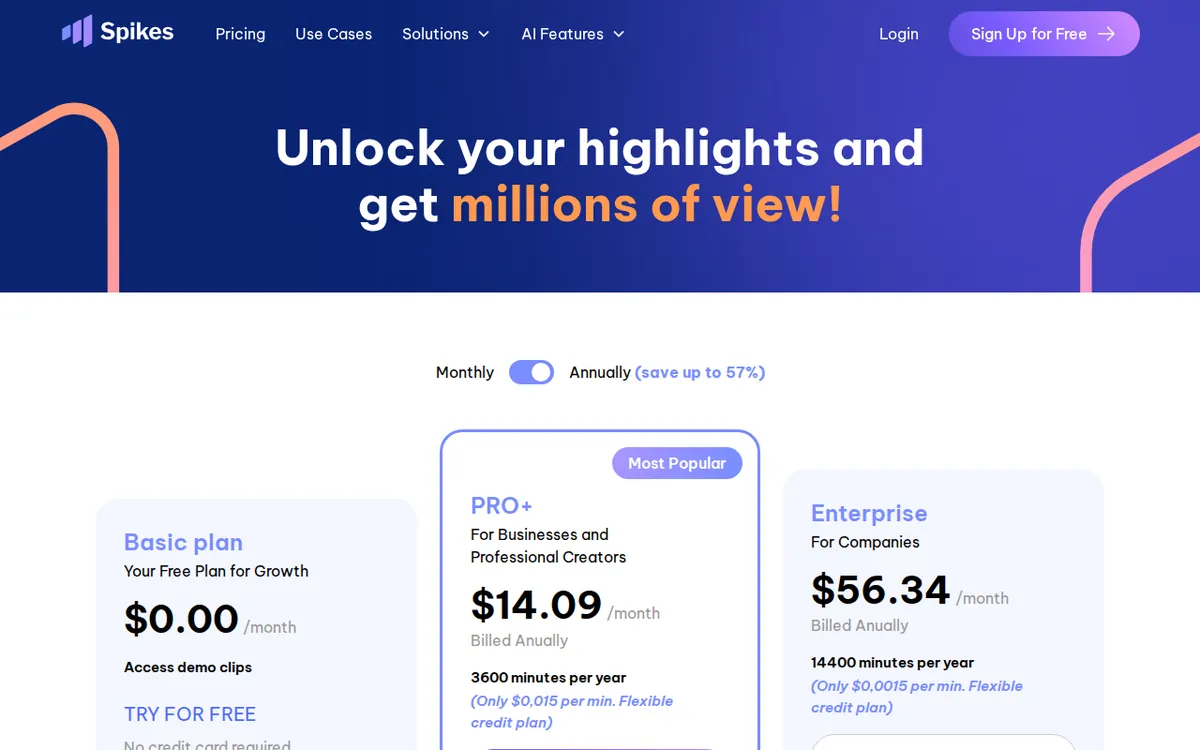
Figure: spikes.studio official pricing page, captured 2026-11-16.
The paid plans: PRO+ and Enterprise
The pricing page lists two paid plans, both billed monthly. The data we hold includes no yearly price and no annual discount, so we cannot say whether one exists. Check the pricing page before you assume either way.

Illustration: The free tier provides a tiny, watermarked snippet of tape, requiring a pricey upgrade for clean results.
PRO+ costs US$32.99 per month. The site marks it as the most popular plan. It includes:
- 300 minutes of processing per month
- No watermark
- Exports up to 1080p
- Dynamic captions, meaning animated subtitles that highlight words as they are spoken
- AI B-roll, meaning the tool adds cutaway footage over your clip
- GIF and animation inserts
- Automatic scheduling and posting to social platforms
- 90 days of storage
Enterprise costs US$115.99 per month. It is meant for high-volume teams. It includes:
- 1200 minutes of processing per month
- Custom branded templates
- Exports up to 1080p
- Higher-priority processing speed
- A dedicated account manager
- Unlimited storage
A few things stand out.
First, there is no middle step. You go from free straight to US$32.99. No cheap starter tier exists in our data, so the cheapest upgrade path is PRO+, and it is the only sensible first move.
Second, Enterprise does not raise the picture quality. Both paid plans top out at 1080p. You pay the higher price for volume, speed, branding tools, support and storage. If you only want sharper video, Enterprise gives you nothing extra.
Third, our data lists the caption, B-roll, GIF and scheduling features only under PRO+. It does not say whether Enterprise includes them, and it does not say whether Enterprise removes the watermark. It would be strange if it did not, but we have no confirmation. If you are considering Enterprise, ask the sales team those two questions first.
When paying is not worth it
Skip PRO+ if any of these fit you:
- You clip rarely. If you make a few shorts a month from short source videos, 30 free minutes may cover you. The watermark is the only cost, and that only matters if you publish.
- You only want to test. Use the free plan, judge the highlight picks, and leave.
- Your source footage is short. The meter counts source video, not finished clips. Short sources stretch the free allowance.
- You already have a captioning and scheduling workflow. Much of PRO+’s feature list is captions, B-roll and auto-posting. If other tools already do that for you, you are paying for overlap.
Skip Enterprise unless you truly run a high-volume operation. The jump from US$32.99 to US$115.99 buys a larger allowance, 1200 minutes, plus team-oriented extras. If you are a solo creator, the account manager and custom templates are not for you.
Pay for PRO+ when the watermark blocks you. That is the plainest trigger. The moment you want to post a clip on a real channel, the free plan stops being useful.
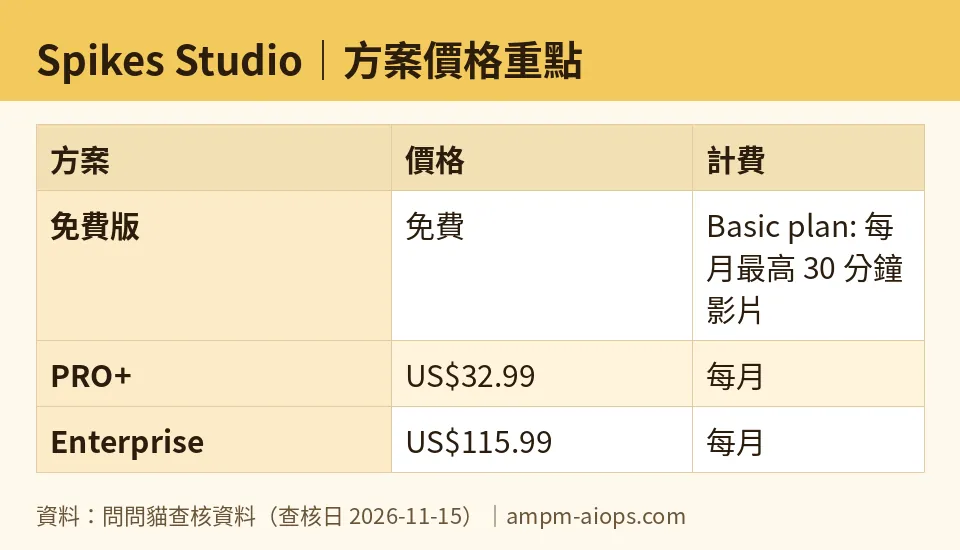
Figure: compiled by AMPM from its verified data (last verified 2026-11-15).
🔍 AMPM exclusive check
Nothing differed from the official page this time. Every number in this article matches the Spikes Studio pricing page, checked 2026-11-15. Our automated checks also found no changes on 2026-11-11, 2026-11-12, 2026-11-13 and 2026-11-14.
There are limits to what we checked. This tool entered our database recently, and its data has had one round of checking, not the full manual cross-check we give older entries. We did not verify the commercial-use terms. If you plan to monetize clips, read the terms on the official site yourself. We also could not confirm whether a yearly plan exists, or whether Enterprise removes the watermark.
☀️ AMO, the budget-minded cat

AMO’s question is blunt: is free enough, and is paying worth it?
Free is enough in one case: you are testing. You get 30 minutes of processing, 720p exports and 7 days of storage, with no card on file. That is a fair trial. You can run one or two clips and see whether the AI’s picks match your taste. The cost is zero, and the risk is zero.
Free is not enough the moment you want to publish. The watermark rules out brand channels and client work. The 30-minute cap runs out after a long stream or two. The 7-day storage means you must download everything fast.
Is PRO+ worth US$32.99 a month? It depends on volume. You get 300 minutes, no watermark, 1080p, captions, B-roll, GIF inserts, auto-posting and 90 days of storage. If you clip weekly from long streams, that package replaces several small tools and the watermark problem goes away. If you clip once a month, you are paying every month for something you use rarely.
AMO’s advice is to treat PRO+ like a tool you rent for a busy stretch. The data says monthly billing, so you can test whether cancelling is easy before you commit. Confirm that on the site. Do not touch Enterprise at US$115.99 unless a team is sharing the workload. The extra money buys 1200 minutes, speed and support, not better video.
Verdict: who should use it, who should skip it
Use the free plan if you want to test AI highlight detection before spending anything. It works for a quick trial and little else.
Upgrade to PRO+ at US$32.99 per month if you regularly turn long videos or streams into clips and need them watermark-free. It is the only upgrade that makes sense for individuals and small channels.
Consider Enterprise at US$115.99 per month if a team produces a lot of footage and needs 1200 minutes, custom branding and a dedicated contact. Ask about watermark removal and feature coverage first.
Skip it if you clip only occasionally from short videos, or if your current tools already handle captions and scheduling. The free plan may be all you need, and the paid plan would sit idle.
Written: 2026-11-16 Price last verified: 2026-11-15 Tool last health-checked: 2026-11-15
🔗 Related on AMPM
📎 Sources
All prices and quotas in this article come from AMPM’s verified dataset for Spikes Studio (last verified 2026-11-15); primary sources:
🐾 Meet the cats: AMO and PIMI
AMPM is a Taiwan-based AI-tool pricing watchdog. Our motto: ask before you subscribe. Two cats argue every tool from two sides:
- ☀️ AMO — the budget-minded cat. Always asks: is the free tier enough, and is paying actually worth it?
- 🌙 PIMI — the performance-minded cat. Cares about whether it works well, fast, and gets your job done.
When they are done arguing, you know whether to pay. Every number is checked by us, with the verification date at the end.
🐾 Our sister sites also checked
Read next
- Spikes Studio Full breakdown: pricing, features and real-world limits
- Spikes Studio Is the free quota enough?
- Spikes Studio Alternatives
- Free plan limits for every AI tool we track
