[How-to] Sanity Free Plan: Build Your First Content Site Before the Role Wall
- Free tier: Yes
- Cheapest paid plan: US$15/mo and up
- Free quota: Up to 20 user seats (limited to Admin and Viewer roles), 2 public …
- Last checked: 2026-11-19
Article last updated: 2026-11-08



Sanity is a headless CMS — a content system where you store text and images in one place and pull them into any website or app through an API. It also ships an AI Content Agent that can draft and edit entries for you. The free tier looks generous on paper: 20 user seats, 2 public datasets, 10,000 documents, and monthly allowances for traffic and storage. Then you invite a second writer and discover the catch. The free plan only offers two roles — Admin and Viewer. There is no middle editor role. So either your writer can change everything, including settings, or they can only read. That single gap decides whether Sanity is a real free option for your team or a paid product wearing a free label.
This guide walks a beginner through setup, shows what the free tier actually covers, and flags the blockers before you hit them.
What the free tier gives you, and where the roles stop
Start with the numbers, because they matter more than the marketing. The free plan includes up to 20 user seats, but those seats are limited to Admin and Viewer roles. You get 2 public datasets (a dataset is one content store — think one project’s worth of content), 10,000 documents (each document is one content entry, like a blog post or product page), 1 million CDN requests per month, 250,000 API requests per month, 100 GB of bandwidth, and 100 GB of static asset storage. Each month you also get 1,000 AI Credits (units the AI Content Agent spends when it generates or edits content) and 500,000 function invocations.
For a solo builder or a small site, that is a lot of room. Ten thousand documents is far more than most first projects need. The CDN and API allowances are sized for real traffic, not a demo.
The problem is people, not content. Admin can do everything. Viewer can read. If you want a freelance writer to draft posts without touching your billing or API settings, the free tier has no role for that. Your only options are to hand over Admin — full control — or make them a Viewer who cannot write. That is the wall.
Growth costs US$15 per seat per month, billed monthly with no forced annual contract. It raises the seat cap to 50, adds 5 permission roles, private datasets, 25,000 documents, scheduled publishing, and AI collaboration. Overage is pay-as-you-go — for example, US$1 per 250,000 API requests. Prices vary by country; we checked from Taiwan.
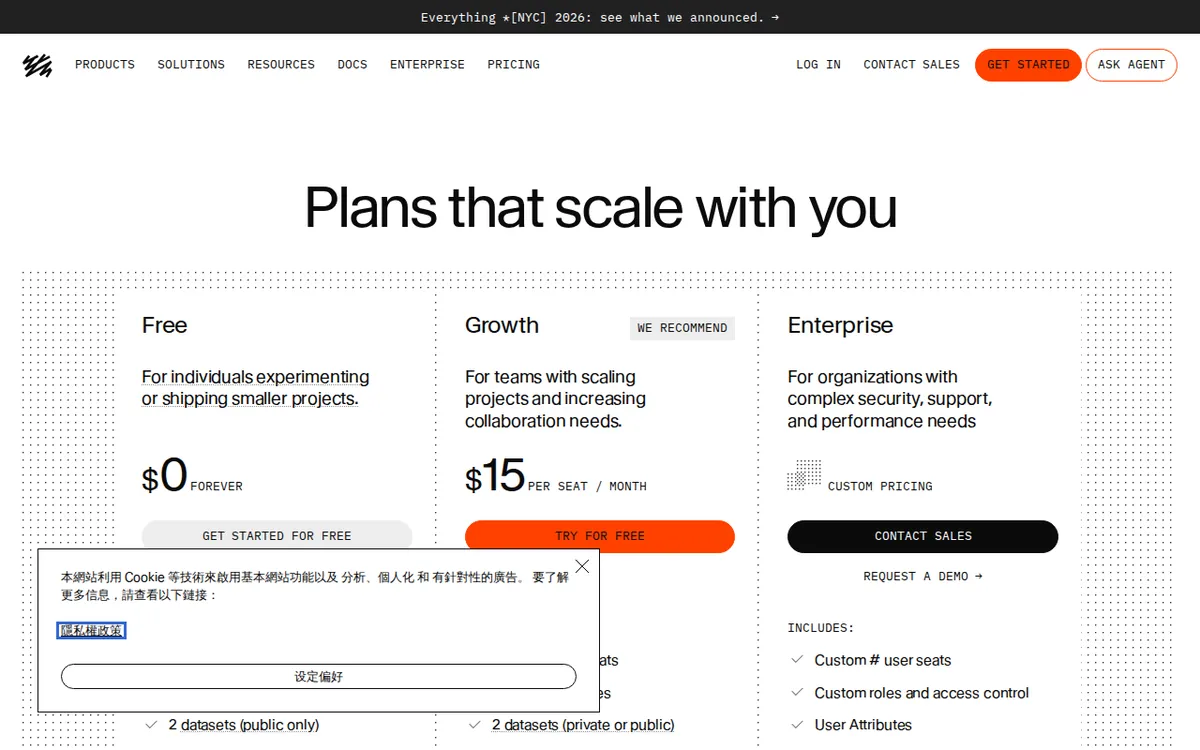
Figure: sanity.io official pricing page, captured 2026-11-08.
Step-by-step: get your first project live
- Create a free account at sanity.io and start a new project. Pick the free plan when asked.
- Choose or accept a dataset. You get 2 public datasets on free, so you can run a production store and a staging copy without paying.
- Install the Studio — Sanity’s editing interface — locally or deploy it. The Studio is where you and your team actually write.
- Define your content schema. This is the shape of your documents: a blog post has a title, body, author, and date. Do this early; changing it later means migrating content.
- Add yourself as Admin. Invite anyone else as Admin or Viewer only. Accept this now, because you cannot add an editor role on free.
- Connect your front end. Pull content through the API into whatever site framework you use.
- Watch your monthly meters — API requests, CDN requests, bandwidth, and AI Credits — in the dashboard.
Common blockers and fixes:
- “My writer needs to draft but I don’t want to give Admin.” On free, you cannot split this. Either share Admin and trust them, or upgrade to Growth for the 5-role system. There is no third path.
- “I hit the API request ceiling.” Free gives 250,000 API requests per month. Cache responses and avoid fetching on every page load.
- “AI Credits ran out.” Free includes 1,000 AI Credits monthly. They reset each month; heavy AI drafting burns them fast.
- “I need a private dataset.” Free datasets are public. Private datasets require Growth.
🔍 AMPM exclusive check
Nothing differed from the official page this time; every number below matches it, checked 2026-11-07. What the pricing page does not spell out in one place is the practical consequence of the role limit: the free tier’s 20 seats sound like a team plan, but with only Admin and Viewer available, those 20 seats cannot support a normal editorial workflow where writers draft and editors approve. The seat count and the role count tell two different stories. We also note the record itself carries a caution — this tool was logged as an automatically entered challenger candidate, checked in a single pass and not yet cross-verified by three human reviewers, so confirm free quotas and commercial terms on the official site at the moment you sign up. The vendor page states the numbers; it does not warn you that a two-role system is the real ceiling for teams.
☀️ AMO, the budget-minded cat

Free is genuinely enough here — if you are one person, or a team that does not mind everyone holding Admin. Look at what costs nothing: 20 seats, 2 public datasets, 10,000 documents, 1 million CDN requests, 250,000 API requests, 100 GB bandwidth, 100 GB static storage, 1,000 AI Credits, and 500,000 function invocations every month. For a solo blog or a small marketing site, you will not touch most of those ceilings for a long time. The moment you need a writer who cannot see billing, free stops working. Growth is US$15 per seat per month. For a three-person team that wants proper roles, that is three seats billed monthly — and the data gives no annual price, so do not expect a yearly discount figure here. The honest budget read: stay free while you are solo, and treat the first non-Admin collaborator as the trigger to pay. Do not upgrade for the document cap; 10,000 is rarely your problem. Upgrade for the roles.
🌙 PIMI, the performance-minded cat

Does it actually work? The infrastructure numbers say yes. One million CDN requests and 250,000 API requests per month, plus 100 GB of bandwidth, is real delivery capacity, not a toy allowance. A headless CMS lives or dies on API speed and CDN reach, and those limits are set high enough that a production site can run on free without throttling under normal load. The AI Content Agent gets 1,000 AI Credits monthly and 500,000 function invocations, which is enough to test whether AI drafting fits your workflow before you commit money. Where performance meets a wall is collaboration, not speed. Five permission roles and scheduled publishing sit behind Growth at US$15 per seat per month, and scheduled publishing is the feature that separates a hobby site from an editorial operation. Overage is pay-as-you-go at US$1 per 250,000 API requests, so a traffic spike will not silently kill your site — it bills. For raw content delivery, free performs. For team workflow, free is deliberately limited.
Verdict: who should use it, who should skip it
Use the free tier if you are a solo builder, a developer prototyping a content-driven site, or a small team where everyone can hold Admin. The content and traffic allowances are strong, and you can run a real project without paying.
Skip it — or budget for Growth — if your workflow needs a writer who drafts without full control, an editor who approves, private datasets, or scheduled publishing. The free tier’s 20 seats cannot substitute for the 5 roles that only Growth provides at US$15 per seat per month. If roles matter to you, free is a trial, not a home.
Written: 2026-11-08 Price last verified: 2026-11-07 Tool last health-checked: 2026-11-08
🔗 Related on AMPM
📎 Sources
All prices and quotas in this article come from AMPM’s verified dataset for Sanity (last verified 2026-11-07); primary sources:
🐾 Meet the cats: AMO and PIMI
AMPM is a Taiwan-based AI-tool pricing watchdog. Our motto: ask before you subscribe. Two cats argue every tool from two sides:
- ☀️ AMO — the budget-minded cat. Always asks: is the free tier enough, and is paying actually worth it?
- 🌙 PIMI — the performance-minded cat. Cares about whether it works well, fast, and gets your job done.
When they are done arguing, you know whether to pay. Every number is checked by us, with the verification date at the end.
🐾 Our sister sites also checked
Read next
- Sanity Full breakdown: pricing, features and real-world limits
- Sanity Is the free quota enough?
- Sanity Alternatives
- Free plan limits for every AI tool we track
