[Review] Retool Pricing: Does the Free Tier Cover a Real Internal Tool?
- Free tier: Yes
- Cheapest paid plan: US$12/mo and up
- Free quota: Free plan: supports up to 5 users, includes 500 Workflow executions …
- Last checked: 2026-11-19
Article last updated: 2026-11-14



Retool sells itself as the fastest way to build internal tools and automation agents. The pitch is simple: drag components onto a canvas, wire them to your data, ship an admin panel or an approval flow without a front-end team. The pricing page is less simple. There are two paid tiers, two seat types inside each tier, annual and monthly rates, and three separate quotas that run out at different speeds.
This review is our verdict after reading the verified data, not a hands-on test. Every number below comes from the pricing page as we read it. Prices vary by country; we checked from Taiwan. Retool bills per seat, which means you pay for each person who logs in, split into builders (people who create apps) and internal users (people who only view or operate them).
The free tier is a real product, not a demo
Retool’s free plan supports up to 5 users. It includes 500 workflow runs per month, 250 shared AI credits, 20 hours of AI agent time, and 5 GB of database storage. A workflow run is one execution of an automated sequence; an AI credit is a unit consumed when an AI feature does work for you.

Illustration: Free shared resources run out quickly, forcing an upgrade to a plan where everyone pays.
That is enough to build something genuine. A five-person ops team can run an inventory tracker, a support dashboard, or an approval queue on the free plan. The 5 GB storage is not generous, but it is not a teaser either. The 20 hours of agent time is the number most people will hit first if they lean on AI automation, because agent sessions burn time continuously while they run.
The catch is structural, not numeric. The moment you need a sixth person, you do not buy more quota. You buy a plan.
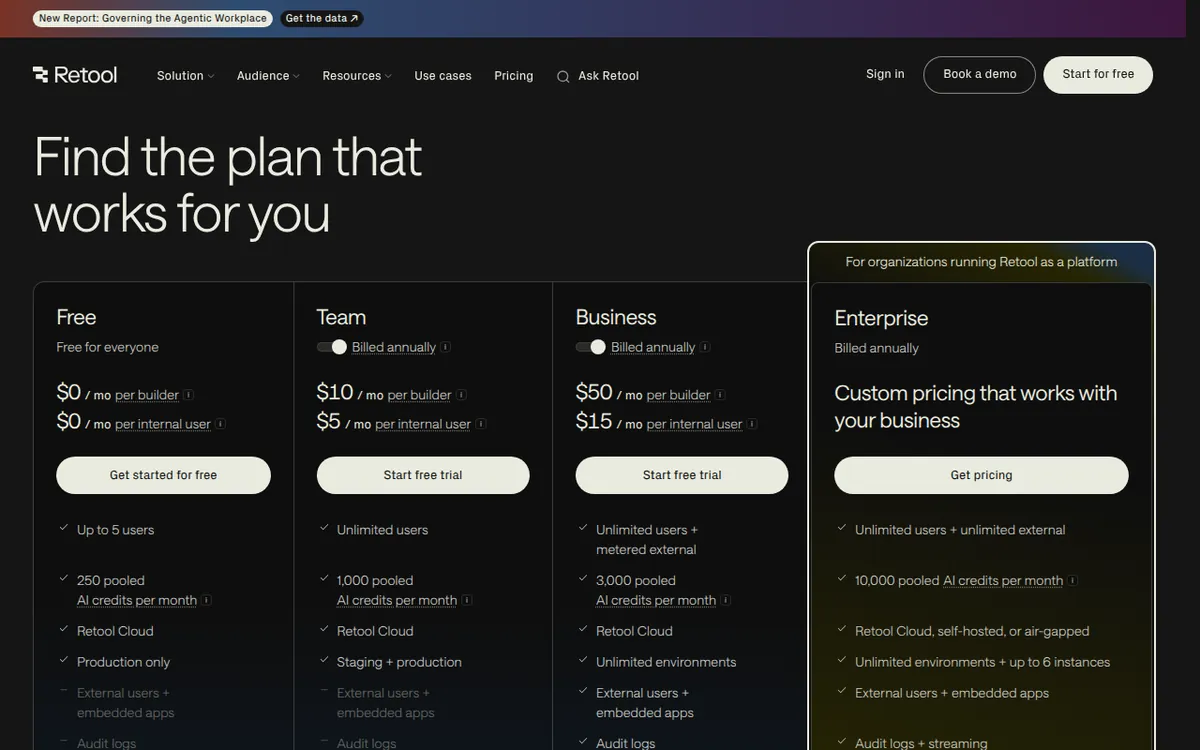
Figure: retool.com official pricing page, captured 2026-11-14.
The jump from free to paid has no middle ground
Team costs US$12 per builder per month, or US$10 per month on annual billing. Internal users pay US$7 per month, or US$5 per month annually. That unlocks unlimited users, 5,000 workflow runs per month, 1,000 AI credits per month, and a staging environment for testing before you push changes live.
Business costs US$65 per builder per month, or US$50 monthly on annual billing. Internal users pay US$18 per month, or US$15 annually. The first 50 external users are free, then US$10 per person per month and up. Business adds 3,000 AI credits per month, unlimited custom environments, audit logs (a record of who changed what), and granular permission controls.
Read those two paragraphs again. There is no plan between US$12 and US$65 per builder. A team that outgrows 5,000 workflow runs or 1,000 AI credits has to more than quintuple its per-builder spend. Retool does not sell extra workflow runs or extra AI credits as add-ons. You move up a tier or you ration.
Where the seat math actually bites
The builder-versus-internal-user split is the most important thing on the page, and it is easy to miss. If your team has three people building and twenty people just clicking buttons, you are not paying 23 times the builder rate. You are paying three builder seats plus twenty internal user seats.
On Team monthly, that is three at US$12 plus twenty at US$7. On Business monthly, it is three at US$65 plus twenty at US$18. The gap between those two configurations is where most budget decisions get made, and it is not a small gap.
External users only appear on Business. The first 50 are free, which sounds generous until you remember that Business itself starts at US$65 per builder. You are paying for the tier to reach the free external users.
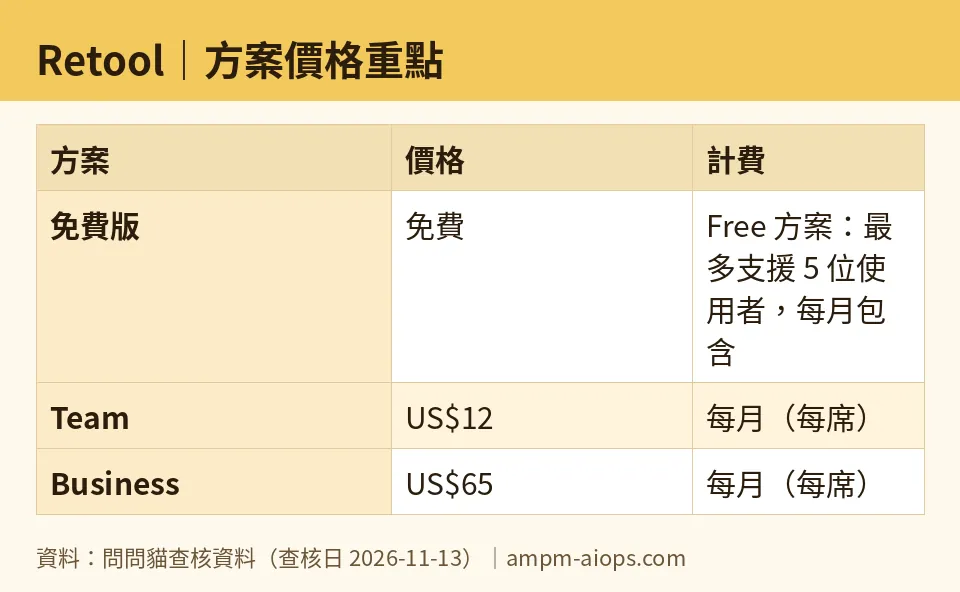
Figure: compiled by AMPM from its verified data (last verified 2026-11-13).
🔍 AMPM exclusive check
Nothing differed from the official page this time; every number below matches it, checked 2026-11-13. We re-read the pricing page daily from 2026-10-28 through 2026-11-13 and found no changes across sixteen consecutive checks.
One thing the vendor page does not spell out: the free tier’s three quotas — 500 workflow runs, 250 AI credits, 20 agent hours — are separate meters. Exhausting one does not consume another, and there is no published way to buy more of any single one. The only lever is upgrading the whole plan. That is not hidden, exactly, but it is not stated either.
We also flag a sourcing caveat honestly: this tool entered our database as an automatically detected challenger. The data has been through one verification round, not three-way manual cross-checking. Free-tier allowances and commercial terms should be confirmed on the official page at the moment you sign up.
☀️ AMO, the budget-minded cat

Free is genuinely usable here, and that is rarer than it should be. Five users, 500 workflow runs, 250 AI credits, 20 agent hours, 5 GB storage. For a small ops team automating a handful of internal processes, that covers real work at zero cost.
The question is what happens on month two. If you are running 500 workflow executions a month, you are averaging about 16 a day. That is a light load. A single busy approval flow can clear that. The 250 AI credits will go faster if anyone uses AI features in earnest, and the 20 agent hours disappear quickly if agents run on schedules rather than on demand.
When you cross any of those lines, your only option is Team at US$12 per builder per month, or US$10 on annual. That is not expensive in absolute terms. But it is a cliff, not a ramp. There is no US$3 top-up for 500 more runs. Budget for the jump, not the overage.
The internal-user rate of US$7 monthly, US$5 annually, is the quiet win. If most of your five-person limit is viewers rather than builders, Team stays cheap even after you grow.
🌙 PIMI, the performance-minded cat

The free tier’s 5,000-run ceiling on Team is a tenfold increase over free, and 1,000 AI credits is four times the free allowance. For a team that has actually outgrown free, Team is a reasonable step.
The problem is the next step. Business at US$65 per builder monthly, US$50 annually, exists mainly for audit logs, granular permissions, unlimited custom environments, and external users. If you need those, fine. If you only need more AI credits, you are paying for governance features to get capacity. That is poor value for a team whose bottleneck is compute, not compliance.
The staging environment on Team matters more than the pricing page implies. Testing changes before they hit production is not a luxury once real people depend on your internal tools. Getting it at US$12 per builder is the strongest argument for Team over free.
The 3,000 AI credits on Business is three times Team’s 1,000. Whether that is enough depends entirely on what your agents do. Retool does not publish a per-action credit cost in this data, so we cannot tell you how far 3,000 credits stretches. That is a real gap for anyone trying to size the plan.
Verdict: who should use it, who should skip it
Use the free tier if you have five or fewer people, your automation load is light, and you want to prove the concept before spending anything. Use Team if you have crossed the user limit, need staging, or have outgrown 500 workflow runs. The US$12 builder rate and US$7 internal-user rate are defensible for what you get.
Skip it if your bottleneck is AI capacity rather than seats. Retool does not sell credits or runs separately, so a team that only needs more compute gets pushed into Business at US$65 per builder for features it may not want. Skip it too if you need external users at scale without governance requirements, because external access only exists on Business.
The honest summary: free is real, Team is fair, and Business is priced for companies that need control, not just capacity. Know which one you are before you upgrade.
Written: 2026-11-14 Price last verified: 2026-11-13 Tool last health-checked: 2026-11-14
🔗 Related on AMPM
📎 Sources
All prices and quotas in this article come from AMPM’s verified dataset for Retool (last verified 2026-11-13); primary sources:
🐾 Meet the cats: AMO and PIMI
AMPM is a Taiwan-based AI-tool pricing watchdog. Our motto: ask before you subscribe. Two cats argue every tool from two sides:
- ☀️ AMO — the budget-minded cat. Always asks: is the free tier enough, and is paying actually worth it?
- 🌙 PIMI — the performance-minded cat. Cares about whether it works well, fast, and gets your job done.
When they are done arguing, you know whether to pay. Every number is checked by us, with the verification date at the end.
🐾 Our sister sites also checked
Read next
- Retool Full breakdown: pricing, features and real-world limits
- Retool Is the free quota enough?
- Retool Alternatives
- Free plan limits for every AI tool we track
