[How-to] Retool Free Tier: Build Your First Internal Tool Before the 5-User Wall
- Free tier: Yes
- Cheapest paid plan: US$12/mo and up
- Free quota: Free plan: supports up to 5 users, includes 500 Workflow executions …
- Last checked: 2026-11-19
Article last updated: 2026-11-07



Retool is a platform for building internal tools — the dashboards, admin panels, and approval screens that a company runs on but never sells. It also handles automation agents, which are scripts that do repetitive work on their own. The free tier looks generous on paper. It is not generous in one specific way, and that way decides whether you can stay on it.
This is a how-to for a beginner. You will get a working internal tool running on the free plan, learn what the free plan actually allows, and hit the first wall on purpose instead of by accident.
What the free plan gives you, in plain terms
Retool’s free plan supports up to 5 users. That is the number that matters most, and we will come back to it.
On top of that, each month you get 500 Workflow runs (a Workflow is an automated sequence of steps the platform executes for you), 250 shared AI credits (a credit is one unit of AI usage, pooled across everyone on the account), 20 hours of AI Agent usage, and 5 GB of database storage.
That is enough to build something real. A small team can run an internal approval tool, a support dashboard, or a scheduled data sync on those numbers without paying anything. The 5 GB storage will not be your problem early. The 500 Workflow runs will not be your problem early either, unless you schedule something to run every few minutes.
The 250 AI credits are shared, not per person. If five people each lean on AI features, that pool drains five times faster than one person alone would drain it. Watch that number in week one so you learn your own burn rate.
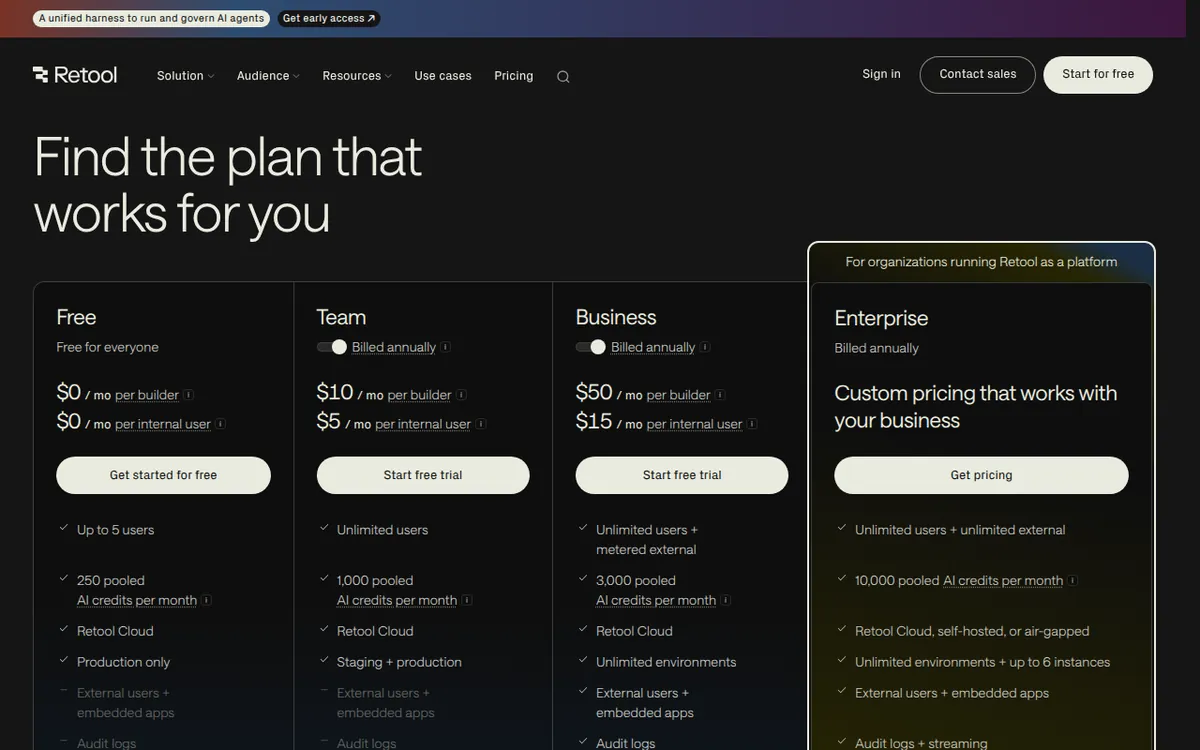
Figure: retool.com official pricing page, captured 2026-11-07.
Step 1: Build one tool, not five
Beginners lose the free plan by spreading out. Pick one job. A common first build: a table that lists incoming requests, a form to approve or reject each one, and a button that writes the decision back to your database.
Build that. Connect one data source. Add one query that reads rows, one that writes a row. Put a table component on the canvas and point it at the read query. Add a form and wire the submit button to the write query.
Do not add AI features yet. Get the plain version working first. Once it works, you know your baseline usage with zero AI credits spent, and every credit after that is a measured choice rather than a guess.
Step 2: Count your seats before you invite anyone
Here is the trap. The free plan caps at 5 users, and Retool splits users into two kinds: Builders, who create and edit apps, and Internal users, who only view and operate them. On the paid Team plan, a Builder costs US$12/month billed monthly, or US$10/month averaged over annual billing. An Internal user costs US$7/month billed monthly, or US$5/month averaged over annual billing.
Notice the gap. A viewer is cheaper than a builder on every paid tier. That means the cheapest way to grow past 5 people is to make sure most of your 5 are viewers, not builders. If you hand Builder access to everyone because it is easier, you are buying the expensive seat for people who will never open the editor.
Before you invite person number six, decide who actually builds. Everyone else is an Internal user.
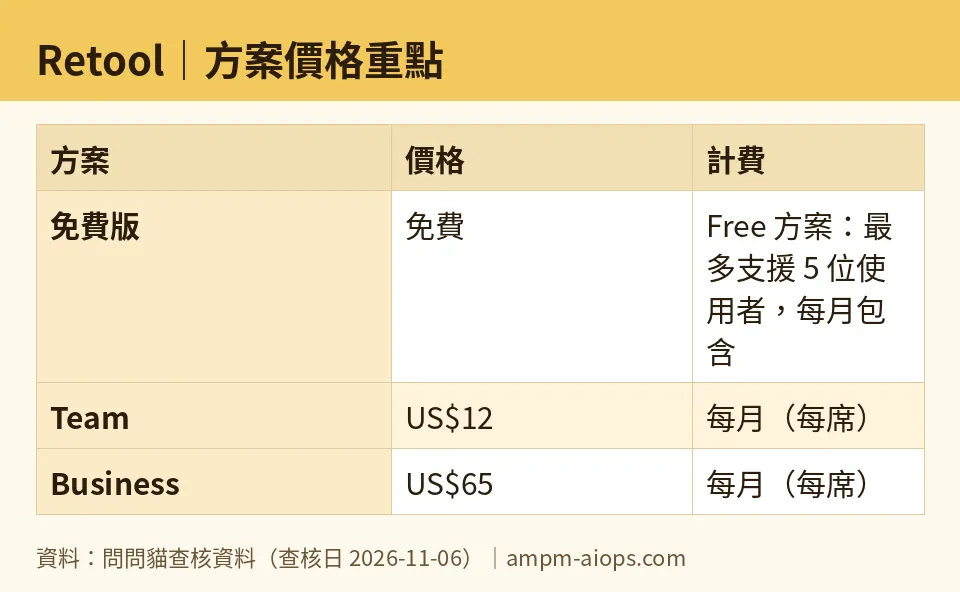
Figure: compiled by AMPM from its verified data (last verified 2026-11-06).
Step 3: Know what the next tier unlocks
The Team plan removes the 5-user cap. It raises Workflow runs to 5,000 per month and AI credits to 1,000 per month, and it adds a Staging environment — a separate copy of your app for testing changes before they touch real data.
The Business plan goes further: a Builder costs US$65/month billed monthly, or US$50/month averaged over annual billing. An Internal user costs US$18/month billed monthly, or US$15/month averaged over annual billing. The first 50 External users are free, then US$10 per person per month and up. Business also gives 3,000 AI credits per month, unlimited custom environments, audit logs (a record of who did what), and fine-grained permission controls.
Prices vary by country; we checked from Taiwan. There is no yearly total in the data, so we are not printing one — the annual figures above are monthly averages, not a lump sum.
🔍 AMPM exclusive check
Nothing differed from the official page this time; every number below matches it, checked 2026-11-06.
One thing the pricing page does not spell out, and it is the reason this article exists: the free plan’s 5-user limit is a hard ceiling, not a soft one. Retool does not quietly let a sixth person in and bill you later. You either upgrade or you stop adding people. For a beginner, that means the free plan is a real working environment right up until it is not, and the switch flips the moment your team grows.
Our own note on confidence: this tool was flagged as an automatically entered challenger candidate. The data has been through one pass, not a three-way manual cross-check. Treat the free quota and commercial terms as accurate to the official page on the date checked, and re-read the page before you commit money.
☀️ AMO, the budget-minded cat

Free is genuinely enough here, and I want to be specific about when.
Five users, 500 Workflow runs a month, 250 shared AI credits, 20 hours of AI Agent time, 5 GB storage. For a two-to-four person team building one internal tool, that is not a trial. That is a working setup you can run for months. The 500 runs are the number I would watch: if you schedule a Workflow to fire every 15 minutes, that is roughly 2,880 runs a month, and you blow through the free allowance in about five days. Keep automation on-demand or hourly and you stay inside it.
The moment you pay, the math changes shape. Team starts at US$12/month per Builder billed monthly, or US$10/month averaged over annual billing. But the seat you should actually compare is the Internal user at US$7/month billed monthly, or US$5/month averaged over annual billing. If your sixth person only needs to look at data and click approve, you are not paying builder money. You are paying viewer money, and that is a much easier number to justify.
My rule: stay free until you genuinely need person six. Then buy the cheapest seat that person can do their job on. Do not upgrade the whole team because one person needs the editor.
🌙 PIMI, the performance-minded cat

Free tiers are usually where the product quietly stops working well. That is not what happens here.
The free plan gives you the same builder, the same components, the same data connections. What it limits is volume, not capability. 500 Workflow runs and 250 AI credits are real budgets, not a demo mode. If your tool does its job in 300 runs a month, it performs identically to a paid account.
Where performance actually bites is the 5-user cap, and it bites in a way that hurts good teams. The best internal tools spread. Once three people use your dashboard, five more want in. That is the sign the tool works — and it is exactly when the free plan ends. You are not being punished for building something bad. You are being charged because you built something people use.
The Team plan’s jump to 5,000 Workflow runs and 1,000 AI credits is a 10x and 4x increase respectively, and it adds a Staging environment. That last item matters more than the quotas for anyone shipping changes to a live tool. Testing on real data is how you break real data. Staging is the feature that lets you move fast without that risk.
If your team is past five people and the tool is load-bearing, Team is the honest answer. If you need audit logs and permission control — which you do the moment anyone outside your core team touches it — Business at US$65/month per Builder billed monthly is where that lives.
Verdict: who should use it, who should skip it
Use the free plan if you have five or fewer people, one internal tool to build, and automation that runs on-demand or hourly rather than every few minutes. You can be productive today and stay free for a long time.
Upgrade to Team when person six arrives and your tool is something the team depends on. Buy Internal user seats for anyone who only views and operates, and save Builder seats for people who actually edit.
Skip Retool entirely if you need to give more than a handful of outside people access on a small budget, or if your automation needs to fire constantly. The free plan will not hold either case, and the paid path gets expensive fast.
Written: 2026-11-07 Price last verified: 2026-11-06 Tool last health-checked: 2026-11-07
🔗 Related on AMPM
📎 Sources
All prices and quotas in this article come from AMPM’s verified dataset for Retool (last verified 2026-11-06); primary sources:
🐾 Meet the cats: AMO and PIMI
AMPM is a Taiwan-based AI-tool pricing watchdog. Our motto: ask before you subscribe. Two cats argue every tool from two sides:
- ☀️ AMO — the budget-minded cat. Always asks: is the free tier enough, and is paying actually worth it?
- 🌙 PIMI — the performance-minded cat. Cares about whether it works well, fast, and gets your job done.
When they are done arguing, you know whether to pay. Every number is checked by us, with the verification date at the end.
🐾 Our sister sites also checked
Read next
- Retool Full breakdown: pricing, features and real-world limits
- Retool Is the free quota enough?
- Retool Alternatives
- Free plan limits for every AI tool we track
