[Pricing] RescueTime Worth It? The Plan Gap Between Focus Blocking and AI Timesheets
- Free tier: Yes
- Cheapest paid plan: US$9/mo and up
- Free quota: The Lite free plan offers basic cross-device background automatic …
- Last checked: 2026-11-19
Article last updated: 2026-11-18



RescueTime tracks what you do on your computer and phone, then tells you where the hours went. That part is simple. The pricing is where people trip. The plans split into two families: ones that help you focus, and ones that help you bill or report time. The AI-assisted time entry sits only in the second family. If you buy the cheaper personal plan expecting it, you will not find it.
This piece walks through the free tier and all four paid plans. It ends with the cases where paying makes no sense.
What the free plan actually does
The free plan is called Lite. It runs in the background across your devices and logs your activity automatically. You get a basic productivity log and trend reports. That is the whole offer.

Illustration: The promoted AI timesheet auto-fill sits on the highest tier, out of reach from the mid-tier focus plan.
Two things are missing, and they are the two features most people come for:
- Focus Sessions. This is the tool that blocks distracting sites and apps while you work.
- Timesheets. This is the feature for filling in hours against projects or clients.
So Lite is a mirror, not a coach. It shows you that you spent your morning in email and video calls. It does not stop you from drifting, and it does not turn the data into a timesheet.
That can be enough. Plenty of people only need to see the pattern once. If seeing it is the goal, free works.
Paid plans come with a 14-day free trial, according to the data we hold. Use it before you pay.
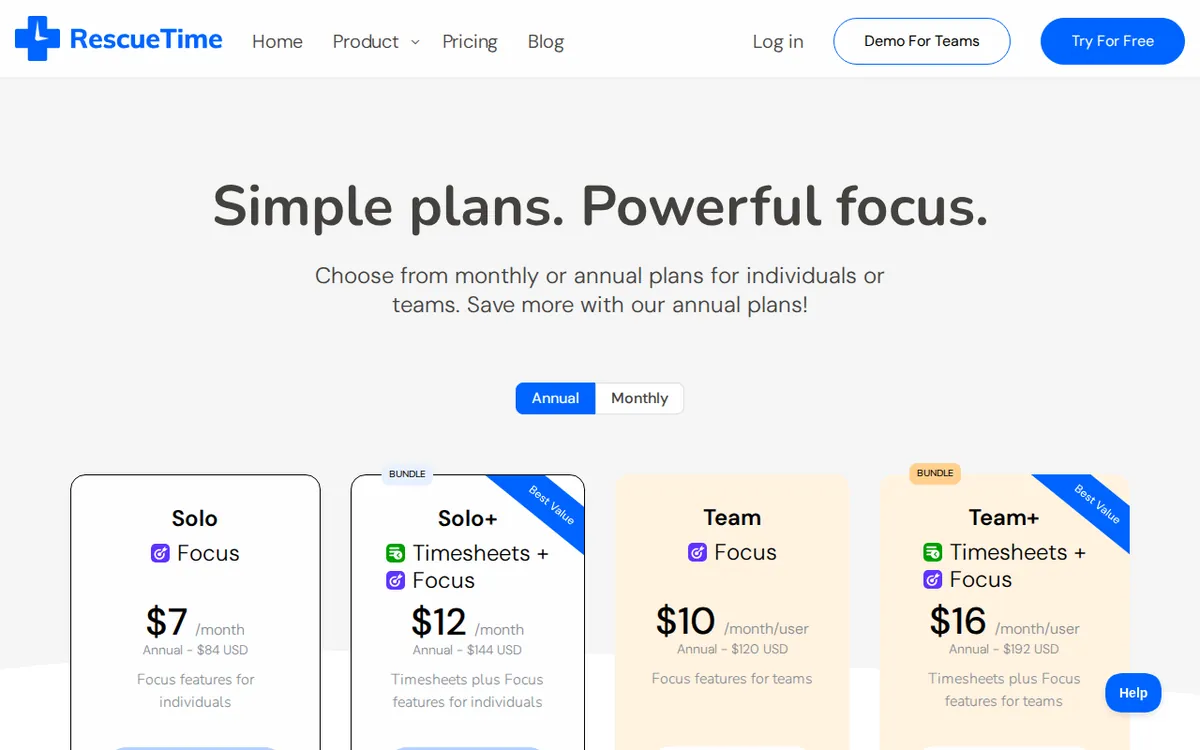
Figure: rescuetime.com official pricing page, captured 2026-11-18.
The four paid plans, side by side
All prices below are monthly, in US dollars. Prices can vary by country; we checked from Taiwan.
Solo Focus: US$9 per month. This is the personal plan built around attention. You get automatic activity tracking and offline time logging. You can block distracting sites and apps, and set goals and schedule focus sessions. Your history is kept with no time limit.
Solo+ (Timesheets + Focus): US$15 per month. This includes everything in Focus, then adds the reporting side:
- Timesheets, meaning a table where you record hours per task.
- AI and RT smart prediction for filling in hours. The official name is “Autocompletion hints”, which means the tool suggests entries based on what it saw you doing.
- Client and project tracking.
- Billing-rate calculation.
- CSV and Excel export.
Team Focus: US$12 per seat per month. A seat is one person’s license. You get team productivity reports, daily pattern trends, team categories and member permission controls. The annual rate is US$10 per seat per month.
Team+ (Timesheets + Focus): US$18 per seat per month. This adds team Timesheets, shared projects and clients, a weekly calendar view of hours and billing-rate reports. The annual rate is US$16 per seat per month.
Notice what is and is not in the data. The two team plans list an annual rate. The two personal plans do not. We have no yearly price for Solo Focus or Solo+, so we will not guess one. Check the pricing page before you assume an annual discount exists for individuals.
The line that matters: Focus versus Timesheets
Look at the names. “Focus” plans are about your attention. “Timesheets + Focus” plans are about your hours as a record, for a client, a manager or an invoice.
The AI smart-fill is the sharpest example. It only appears in Solo+ at US$15. Solo Focus at US$9 does not include it. A reader who sees “AI” on the marketing page and picks the cheaper plan will be disappointed.
The same split holds for teams. Team Focus gives managers reports and categories. Team+ is the one with shared projects, client tracking and billing-rate reports.
So ask one question before anything else: do you need to account for your time to someone else? If yes, you need a Timesheets plan. If no, you need to decide between Lite and a Focus plan.
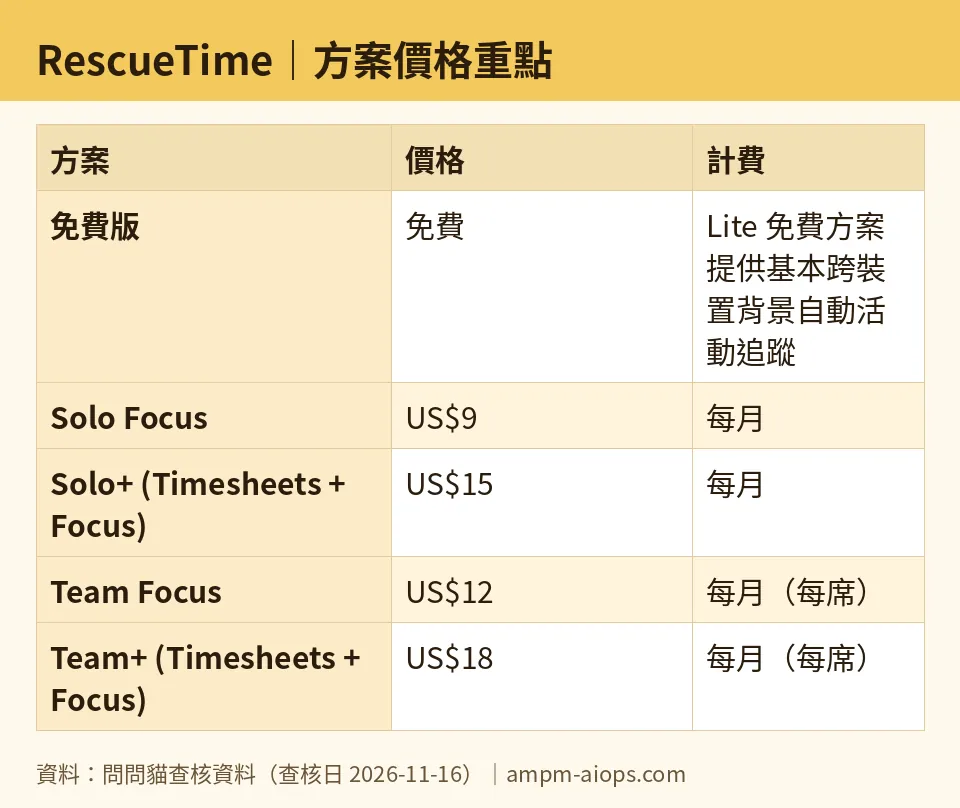
Figure: compiled by AMPM from its verified data (last verified 2026-11-16).
The cheapest upgrade path
Start free with Lite. Run it for a week or two. Then use the 14-day trial on the paid plan that matches your need, not the cheapest one.
- Want to stop yourself from wandering to certain sites? Try Solo Focus.
- Want to bill clients or hand in hours? Try Solo+.
- Running a group? Try the team tier that matches the same split.
If you are a team and can commit for a year, the annual seat rates are lower than monthly: US$10 against US$12 for Team Focus, and US$16 against US$18 for Team+. Whether that is worth the commitment depends on how sure you are about the tool. A 14-day trial is short. Test hard in that window.
🔍 AMPM exclusive check
Here is what we can and cannot say.
On 2026-11-16 we compared the prices and plan contents against RescueTime’s official pricing page. Nothing differed from the official page this time; every number in this article matches it, checked 2026-11-16. That includes the four monthly prices, the two team annual rates and the 14-day trial.
Now the limits of that check. This tool entered our database as a candidate, and our data comes from a single pass of the official site. We have not cross-checked it by hand against several independent sources. We also did not test the product ourselves. That means we cannot tell you how accurate the AI time suggestions are, how reliably the focus blocking works, or whether any usage cap applies. The data does not mention any, and we will not invent one.
One more gap. Our data says the free plan lacks Focus Sessions and Timesheets, but it does not spell out every smaller limit on Lite. Treat the official page as the final word on free-plan details and on commercial-use terms.
☀️ AMO, the budget-minded cat

Is free enough? For a lot of people, yes. Lite gives you automatic tracking across your devices, a basic productivity log and trend reports, at no cost. If your question is “where does my day go?”, that answers it. Pay nothing, look at the report, change one habit.
Is paying worth it? Only when you want a feature Lite lacks, and only the feature you will really use.
Solo Focus is US$9 a month. You are paying for blocking and scheduled focus time. If you already have a browser extension that blocks sites for free, this is a hard sell, because Lite already covers the tracking half.
Solo+ is US$15 a month. That is the one that pays for itself, but only if your time turns into money. Freelancers who bill by the hour need exactly the Timesheets, client tracking, billing rates and CSV or Excel export. If one forgotten hour of billing costs you more than the gap between the two personal plans, it is easy to justify. If you do not bill anyone, it is not.
Teams should be careful. Every seat adds up, at US$12 or US$18 monthly per person, or US$10 and US$16 on annual billing. Do not roll it out to everyone. Trial it with a few people first.
My rule: start free, use the 14-day trial, and pay only for the feature you actually hit.
Verdict: who should use it, who should skip it
Use the free Lite plan if you want a quiet record of where your time goes and plan to act on it yourself.
Pay for Solo Focus if distraction is the real problem and you want blocking and scheduled focus sessions built in. Be sure you cannot get the same result from a free blocker.
Pay for Solo+ if you bill clients or report hours, and you want smart-fill suggestions, project tracking and exports. This is the only personal plan with the AI hints.
Pick Team Focus if a manager wants team-level productivity reports without hours-for-billing. Pick Team+ if your team needs shared projects, clients and billing-rate reports.
Skip paid plans if you do not need to blocking, billing or reporting. Lite does the tracking already.
Before you commit, confirm current prices on the official page. They can differ by country, and our data comes from one pass of that page.
Written: 2026-11-18 Price last verified: 2026-11-16 Tool last health-checked: 2026-11-17
🔗 Related on AMPM
📎 Sources
All prices and quotas in this article come from AMPM’s verified dataset for RescueTime (last verified 2026-11-16); primary sources:
🐾 Meet the cats: AMO and PIMI
AMPM is a Taiwan-based AI-tool pricing watchdog. Our motto: ask before you subscribe. Two cats argue every tool from two sides:
- ☀️ AMO — the budget-minded cat. Always asks: is the free tier enough, and is paying actually worth it?
- 🌙 PIMI — the performance-minded cat. Cares about whether it works well, fast, and gets your job done.
When they are done arguing, you know whether to pay. Every number is checked by us, with the verification date at the end.
🐾 Our sister sites also checked
Read next
- RescueTime Full breakdown: pricing, features and real-world limits
- RescueTime Is the free quota enough?
- RescueTime Alternatives
- Free plan limits for every AI tool we track
