[Review] Reclaim.ai Pricing: The 100-Seat Wall Nobody Mentions on the Pricing Page
- Free tier: Yes
- Cheapest paid plan: US$12/mo and up
- Free quota: Lite permanently free: limited to 1 user, 5 AI Agents, scheduling time …
- Last checked: 2026-11-19
Article last updated: 2026-11-11



Reclaim.ai sells itself as a scheduling AI agent — software that reads your calendar and moves tasks, focus blocks and meetings around automatically. The pitch is simple: stop negotiating with your own week. The pricing page is less simple. Four tiers, two billing rhythms, and one structural trap that only shows up when you try to buy the plan you actually want.
This review is based on the verified pricing data we hold, checked against the official pricing page on 2026-11-10. We have not run the product. Every number below comes from that data. Prices vary by country; we checked from Taiwan.
The free tier is a real product, not a demo
Lite is free forever. That is unusual and worth stating plainly, because most scheduling tools give you a trial and then lock the door.
What Lite gives you: 1 user, 5 AI Agents, a scheduling horizon of up to 1 week, 2 connected calendars, 1 two-way calendar sync, and 1 scheduling link. Integrations are basic — Google Tasks, Slack, Zoom, Google Meet.
Read that list again as a single person with one job. Five agents is enough to protect a lunch break, a focus block, and a couple of recurring routines. A one-week horizon means the agent can only plan seven days out, so anything you schedule three weeks ahead sits outside its reach. Two connected calendars covers a work account and a personal one. One sync means only one of those calendars writes back.
For a freelancer or a solo knowledge worker, that is a functioning tool. For anyone coordinating with a team, it is a ceiling you will hit in the first week.
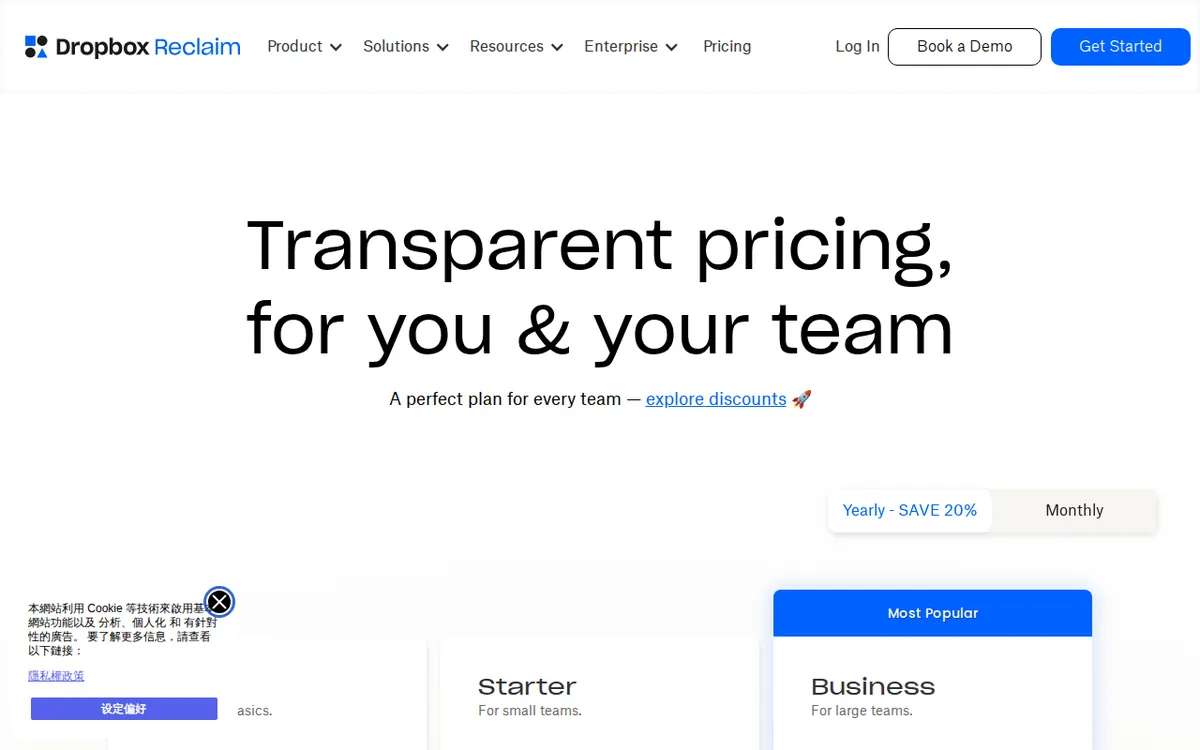
Figure: reclaim.ai official pricing page, captured 2026-11-11.
Where the plan ladder stops making sense
Starter is US$12 per seat per month billed monthly, or US$10 per seat per month billed annually. It raises the seat cap to 10, the scheduling horizon to 8 weeks, agents to 10 per seat, calendar syncs to 3, and adds full third-party task integration — Todoist, Asana, Linear and similar.
Business is US$18 per seat per month monthly, or US$15 per seat per month annually. Seat cap 100. Horizon 12 weeks. 100 agents per seat. Unlimited calendar syncs, team time analytics, priority support.
Enterprise is US$22 per seat per month, annual contract only. No monthly option. Minimum purchase: 100 seats. Unlimited agents per seat, enterprise SSO, central administration, custom work.
Here is the problem. Business already supports up to 100 seats. Enterprise starts at 100 seats. So the only way to buy Enterprise is to buy at least the maximum size Business allows — and Enterprise costs more per seat while removing your ability to pay monthly.
If you have 100 seats, Business is US$18 per seat monthly or US$15 annually. Enterprise is US$22 per seat, annual only. You are paying a premium for SSO, central admin and custom work, which is a legitimate trade for some companies. But the pricing structure means there is no gradual path. You either fit inside Business at 100 seats or fewer, or you jump to a plan whose floor is exactly where the previous plan’s ceiling sits.
The data does not include a yearly total for any plan, so we cannot tell you what a 100-seat Enterprise contract costs per year. That number is not published in what we verified.
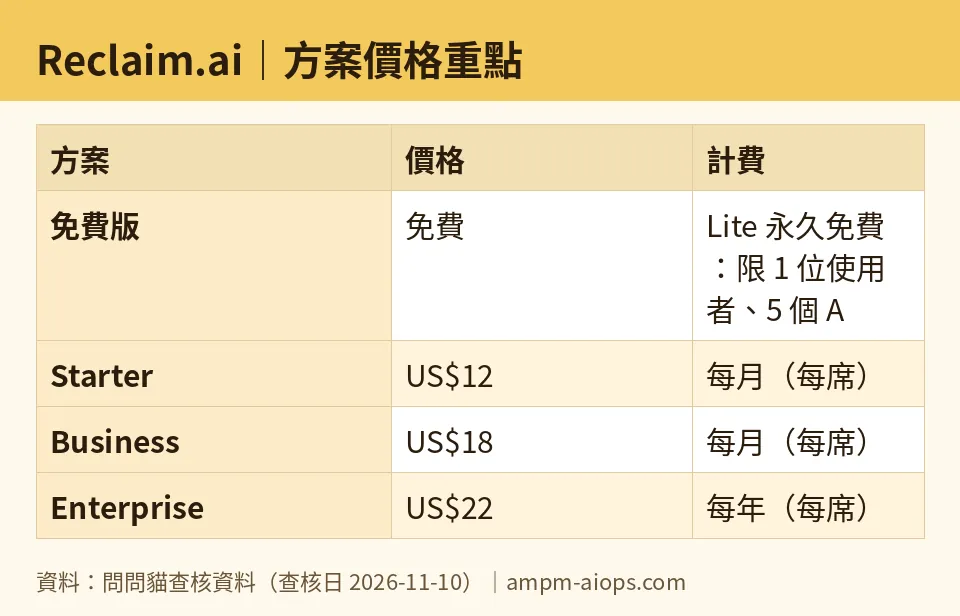
Figure: compiled by AMPM from its verified data (last verified 2026-11-10).
🔍 AMPM exclusive check
Nothing differed from the official page this time; every number below matches it, checked 2026-11-10. Our verification log shows sixteen consecutive daily re-checks from 2026-10-26 through 2026-11-10, each confirming the price and quota figures were unchanged.
One thing the pricing page does not spell out, and which our data flags explicitly: this tool was logged as an automatically ingested challenger candidate. The data has been through one verification round, not a three-way manual cross-check. Free-tier quotas and commercial terms should be confirmed against the live page at the moment you buy. That is not a criticism of Reclaim.ai — it is a statement about how confident anyone should be in a single-pass record, including ours.
☀️ AMO, the budget-minded cat

The question I care about is whether free is enough, and whether paying buys anything real.
Free gives you 1 user, 5 agents, a 1-week horizon, 2 calendars, 1 sync, 1 scheduling link. If you are one person with one calendar and one recurring need — protect my mornings, block my lunch, remind me to do admin — that is genuinely sufficient. You pay nothing and the core behaviour works.
The first paid step is Starter at US$12 per seat monthly, or US$10 annually. What does that US$12 actually buy a solo user? The horizon goes from 1 week to 8 weeks. Agents go from 5 to 10. Syncs go from 1 to 3. You get real task integrations.
If you plan more than a week ahead, the free tier’s 1-week horizon is the wall that pushes you to pay. That is the honest trigger. Not agent count — most solo users will not exhaust 5 agents. The horizon.
Now the jump that bothers me. Starter caps at 10 seats. Business caps at 100. If you are an 11-person team, Starter is closed to you and Business is your only option at US$18 monthly or US$15 annually per seat. There is no plan between 10 and 100 seats. An 11-person team pays the same per-seat rate as a 99-person team.
And if you are a 100-person company, you are standing exactly on the line where Enterprise begins at US$22 per seat, annual only, with no monthly escape hatch. Budget-wise, that is the sharpest edge in this entire pricing table.
🌙 PIMI, the performance-minded cat
I care about whether the thing works at scale and whether the plan you buy can actually carry your team.
Look at agent counts per seat. Free: 5. Starter: 10. Business: 100. Enterprise: unlimited. That is a 10x jump from Starter to Business, and it tells you something about who each tier is built for. Starter is a personal productivity plan wearing a team label. Business is where the product is actually designed to run.
The scheduling horizon matters more than people realise. Free plans 1 week out. Starter reaches 8 weeks. Business reaches 12 weeks. If your work involves quarterly planning, project sprints, or anything with a runway longer than a month, the free and Starter horizons will fight you. An agent that cannot see past 8 weeks cannot defend a deadline that lives 10 weeks away.
Calendar sync is the other quiet limiter. Free gives 1 two-way sync. Starter gives 3. Business gives unlimited. Two-way sync is what lets the agent write changes back into your calendar rather than just reading it. One sync on a free plan means the agent can only act on one calendar. If your work and personal life live in separate calendars, free is structurally half-blind.
Business also adds team time analytics and priority support. For a manager trying to see where a team’s hours actually go, that analytics layer is the reason to move up — not the agent count.
The performance verdict: the product’s real capability starts at Business. Starter is a bridge. Free is a genuine single-user tool with a hard horizon.
Verdict: who should use it, who should skip it
Use the free Lite tier if you are one person, you plan roughly a week ahead, and you want an agent to defend focus time without paying. That is a fair deal and the 1-week horizon is a stated limit, not a hidden one.
Pay for Starter if you are a solo user or a very small team that plans 8 weeks out and needs more than one calendar writing back. US$10 per seat annually is the better rhythm if you are committed.
Pay for Business if you are a team between 11 and 100 seats, or if you need unlimited syncs, a 12-week horizon, and team analytics. This is the plan the product is built around.
Skip Enterprise unless you specifically need SSO, central administration and custom work — and unless you can commit to 100 seats on an annual contract with no monthly option. The floor is high and the billing flexibility is gone.
Skip the whole thing if you are an 11-person team hoping for a mid-tier price. There isn’t one.
Written: 2026-11-11 Price last verified: 2026-11-10 Tool last health-checked: 2026-11-11
🔗 Related on AMPM
📎 Sources
All prices and quotas in this article come from AMPM’s verified dataset for Reclaim.ai (last verified 2026-11-10); primary sources:
🐾 Meet the cats: AMO and PIMI
AMPM is a Taiwan-based AI-tool pricing watchdog. Our motto: ask before you subscribe. Two cats argue every tool from two sides:
- ☀️ AMO — the budget-minded cat. Always asks: is the free tier enough, and is paying actually worth it?
- 🌙 PIMI — the performance-minded cat. Cares about whether it works well, fast, and gets your job done.
When they are done arguing, you know whether to pay. Every number is checked by us, with the verification date at the end.
🐾 Our sister sites also checked
Read next
- Reclaim.ai Full breakdown: pricing, features and real-world limits
- Reclaim.ai Is the free quota enough?
- Reclaim.ai Alternatives
- Free plan limits for every AI tool we track
