[How-to] Railway Free Plan After the Trial: What Beginners Can Actually Deploy
- Free tier: Yes
- Cheapest paid plan: US$5/mo and up
- Free quota: Free plan (includes a 30‑day trial with a US$5 credit, thereafter …
- Last checked: 2026-11-19
Article last updated: 2026-11-05



So you want to put a small app online, and someone told you Railway makes that easy. They were right. Railway is a cloud platform that runs your code, databases and AI agents without you touching a server. You connect a project, it builds and ships it.
Here is the part nobody mentions at the start. Railway’s free tier is not one thing. It is two phases, and they behave very differently. The first phase is generous enough to fool you. The second phase is where beginners get stuck, usually at the worst moment — a few weeks in, when the app is live and people are using it.
This guide is for a beginner who wants to get something real running on Railway without a surprise bill. We will walk through what the free tier actually gives you, the exact steps to deploy your first project, the three blockers that stop most people, and how to read Railway’s usage-based bill before it reads you.
One note before the numbers: prices vary by country; we checked from Taiwan. Every figure below is in US dollars as Railway lists them.
What the free tier gives you, in two phases
Railway’s free plan starts with a 30-day trial that includes US$5 in credits. A credit here is prepaid usage — Railway draws down that balance as your app consumes compute. After the 30 days, the plan keeps going but drops to US$1 in free credit per month.
That US$1 is the number to sit with. Railway bills by usage, measured in seconds. On the Hobby plan, extra CPU costs US$0.00000772 per second and memory costs US$0.00000386 per second. Run the math on a small always-on service and US$1 does not stretch far. A service that idles all month still consumes memory every second it exists.
The free plan also caps what any single service can use: 1 vCPU, 0.5 GB RAM, 0.5 GB of persistent storage, and 1 project. A vCPU is a slice of a processor; RAM is working memory. Those ceilings are fine for a hobby app, a bot, a small API. They are not fine for anything with real traffic.
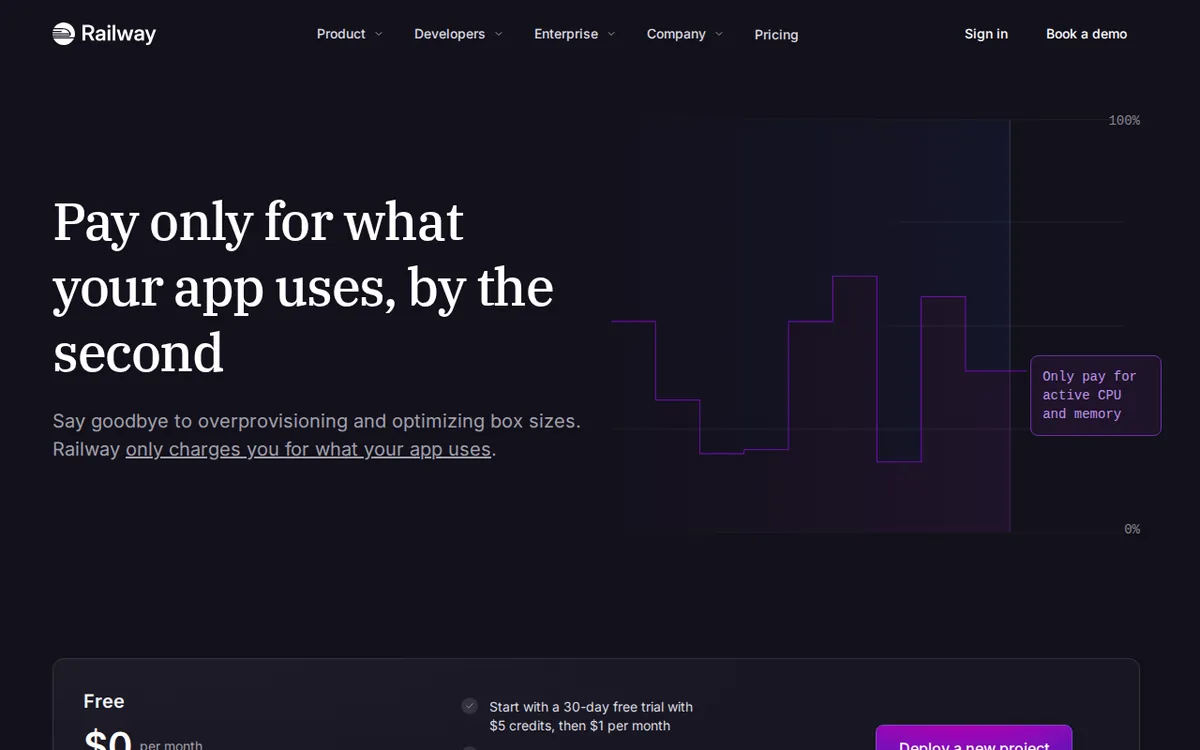
Figure: railway.com official pricing page, captured 2026-11-05.
Deploy your first project: the concrete steps
- Create a Railway account and start a new project. On the free plan you get exactly 1 project, so name it something you will keep.
- Add a service. You can deploy from a GitHub repo, a Dockerfile, or a template. For a first run, pick a template — Railway’s starter templates come preconfigured and skip the build errors that scare beginners off.
- Add a database if you need one. Railway provisions Postgres, MySQL, Redis and others as services inside the same project. Watch the storage cap: 0.5 GB of persistent storage on free.
- Set your environment variables. These are the secret values your app needs — API keys, database URLs. Railway injects them at build time. Get this wrong and your app deploys successfully but crashes on the first request.
- Deploy and watch the build log. The log tells you what failed. Read it before you change anything.
- Open the generated domain and test the app yourself. Do not assume a green deploy means a working app.
That is the whole loop. The first deploy usually takes under an hour. The problems start after.
Three blockers that hit beginners
Blocker one: the trial ends and the app keeps running. Your US$5 trial credit is gone after 30 days. The service does not stop. It keeps consuming, now against US$1 a month. If you built something always-on, you will burn through that credit and the service will be suspended. Fix: know your trial end date, and decide before it arrives whether this app is worth the Hobby plan.
Blocker two: the 1-project limit. Free gives you 1 project. A project can hold multiple services, so you can run an app and a database together. But your second idea needs a second project, and that means paying. Fix: consolidate. Put related services in one project while you are learning.
Blocker three: silent overages. Railway bills by the second. A memory leak, a runaway loop, a service that never sleeps — all of it meters. On the free plan the ceiling is low enough that you hit suspension rather than a bill. On Hobby, overages are real money at the same per-second rates. Fix: set a usage limit in your account settings before you upgrade, not after.
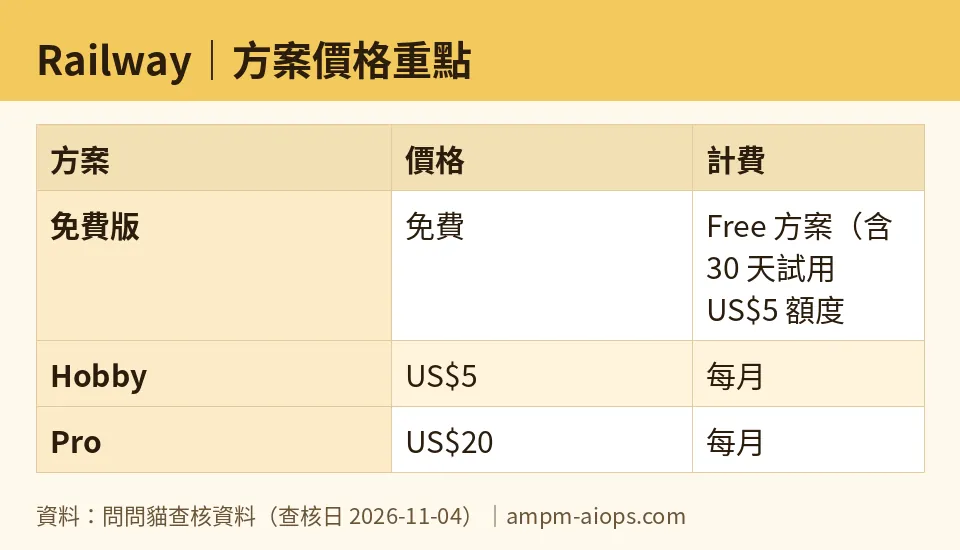
Figure: compiled by AMPM from its verified data (last verified 2026-11-04).
🔍 AMPM exclusive check
Nothing differed from the official page this time; every number below matches it, checked 2026-11-04. Our verification history shows the pricing and quota figures unchanged across daily checks from 2026-10-24 through 2026-11-04.
One thing worth stating plainly, because the vendor page does not spell it out: the free plan’s US$1 monthly credit and the 30-day US$5 trial are separate phases, not a combined balance. Beginners read “US$5 free” and plan a month of heavy use. The US$1 that follows is roughly a fifth of that, and it arrives whether or not you are ready.
We also flag our own confidence level. Railway is a challenger candidate in our database, checked in one pass. The free quota and commercial terms should be confirmed on the official site at the moment you sign up.
☀️ AMO, the budget-minded cat

The only question that matters here: is free enough, and if not, is US$5 worth it?
Free is enough for exactly one thing — learning. One project, 1 vCPU, 0.5 GB RAM, 0.5 GB storage. You can deploy a small app, attach a database, break it, fix it, and understand how Railway works. For 30 days you have US$5 to spend on that education. That is a fair deal and I would take it.
After day 30, free stops being a hosting plan and becomes a demo. US$1 a month at US$0.00000386 per second for memory does not keep an always-on service alive. Do the honest comparison: Hobby is US$5 a month and includes US$5 of compute credit at the base price. That is not a fee on top of usage — it is prepaid usage. For a single small app that idles most of the day, US$5 covers it. For anything busier, you pay the same per-second rates on top.
So the budget answer is clean. Stay free while you are learning and nothing is public. The moment real users depend on your app, move to Hobby at US$5. Do not try to run a production service on US$1. You will spend more time fighting suspension than building.
Pro, at US$20 a month with US$20 of included compute and unlimited team seats, is not a budget question. Skip it until a team is actually involved.
🌙 PIMI, the performance-minded cat

Does Railway actually work well, and does the free tier do the job?
On performance, Railway is solid. Deploys are fast, the build pipeline is clean, and the platform handles databases and AI agents in the same project without extra plumbing. The per-second billing model is honest — you pay for what you use, not for a tier you outgrow.
But the free tier’s ceilings are the story. 1 vCPU and 0.5 GB RAM is a real constraint. A Node app with a framework and a database connection will sit near that memory line at idle. Add a traffic spike and it falls over. 0.5 GB of persistent storage is tighter than it sounds once you have a database with actual rows.
Hobby changes the picture properly: 48 vCPU, 48 GB RAM, 5 GB storage per service. That is a serious jump from 1 vCPU and 0.5 GB, and it is the tier where Railway starts performing like the platform people recommend. Pro goes to 1,000 vCPU, 1 TB RAM, 1 TB storage, 42 replicas and priority support — that is infrastructure for teams running real load.
My read: the free tier is a test drive, not a home. It proves the workflow works. It does not prove your app will hold up. If your app needs to stay up and stay fast, Hobby is the floor, not the upgrade.
Verdict: who should use it, who should skip it
Use Railway’s free plan if you are learning to deploy, building a private project, or testing whether the platform fits your stack. One project, 30 days, US$5 of credits — enough to find out.
Move to Hobby at US$5 a month the moment your app has real users or needs to stay online. The included US$5 of compute covers a small service, and the jump to 48 vCPU and 48 GB RAM per service is the difference between a demo and a deployment.
Skip Railway entirely if you need a permanently free host for a production app. US$1 a month will not carry it, and the suspension will arrive without warning.
Skip Pro at US$20 until you have a team and real traffic. It is priced for that, not for you.
Written: 2026-11-05 Price last verified: 2026-11-04 Tool last health-checked: 2026-11-05
🔗 Related on AMPM
📎 Sources
All prices and quotas in this article come from AMPM’s verified dataset for Railway (last verified 2026-11-04); primary sources:
🐾 Meet the cats: AMO and PIMI
AMPM is a Taiwan-based AI-tool pricing watchdog. Our motto: ask before you subscribe. Two cats argue every tool from two sides:
- ☀️ AMO — the budget-minded cat. Always asks: is the free tier enough, and is paying actually worth it?
- 🌙 PIMI — the performance-minded cat. Cares about whether it works well, fast, and gets your job done.
When they are done arguing, you know whether to pay. Every number is checked by us, with the verification date at the end.
🐾 Our sister sites also checked
Read next
- Railway Full breakdown: pricing, features and real-world limits
- Railway Is the free quota enough?
- Railway Alternatives
- Free plan limits for every AI tool we track
