[How-to] Postman Free Tier Limits: Build Your First API Before the Team Wall
- Free tier: Yes
- Cheapest paid plan: US$12/mo and up
- Free quota: Limited to a single user (cannot create or join team workspaces), …
- Last checked: 2026-11-01
Article last updated: 2026-11-10



Postman is one of those tools that looks simple from the outside and gets complicated fast. You download it, you send a request, it works. Then you try to invite a teammate, or you hit a quota you didn’t know existed, and suddenly you’re reading a pricing page.
This guide is for beginners who want to get productive on Postman’s free tier without paying. We’ll walk through what the free plan actually gives you, the concrete steps to build and test your first API, the blockers you’ll hit, and how to fix them. Every number here comes from Postman’s own pricing page, verified on 2026-11-01.
What the free tier actually gives you
Postman’s free tier is genuinely useful for one person. Here’s what you get:
- Unlimited collection runs. A collection is a folder of saved API requests. Running a collection means executing all of them in sequence, which is how you test a whole workflow at once. Unlimited runs on free is generous.
- Mock servers. A mock server fakes an API response so you can build against it before the real backend exists. Useful when you’re waiting on someone else.
- 1,000 API monitoring requests per month. Monitoring pings your API on a schedule and alerts you if it breaks. 1,000 requests a month is enough for a small project.
- 100 Postman AI credits per month, or 50 depending on the release policy. Credits are units you spend on AI features like Postbot, the built-in assistant that writes test scripts and explains responses. The 50-vs-100 split is a real ambiguity in Postman’s own documentation, so budget for 50.
- Single user only. This is the big one. You cannot create or join a team workspace on the free tier. Everything lives in your personal workspace.
That last point is the wall most beginners hit. More on that below.
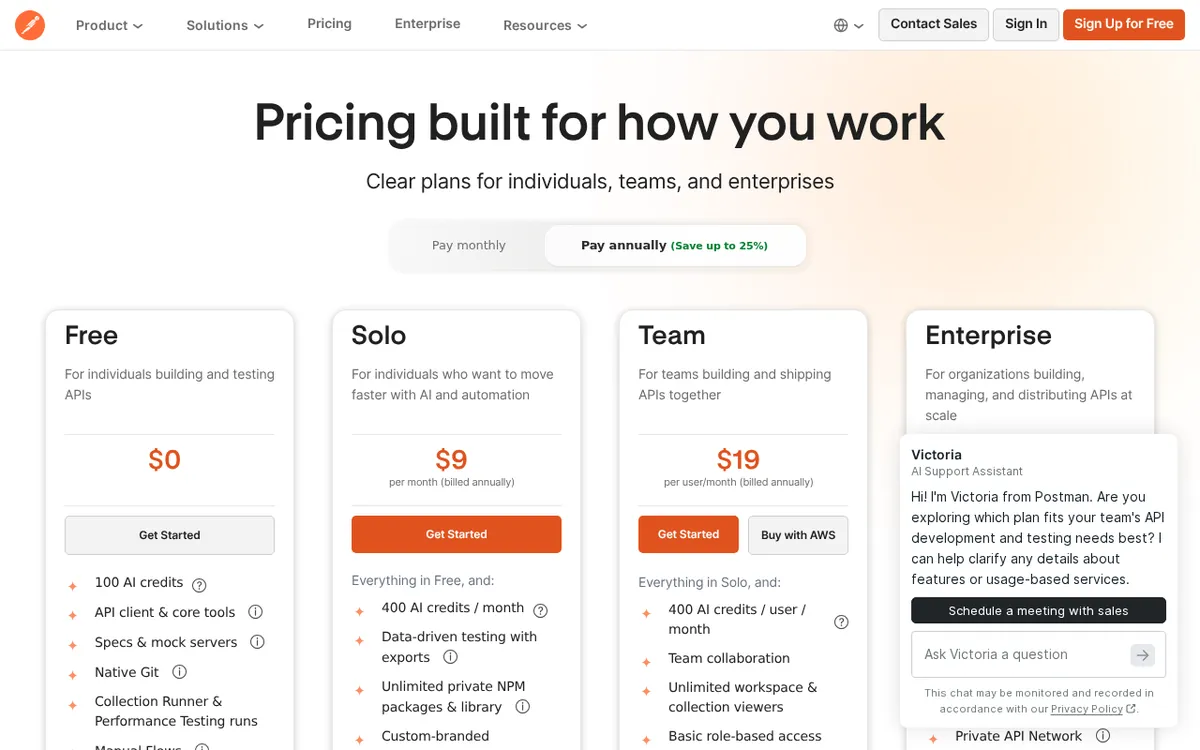
Figure: postman.com official pricing page, captured 2026-11-10.
Step-by-step: your first working API test
Here’s a concrete path from zero to something useful.
Step 1: Install and create a workspace. Download Postman, sign up, and you land in a personal workspace. That’s fine for now. Don’t try to invite anyone yet.
Step 2: Send your first request. Create a new request, paste in a public API URL (something like a weather or public data endpoint), and hit Send. You’ll see the response body, status code, and headers. This is the core loop of Postman.
Step 3: Save it to a collection. Click Save, create a new collection, and name it. Now you have a reusable request instead of a one-off.
Step 4: Add a test script. In the Tests tab, write a simple assertion. Something like checking that the status code equals 200. This is where Postman starts earning its keep. You’re no longer just looking at responses, you’re verifying them.
Step 5: Run the collection. Use the Collection Runner to execute every request in order. This is your first taste of automated testing, and it’s free and unlimited.
Step 6: Try Postbot once. Open the AI assistant and ask it to write a test for you. Watch your credit balance. You have 50 or 100 to spend for the month, and it goes faster than you’d think if you lean on it.
Step 7: Set up a mock server. If you’re building against an API that doesn’t exist yet, create a mock. This lets you keep working instead of waiting.
That’s a real workflow. You can do all of it on free.
The blockers, and how to fix them
Blocker 1: You can’t add a teammate. The free tier is single-user. If you need to share a collection with someone, you have three options. Export the collection as a JSON file and send it. Use a shared link if Postman allows it for your setup. Or upgrade to Team at US$23 per seat per month, or US$19 per seat per month billed annually. Team also gives each person 400 AI credits per month and basic RBAC, which stands for role-based access control, meaning you can limit what each person can change.
Blocker 2: You run out of AI credits. 50 or 100 credits a month is not a lot if you’re using Postbot for everything. Fix: use Postbot for the hard stuff (writing complex test logic) and write simple assertions yourself. The manual path costs nothing.
Blocker 3: Monitoring requests run out. 1,000 per month sounds like a lot until you’re pinging every five minutes. Fix: space out your monitoring intervals. If you need more, Solo at US$12 per month (US$9 per month billed annually) includes expanded API monitoring and 400 AI credits.
Blocker 4: You need data-driven testing. Running the same collection with different input data is a paid feature. Solo includes data-driven test export. If you’re doing this manually on free, you’re copy-pasting, and that gets old.
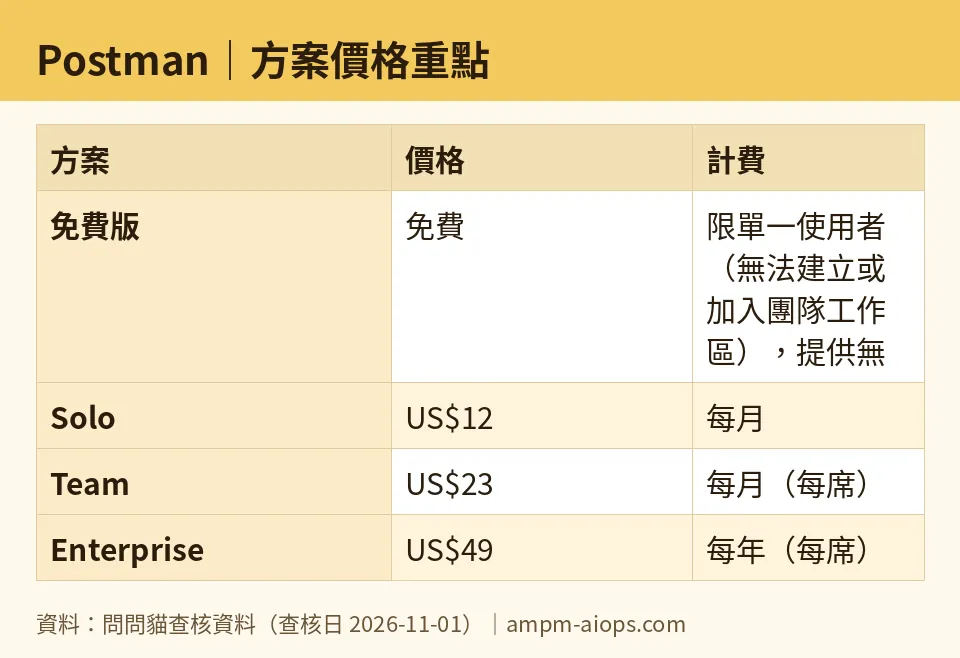
Figure: compiled by AMPM from its verified data (last verified 2026-11-01).
🔍 AMPM exclusive check
Nothing differed from the official page this time; every number below matches it, checked 2026-11-01. One thing worth flagging: the free tier’s AI credit allowance is listed as 100 credits per month, or 50 depending on the release policy. That conditional is Postman’s own wording, not our interpretation. It means the number you see when you sign up may not match what a blog post from six months ago told you. Check your own account dashboard for the real figure. Prices vary by country; we checked from Taiwan.
☀️ AMO, the budget-minded cat

Free is enough. That’s the short version. For a solo developer, a student, or anyone learning API testing, Postman’s free tier covers the entire core workflow: unlimited collection runs, mock servers, 1,000 monitoring requests, and 50 to 100 AI credits a month. You can build, test, and monitor a real project without paying anything.
The question is when paying becomes worth it. Look at the jump points. Solo costs US$12 per month, or US$9 per month billed annually. What do you get for that? 400 AI credits instead of 50 or 100, data-driven test export, and expanded API monitoring. If you’re burning through credits every month, that’s a real upgrade. If you’re not, you’re paying for headroom you don’t use.
Team costs US$23 per seat per month, or US$19 per seat per month billed annually. That’s the price of collaboration. The moment you need a second person in the same workspace, free stops working entirely. There’s no workaround that feels good. Exporting JSON files and sending them over chat is not collaboration, it’s a tax on your time.
Enterprise at US$49 per seat per month billed annually is not a beginner conversation. It adds 800 AI credits per person, a private API network, and advanced governance with audit logs. If you don’t know what audit logs are for, you don’t need this plan.
The budget verdict: stay free until you hit the single-user wall or run out of credits every month. Those are the only two signals that matter.
🌙 PIMI, the performance-minded cat

Does free actually work well? Yes, with caveats.
Unlimited collection runs is the standout. Most tools meter this. Postman doesn’t, on free. That means you can run a 50-request collection as many times as you want while debugging, and it costs nothing. For performance testing your own workflow, that’s the feature that matters most.
Mock servers on free are also solid. You get a real endpoint that returns realistic responses, which means your frontend team can build without waiting on backend. That’s a genuine productivity win.
Where free gets slow is AI. 50 to 100 credits a month is thin. Postbot is useful, but you’ll feel the ceiling within a week if you use it heavily. Solo’s 400 credits per month is a four-to-eight-times increase, and that changes how you work. You stop rationing.
Monitoring at 1,000 requests per month is fine for a side project and tight for anything production-adjacent. If your API needs constant watching, you’ll want Solo’s expanded monitoring.
The collaboration gap is the real performance killer. A team of three on free is three people working in three separate silos. Team at US$23 per seat per month fixes that with shared workspaces and basic RBAC. For a working team, that’s not a luxury, it’s the difference between shipping and not.
Performance verdict: free is fast and capable for one person. The moment “one person” stops being true, free stops being viable.
Verdict: who should use it, who should skip it
Use the free tier if: you’re a solo developer, a student, or anyone learning API testing. You get unlimited collection runs, mock servers, 1,000 monitoring requests, and 50 to 100 AI credits a month. That’s a complete workflow for one person.
Upgrade to Solo (US$12/month, or US$9/month billed annually) if: you’re a solo developer who keeps running out of AI credits or needs data-driven testing and expanded monitoring.
Upgrade to Team (US$23 per seat per month, or US$19 per seat per month billed annually) if: you need a second person in the same workspace. There is no free workaround for this.
Skip Postman entirely if: you need multi-user collaboration on a zero budget. The free tier won’t do it, and no amount of clever exporting replaces a shared workspace.
Written: 2026-11-10 Price last verified: 2026-11-01 Tool last health-checked: 2026-11-10
🔗 Related on AMPM
📎 Sources
All prices and quotas in this article come from AMPM’s verified dataset for Postman (last verified 2026-11-01); primary sources:
🐾 Meet the cats: AMO and PIMI
AMPM is a Taiwan-based AI-tool pricing watchdog. Our motto: ask before you subscribe. Two cats argue every tool from two sides:
- ☀️ AMO — the budget-minded cat. Always asks: is the free tier enough, and is paying actually worth it?
- 🌙 PIMI — the performance-minded cat. Cares about whether it works well, fast, and gets your job done.
When they are done arguing, you know whether to pay. Every number is checked by us, with the verification date at the end.
🐾 Our sister sites also checked
Read next
- Postman Full breakdown: pricing, features and real-world limits
- Postman Is the free quota enough?
- Postman Alternatives
- Free plan limits for every AI tool we track
