[Review] Plus AI Pricing: Is the Free Trial Worth the Card You Must Hand Over?
- Free tier: No
- Cheapest paid plan: US$15/mo and up
- Free quota: No permanent free plan. 7-day free trial with 1,000 AI credits (credit …
- Last checked: 2026-11-19
Article last updated: 2026-11-05



Plus AI is a presentation add-on for Google Slides and PowerPoint. It generates slides, rewrites text, and reformats decks without leaving the editor you already use. That focus is the whole pitch. It is not a standalone slide app. It plugs into the two tools most offices already pay for.
The pricing page tells a simple story. There is no permanent free plan. You get a 7-day trial with 1,000 AI credits, and you must attach a credit card. If you do not cancel before day 7, the card gets charged. After that, four paid tiers run from US$15 to US$240 per seat per month, with annual billing cutting the monthly rate.
Here is the part most reviews skip. The trial is not a free tier. It is a timed demo wired to your payment method. That single design choice decides whether Plus AI is a smart buy or a subscription you forget to kill.
The trial is the real product decision
A credit, in this context, is one unit of AI work — a slide generated, a block of text rewritten, a layout changed. The trial hands you 1,000 of them across 7 days. That sounds generous until you map it to real decks. A short presentation with a handful of AI-assisted slides can burn through credits faster than a week suggests, especially if you rewrite and reformat repeatedly.
The card requirement is the sharper edge. Plenty of tools let you test without payment details. Plus AI does not. That means the trial is a commitment device, not a sandbox. You are one forgotten calendar reminder away from a paid month.
To be fair, this is a common model. It filters out people who were never going to pay. But it also means the honest question is not “is the trial good?” It is “will I actually cancel in time?” If the answer is maybe, treat the trial as a paid plan you might return.
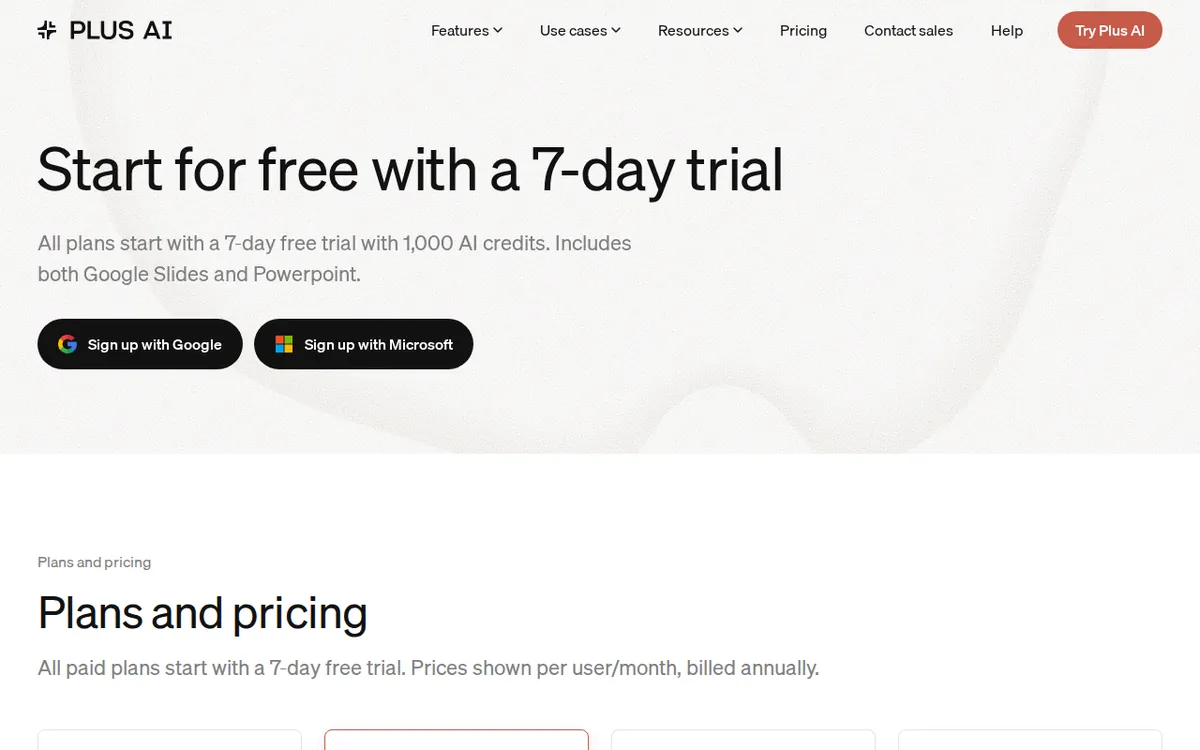
Figure: plusai.com official pricing page, captured 2026-11-05.
What each paid tier actually unlocks
The four plans scale on two axes: monthly AI credits and feature access. Everything is priced per seat, so a team of five multiplies every number below by five.
Basic sits at US$15 per seat monthly, or US$10 per seat monthly on annual billing. It includes 1,500 AI credits a month and covers single-slide insertion, AI rewriting, and layout changes. This is the entry point for one person who mostly edits existing decks.
Pro is US$25 monthly, or US$20 on annual. It raises the quota to 3,000 credits and adds the features that matter: converting PDF, docx, and txt files into presentations, prompts longer than 100,000 characters, AI image generation, and MCP Server plus Presentation API connections. Those API links let other software talk to Plus AI directly — useful if you want slide generation triggered by another tool.
Team is US$40 monthly, or US$30 on annual. It gives 6,000 credits and adds custom brand visuals — logo, colors, fonts — plus advanced image models and shared team presets. This is where a company standardizes how its decks look.
Max is US$240 monthly, or US$200 on annual. It offers unlimited AI credits and priority email support. No quota ceiling, no feature gate listed beyond that.
One thing the data does not contain: any annual total price. The annual figures are monthly averages under an annual commitment. We are not going to multiply them out, because the source does not state a yearly number. If you need the exact annual charge, the checkout page is the only place to get it.
Prices can vary by country. We checked from Taiwan.
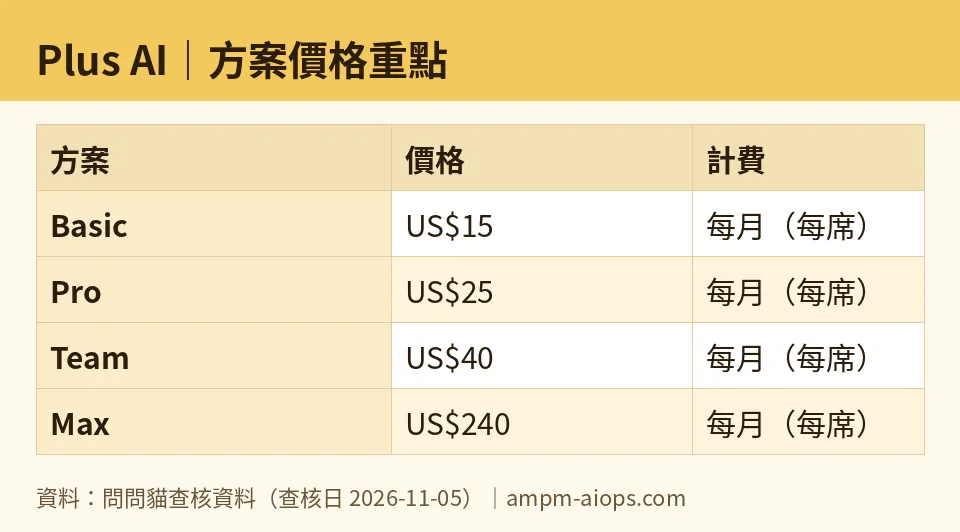
Figure: compiled by AMPM from its verified data (last verified 2026-11-05).
🔍 AMPM exclusive check
Nothing differed from the official page this time. Every price and quota below matches what the vendor lists, checked 2026-11-05.
What we can add is context the pricing page does not spell out. The trial’s 1,000 credits and the Basic plan’s 1,500 credits are close in size. That means a heavy trial week can feel similar to a light paid month — which makes the jump to paid feel smaller than it is. The page also does not explain how quickly credits drain per action, so the quota numbers alone will not tell you if 1,500 is a lot or a little for your workflow.
One more gap: the free-trial terms say the card is charged automatically if you do not cancel. The page does not advertise a reminder email. Assume there is none and set your own.
☀️ AMO, the budget-minded cat

No permanent free plan is the first problem. If your budget is zero, Plus AI is not for you past day 7. Compare that to tools that let you keep a limited free tier forever. Here, the trial ends and the meter starts.
The second problem is the card. A free trial that requires payment details is not free in practice — it is deferred billing. The 1,000 credits over 7 days are real, but they come with a trapdoor. Miss the cancel date and you are on a paid plan at US$15 per seat minimum.
Is paying worth it? Look at the annual rates. Basic drops to US$10 per seat monthly, Pro to US$20, Team to US$30, Max to US$200. If you present regularly and already live in Google Slides or PowerPoint, US$10 a month for 1,500 credits is cheaper than most standalone slide tools. The value is real for frequent users.
For occasional users, it is not. Someone who builds one deck a quarter will pay for months they do not use. The per-seat model punishes small teams too — five seats on Basic is five times the price, and credits do not pool across the team in the data we have.
The honest budget verdict: skip the trial unless you are ready to decide within 7 days. If you are, start on Basic annual and only upgrade when you hit the credit ceiling.
🌙 PIMI, the performance-minded cat
Does it do the job well? The feature list says yes for the right tasks. Pro’s file-to-presentation conversion — PDF, docx, txt into slides — is the standout. That is the chore most people hate, and doing it inside Slides or PowerPoint beats exporting to a separate app.
The 100,000-character prompt support on Pro matters for anyone feeding long source documents. Basic cannot do it. If your workflow involves dense reports, Basic will frustrate you and Pro is the real starting line.
The API and MCP Server connections on Pro are the sleeper feature. They let Plus AI act as a component inside a larger pipeline, not just a button you click. Teams building automated reporting should look here first.
Where performance gets murky: credits. Max is the only tier with unlimited AI credits. Every other plan caps you, and the data does not say how many credits a single generation costs. Without that, 1,500 or 3,000 credits is a number, not a guarantee. Heavy image generation on Team’s advanced models could drain a quota quickly, and we cannot confirm the rate.
Speed and output quality are not in the data. We did not run decks through it, so we will not claim either. What we can say: the tier structure puts the genuinely useful features — file conversion, long prompts, API access — behind Pro, not Basic. If you want Plus AI to do more than touch up slides, budget for Pro.
Verdict: who should use it, who should skip it
Use Plus AI if you build presentations inside Google Slides or PowerPoint often, want AI help without switching apps, and will commit to a plan. Pro is the sweet spot for individuals who need file conversion and long prompts. Team makes sense for companies that want consistent branding across decks. Max is for people who generate constantly and hate counting credits.
Skip it if you need a permanent free option. There is none. Skip it if you will not cancel a trial on time — the card charge is automatic. Skip it if you present rarely, because per-seat monthly pricing does not reward occasional use. And skip Basic if your work involves long documents or file conversion; you will outgrow it immediately.
The trial is the decision. Treat those 7 days as a deadline, not a demo.
Written: 2026-11-05 Price last verified: 2026-11-05 Tool last health-checked: 2026-11-05
🔗 Related on AMPM
📎 Sources
All prices and quotas in this article come from AMPM’s verified dataset for Plus AI (last verified 2026-11-05); primary sources:
🐾 Meet the cats: AMO and PIMI
AMPM is a Taiwan-based AI-tool pricing watchdog. Our motto: ask before you subscribe. Two cats argue every tool from two sides:
- ☀️ AMO — the budget-minded cat. Always asks: is the free tier enough, and is paying actually worth it?
- 🌙 PIMI — the performance-minded cat. Cares about whether it works well, fast, and gets your job done.
When they are done arguing, you know whether to pay. Every number is checked by us, with the verification date at the end.
🐾 Our sister sites also checked
Read next
- Plus AI Full breakdown: pricing, features and real-world limits
- Plus AI Is the free quota enough?
- Plus AI Alternatives
- Free plan limits for every AI tool we track
