[Pricing] Miro Free Plan Limits: When Does Paying for AI Credits Actually Pay Off?
- Free tier: Yes
- Cheapest paid plan: US$10/mo and up
- Free quota: Free plan: includes 3 editable whiteboards, unlimited visitor viewing, …
- Last checked: 2026-11-19
Article last updated: 2026-11-19



Miro looks generous on paper. Three editable boards, unlimited visitor viewing, a basic template library, and an AI trial that never expires. That last part is the trap. The free AI allowance is a one-time taste, not a monthly refill, and the moment your team wants AI to do real work on a real board, you are looking at a per-seat bill.
This piece breaks down what the free tier actually gives you, what Starter and Business add, and where the cheapest upgrade path stops making sense. Every number here comes from Miro’s own pricing pages, checked on 2026-11-16. Prices vary by country; we checked from Taiwan.
What the free tier really includes
Miro’s Free plan gives you 3 editable boards. Not 3 boards per month. Three, total, on the account. Visitor viewing is unlimited, which means people you invite can look at your boards without paying, but they cannot edit them. The basic template library is included. And you get a preset 10 to 25 AI trial credits.
Credits are the unit Miro uses to meter AI features. One credit equals one AI action, like generating a diagram or summarizing a board. The 10 to 25 range is what Miro’s own comparison table shows, marked as a limited trial. It does not refill. Once those credits are gone, the AI features stop working on the free plan.
The free tier has no expiry date. Your 3 boards stay yours indefinitely. That is genuinely better than tools that lock your work behind a 14-day clock. But “no expiry” and “no refill” are two different things, and Miro’s pricing page does not put them side by side.
For a solo user sketching ideas, 3 boards and no AI is workable. For a team running sprints, it is not. The moment you need a fourth board, or a private board share, or AI that keeps working past the trial, you are upgrading.
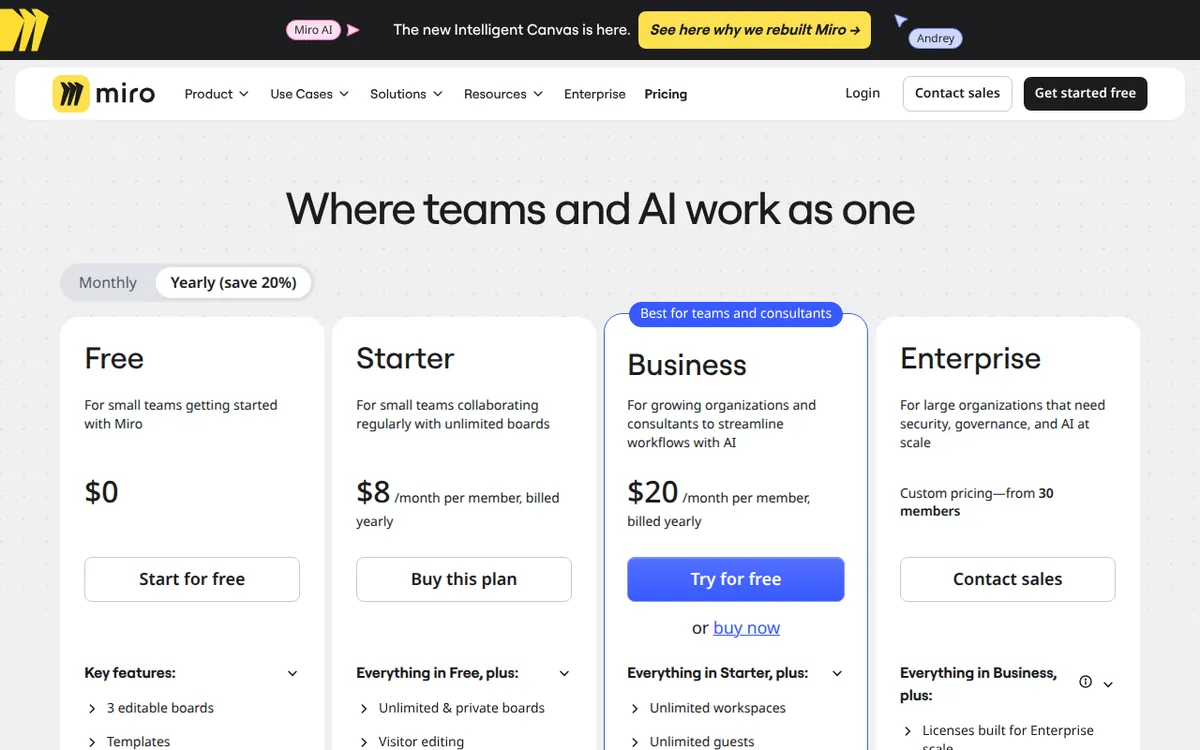
Figure: miro.com official pricing page, captured 2026-11-19.
Starter and Business: what the money buys
Starter costs US$10 per person per month on monthly billing, or US$8 per person per month on annual billing. That gets you unlimited editable boards, private board sharing, custom templates, 25 AI credits per seat per month, and 500 MCP calls per day.
MCP calls are how Miro connects to external AI tools and agents. Think of it as a daily allowance for automated actions that reach outside the board. 500 per day sounds like a lot until you wire Miro into a workflow that fires on every ticket update.
Business costs US$25 per person per month monthly, or US$20 per person per month annually. It adds unlimited visitors, SSO single sign-on, two-way Jira and Azure DevOps sync, 50 AI credits per seat per month, AI workflows and smart agents, and 2,000 MCP calls per day.
The jump from Starter to Business is US$15 per seat per month on monthly billing. What you get for that: double the AI credits, four times the MCP calls, and the integrations that make Miro useful inside an engineering org. If your team lives in Jira, Business is the tier that actually connects.
The cheapest upgrade path is Starter on annual billing at US$8 per person per month. That is the lowest paid entry point Miro offers. It gets you past the 3-board cap and gives you a monthly AI refill. Whether that refill is enough depends on how you use AI.
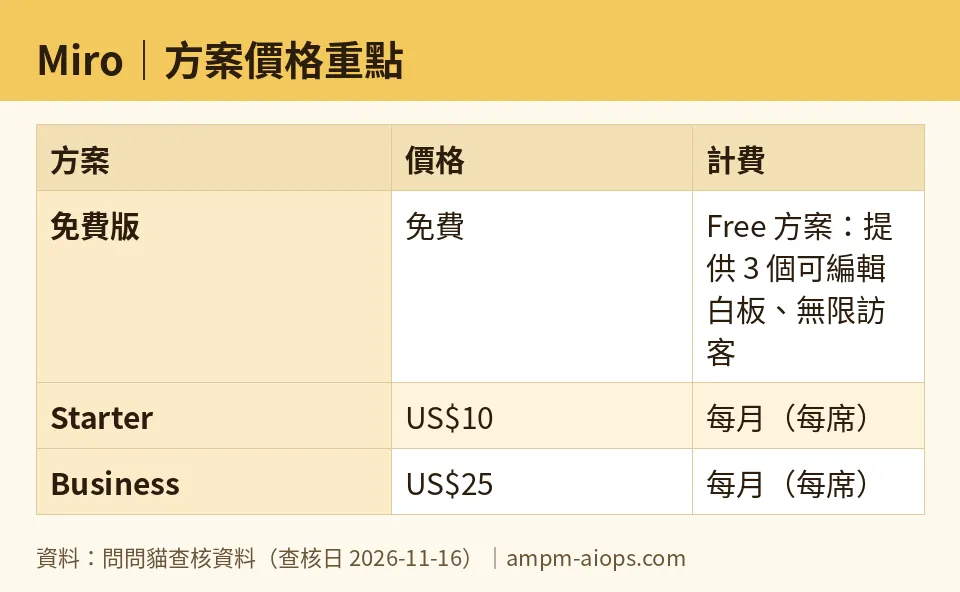
Figure: compiled by AMPM from its verified data (last verified 2026-11-16).
🔍 AMPM exclusive check
Nothing differed from the official page this time; every number below matches it, checked 2026-11-16.
What the pricing page does not spell out: the free AI allowance is a one-time trial, not a monthly quota. The comparison table labels it “Limited trial,” but the word “trial” sits next to a number range that looks like a monthly allowance. Readers who skim will assume 10 to 25 credits refresh. They do not.
The second gap: MCP call limits are daily, while AI credits are monthly. Two different clocks on the same plan. Starter gives you 25 AI credits per month but 500 MCP calls per day. Business gives you 50 AI credits per month but 2,000 MCP calls per day. If you build an automation that runs on MCP calls, you will hit the daily cap long before the monthly AI credits run out. The reverse is also true. These two meters do not move together, and the pricing page does not explain how they interact.
We also confirmed the annual discount is real and consistent: US$8 vs US$10 on Starter, US$20 vs US$25 on Business. Both are per person per month. No hidden setup fee appears on the pricing page.
☀️ AMO, the budget-minded cat

Free is enough if you are one person with three boards and no AI habit. That is the honest answer. Miro does not expire your free boards, does not nag you with a countdown, and does not lock visitor viewing. For a freelancer running a mood board, a roadmap, and a retro, the free tier covers it. You lose AI after 10 to 25 credits, but if you never used AI on a whiteboard, you lose nothing.
The question is whether US$8 per person per month on annual billing is worth it for the next step up. That is the cheapest paid entry. It buys unlimited boards, private sharing, and 25 AI credits per seat per month. If you are hitting the 3-board cap, US$8 is a fair price to remove it.
But watch the seat math. Starter is per seat. A team of five on annual billing pays US$8 times five seats per month. That is the number that matters, not the headline US$8. Miro prices per person, and the pricing page shows the per-person figure prominently. Multiply before you commit.
When is paying not worth it? If your team only needs a shared canvas and nothing else, the free tier’s 3 boards might stretch further than you think. Three boards can hold a lot if you archive and reuse. And if AI is the only reason you are considering Starter, ask whether 25 credits per month per seat actually covers your usage. For light AI use, yes. For daily AI diagramming, no.
🌙 PIMI, the performance-minded cat

Does Miro actually work well enough to justify the paid tiers? The performance question splits into two parts: board performance and AI performance.
Board performance is not metered. Unlimited editable boards on Starter means unlimited. No throttle on how many boards you create or how many people view them. That is the core product, and paying removes the only real cap.
AI performance is where the metering bites. Starter gives 25 AI credits per seat per month. Business gives 50. If your workflow depends on AI generating diagrams, summarizing boards, or running smart agents, those numbers are low. A single complex diagram generation can eat multiple credits. Fifty credits per month per seat is not a daily-use allowance. It is a few sessions per month.
MCP calls are the other performance lever. Starter’s 500 per day and Business’s 2,000 per day are daily resets, which is more forgiving than the monthly AI credits. If you are wiring Miro into an automated pipeline, the MCP allowance matters more than the AI credit count. Business’s 2,000 per day is four times Starter’s, and that gap is the real reason to jump tiers for automation-heavy teams.
The integrations are the other Business-only feature. Two-way Jira and Azure DevOps sync, plus SSO, are not performance features in the speed sense. They are the features that make Miro fit into an existing engineering workflow instead of sitting beside it. If your team already pays for Jira, Business is the tier that connects the two. Starter cannot.
So does it work well? The board does. The AI does, within tight monthly limits. The automation layer works, within daily limits that reset. The question is not whether Miro performs. It is whether your usage pattern fits the meters Miro chose.
Verdict: who should use it, who should skip it
Use the free tier if you are one person, you need 3 boards or fewer, and AI on a whiteboard is not part of your workflow. The no-expiry free plan is genuinely useful, and the 10 to 25 AI trial credits are a bonus, not a reason to stay.
Pay for Starter if you have hit the 3-board cap, you need private board sharing, or you want a monthly AI refill. Annual billing at US$8 per person per month is the cheapest way in. Do the seat math before you commit.
Pay for Business if your team lives in Jira or Azure DevOps, needs SSO, or runs automation that depends on MCP calls. The 2,000 daily MCP calls and 50 monthly AI credits per seat are the features that separate it from Starter. The US$15 per seat per month jump on monthly billing is steep, but the integrations are the reason.
Skip both paid tiers if you only need a shared canvas and can live within 3 boards. Skip Business if you do not use Jira, Azure DevOps, or SSO. Skip Starter if 25 AI credits per month per seat will not cover your AI usage, because the next tier up doubles it but also doubles the price.
Written: 2026-11-19 Price last verified: 2026-11-16 Tool last health-checked: 2026-11-19
🔗 Related on AMPM
📎 Sources
All prices and quotas in this article come from AMPM’s verified dataset for Miro (last verified 2026-11-16); primary sources:
🐾 Meet the cats: AMO and PIMI
AMPM is a Taiwan-based AI-tool pricing watchdog. Our motto: ask before you subscribe. Two cats argue every tool from two sides:
- ☀️ AMO — the budget-minded cat. Always asks: is the free tier enough, and is paying actually worth it?
- 🌙 PIMI — the performance-minded cat. Cares about whether it works well, fast, and gets your job done.
When they are done arguing, you know whether to pay. Every number is checked by us, with the verification date at the end.
🐾 Our sister sites also checked
Read next
- Miro Full breakdown: pricing, features and real-world limits
- Miro Is the free quota enough?
- Miro Alternatives
- Free plan limits for every AI tool we track
