[Pricing] MindMeister free tier: What limits push you to upgrade?
- Free tier: Yes
- Cheapest paid plan: US$7.5/mo and up
- Free quota: Basic Free plan: Create up to 3 mind maps, supports unlimited …
- Last checked: 2026-11-19
Article last updated: 2026-11-18



MindMeister markets itself as a real‑time collaborative mind‑mapping tool with AI‑assisted brainstorming. The free tier is attractive, but it caps the number of maps you can create. This article breaks down what the free plan really offers, details every paid tier, and points out where the hidden limits sit. Readers will see when paying is justified and when the free version suffices.
Free tier: What you actually get
MindMeister’s free tier is labeled Basic on the website. It lets you create up to 3 mind maps. There is no ceiling on the number of collaborators you can invite to each map. You also receive presentation mode, iOS/Android apps, and access to the beta AI editor. Export options are limited to what the free plan provides (no PDF or image export is mentioned). Version history is not listed, so you should assume only the current state is retained.
The free tier’s main quota is the three‑map limit. If you need more maps, you must upgrade. All other features—collaboration, mobile apps, AI editing—are available without extra charge.
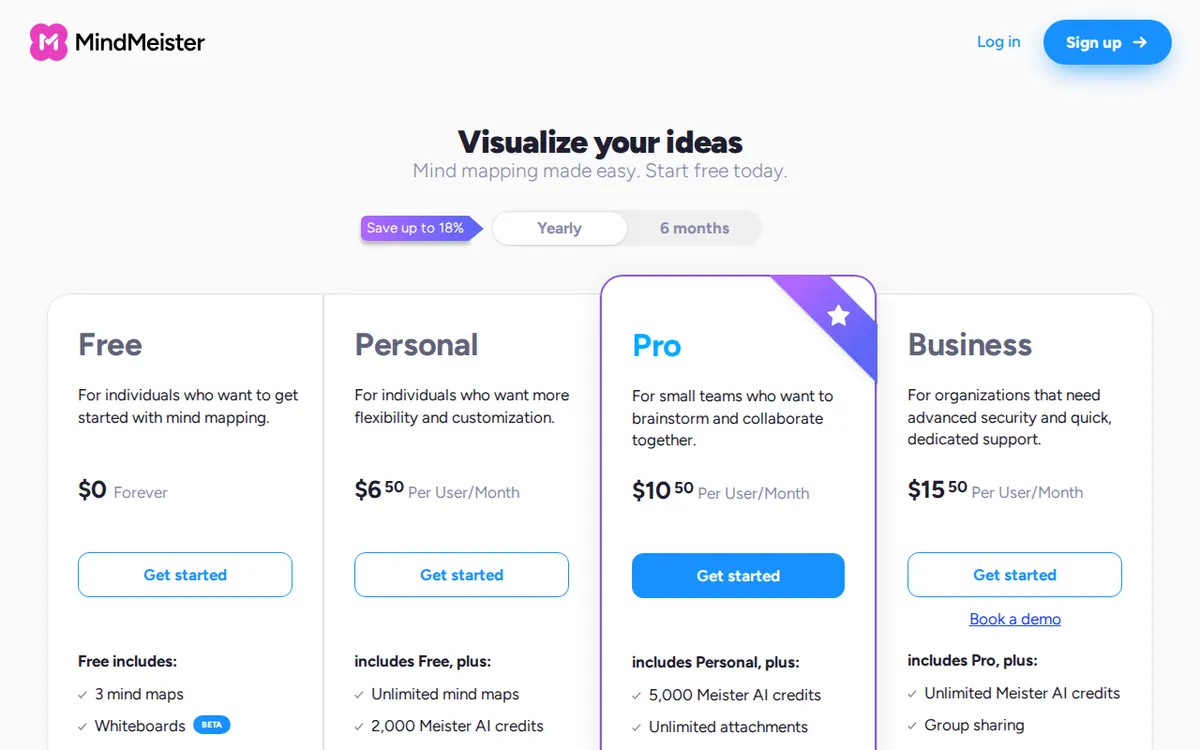
Figure: mindmeister.com official pricing page, captured 2026-11-18.
Paid tiers: What each level adds
MindMeister sells three subscription plans, all billed per seat (price per user). Each plan is a monthly subscription unless you choose the annual option shown in the vendor note. The pricing page lists the following monthly rates in US dollars:
| Plan | Monthly price (US$) | Key unlocks |
|---|---|---|
| Personal | US$7.5 | Unlimited maps, PDF/image export, 2 attachments per map, 7‑day version history, Microsoft Teams integration |
| Pro | US$12.5 | All Personal features plus Word/PowerPoint export, unlimited attachments, unlimited version history, custom colors, Google Workspace integration |
| Business | US$19 | All Pro features plus team group management, compliance export backup, custom domain login, priority customer support |
Personal removes the three‑map cap. You can create as many maps as you like. Export to PDF or image becomes available, which the free tier lacks. Attachments are limited to two per map, and you get a week of version history. Integration with Microsoft Teams is also included.
Pro builds on Personal. It adds the ability to export directly to Word and PowerPoint, which is useful for report generation. Attachments are no longer limited, and version history is unlimited—helpful for large projects. Custom color palettes let you brand your maps. Google Workspace integration lets you sync with Google Drive and Gmail.
Business targets teams and enterprises. It adds group management tools, allowing admins to create and control multiple user groups. Compliance export backup lets you archive maps for legal or audit purposes. You can use a custom domain for single sign‑on, and priority support speeds up issue resolution.
Billing notes
The vendor notes that the listed monthly prices correspond to a 6‑month term for Personal and a 12‑month term for Pro and Business. They also give an approximate monthly average for annual billing: about €6.50 for Personal, €10.50 for Pro, and €15.50 for Business. Those figures are provided by MindMeister; we do not calculate any other totals.
Pricing comparison: Monthly vs. annual averages
When you sign up for a 12‑month commitment, the vendor shows a lower average monthly cost. For example, the Personal plan’s monthly price drops from US$7.5 to roughly €6.50 (the euro figure is shown, not a converted US dollar amount). The Pro plan’s average falls to about €10.50, and Business to about €15.50. No other price tiers exist. There is no free trial beyond the Basic plan; you must upgrade to access additional maps or export features.
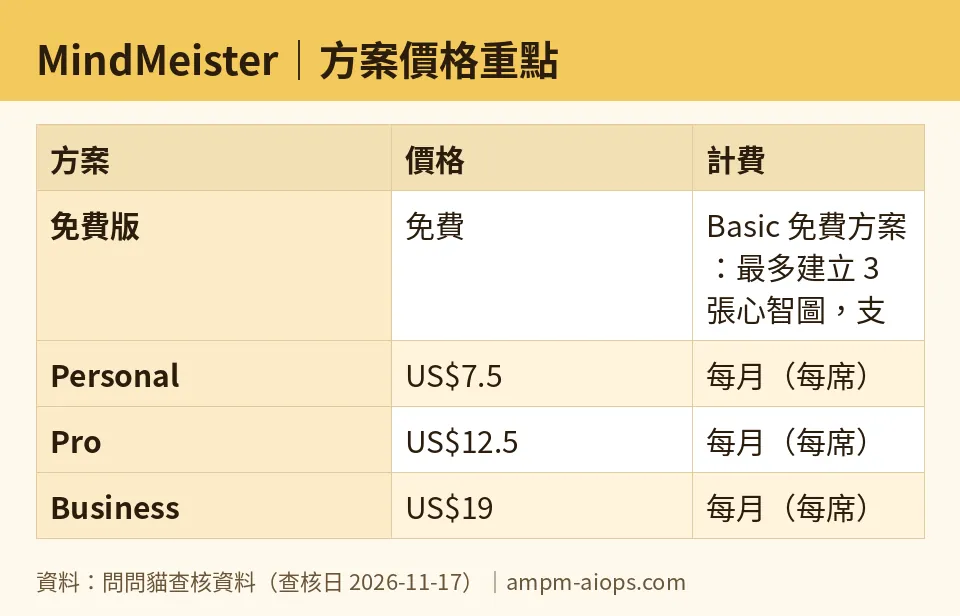
Figure: compiled by AMPM from its verified data (last verified 2026-11-17).
🔍 AMPM exclusive check
We compared the official MindMeister pricing page with the data extracted by our bots on 2026‑11‑17. Every number listed on the site matches the figures above. The vendor does not display a separate “annual‑only” price; instead it shows a monthly average for yearly billing, which we reproduced exactly. No hidden fees, usage caps, or extra seat costs were found. Nothing differed from the official page this time; every number below matches it, checked 2026‑11‑17.
☀️ AMO, the budget‑mind‑ed cat

AMO asks the simple question: Is the free plan enough, or does paying make sense? For a solo user who needs only a handful of maps, the Basic plan may be sufficient. The three‑map ceiling is the only hard stop. If you need to export your maps as PDFs, images, or Office files, you must move to at least Personal.
For freelancers who sell mind‑map deliverables, the Pro plan’s Word/PowerPoint export and unlimited version history can save time and avoid re‑work. The extra attachment slots also let you embed reference files directly in the map.
Small teams that collaborate daily may find Business attractive. The group‑management tools simplify onboarding and off‑boarding. Compliance export backup is valuable for regulated industries. Priority support can reduce downtime when a map is mission‑critical.
If you are a hobbyist or a student who only sketches ideas, the free tier’s three maps and AI assistance might be all you need. Upgrading early could waste money that could be spent on other tools.
Bottom line for the budget‑focused: stay on Basic until you hit the three‑map limit or need an export format the free plan does not provide. Then evaluate Personal versus Pro based on whether you need unlimited attachments and Office exports. Business is justified only for larger groups that need admin controls and compliance features.
Verdict: who should use it, who should skip it
Use MindMeister if
- You need real‑time collaboration with unlimited team members.
- Your workflow relies on exporting maps as PDFs, images, Word, or PowerPoint files.
- You require version history beyond the current state (7 days for Personal, unlimited for Pro).
- You work in an organization that benefits from Microsoft Teams or Google Workspace integration.
Skip or stay on the free tier if
- You only create a few maps per month and can live with the three‑map cap.
- Exporting to Office formats is not part of your process.
- You do not need attachment limits or extensive version history.
- Your team is small enough that group‑management features are unnecessary.
In practice, most individual users will start on Basic, upgrade to Personal when they need unlimited maps or PDF export, and consider Pro only if Office export and unlimited history are essential. Business is a niche choice for teams that need admin controls, compliance backups, and priority support.
Written: 2026-11-18
Price last verified: 2026-11-17
Tool last health-checked: 2026-11-18
🔗 Related on AMPM
📎 Sources
All prices and quotas in this article come from AMPM’s verified dataset for MindMeister (last verified 2026-11-17); primary sources:
🐾 Meet the cats: AMO and PIMI
AMPM is a Taiwan-based AI-tool pricing watchdog. Our motto: ask before you subscribe. Two cats argue every tool from two sides:
- ☀️ AMO — the budget-minded cat. Always asks: is the free tier enough, and is paying actually worth it?
- 🌙 PIMI — the performance-minded cat. Cares about whether it works well, fast, and gets your job done.
When they are done arguing, you know whether to pay. Every number is checked by us, with the verification date at the end.
🐾 Our sister sites also checked
Read next
- MindMeister Full breakdown: pricing, features and real-world limits
- MindMeister Is the free quota enough?
- MindMeister Alternatives
- Free plan limits for every AI tool we track
