[How-to] LM Studio Free Tier: What Local Offline AI Actually Costs You
- Free tier: Yes
- Cheapest paid plan: US$20/mo and up
- Free quota: On-device llama.cpp / MLX offline model inference is completely free …
- Last checked: 2026-11-19
Article last updated: 2026-11-19



LM Studio is a desktop app that runs large language models — the AI that writes and answers questions — directly on your own computer, with no internet needed. It also ships a cloud side called Bionic, which does need the internet and does cost money. The question beginners keep asking is simple: if the local part is free, when does money enter the picture? This guide walks you through setup, what the free tier genuinely covers, and where new users get stuck.
What you get before you pay anything
The local engine is the whole point. LM Studio runs models through llama.cpp and MLX — two open-source inference backends, meaning the software that turns a downloaded model file into actual answers. Both run offline. According to the official pricing page, local inference is completely free and carries no restriction on personal or commercial use. That is not a trial. There is no countdown, no seat limit, no message cap on the local side.
The free tier also includes offline voice transcription, LM Link on up to 5 devices (a way to connect your machines to each other), and a limited number of web searches. Cloud model inference is separate and burns credits — prepaid units you spend per request.
Paid tiers exist for the cloud side only. Bionic+ is listed at US$20 per month, billed monthly. Pro is listed at US$100 per month, billed monthly, and gives 5x the usage ceiling of Bionic+, discounted batch token rates, and early access to new features. No yearly price appears on the page, so there is no annual figure to quote.
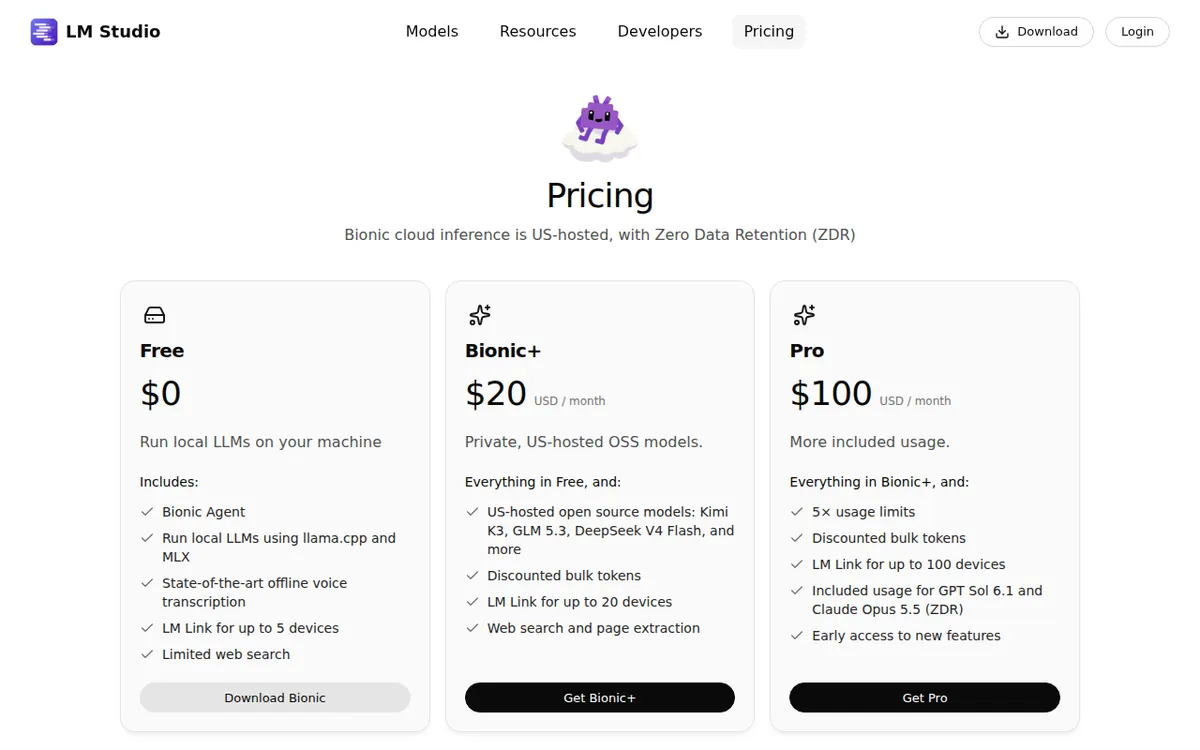
Figure: lmstudio.ai official pricing page, captured 2026-11-19.
Step-by-step: from install to first answer
- Download the desktop app from lmstudio.ai and install it. It runs on a normal laptop; you do not need a server.
- Open the model search inside the app. Pick a small model first — a 7B or 8B parameter model (parameters are the model’s internal size; smaller means faster and lighter). A 70B model will crawl on a machine without a strong GPU.
- Download the model file. This is the slow part. A mid-size model can be several gigabytes. Do this on good Wi-Fi.
- Load it and chat. Everything from here runs offline. Pull your network cable and it still answers.
- Turn on voice transcription if you need it. It works offline too.
- Only touch the cloud models if you specifically need something your local model cannot do. That is where credits start draining.
Three blockers that stop beginners cold
The hardware wall. Local models need RAM or video memory. If the app stutters or refuses to load a model, the model is too big. Drop to a smaller parameter count. This is the single most common first-day problem, and it has nothing to do with pricing.
Confusing local with cloud. The app puts both in front of you. A beginner loads a cloud model by accident, burns credits, and assumes the free tier lied. It did not. Check which model you selected before you type.
Expecting frontier-model quality. A model that fits on a laptop is not the same class as the largest hosted models. For drafting, summarizing, translating, and coding help, local models are genuinely useful. For the hardest reasoning tasks, they are not there yet. Set expectations accordingly.
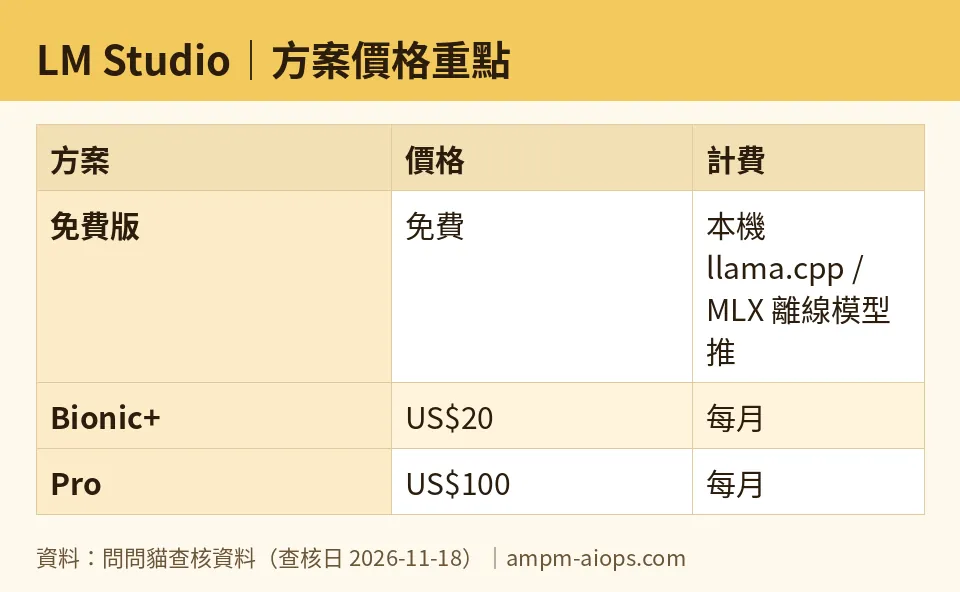
Figure: compiled by AMPM from its verified data (last verified 2026-11-18).
🔍 AMPM exclusive check
Nothing differed from the official page this time; every number below matches it, checked 2026-11-18. One thing the pricing page does not spell out clearly: the free tier’s commercial-use permission applies to local inference, and the page states it plainly once you find the right line — but beginners routinely assume “free” means “personal only” and pay for a subscription they did not need. The reverse mistake also happens: users assume the cloud credits are included in the free tier. They are not. Credits are separate and consumed per cloud request. Our verification history shows the price and quota figures unchanged across daily checks from 2026-10-24 through 2026-11-18. This tool was flagged as an auto-entry candidate and has only been through one verification round, not a three-way manual cross-check, so treat the free-tier and commercial terms as current-as-of-date rather than permanent.
☀️ AMO, the budget-minded cat

Here is the budget question: is free enough, and is paying worth it? For a large share of users, free is not just enough — it is the entire product. Local inference costs nothing, has no cap, and is cleared for commercial work. If your use is drafting, summarizing, translating, or routine coding help, you can run that forever at zero cost. The US$20 Bionic+ tier buys cloud-hosted open models like Kimi K3, GLM 5.3, and DeepSeek V4 Flash, plus discounted batch token rates and web content extraction. The US$100 Pro tier buys 5x the usage ceiling of Bionic+ and early access. Notice what the money does not buy: it does not unlock the local engine, because the local engine was never locked. So the honest budget test is whether you actually hit cloud-model needs. If you never touch a cloud model, both paid tiers are pure waste. If you do, US$20 is the entry point and US$100 only makes sense if you are genuinely burning through the Bionic+ ceiling. No yearly price is published, so there is no annual discount to weigh — you are comparing monthly figures only.
🌙 PIMI, the performance-minded cat

Performance first: does it actually work, and does it work well? The local engine is real and it is fast when the model fits your hardware. llama.cpp and MLX are mature backends, and offline voice transcription plus LM Link across up to 5 devices are included at no cost. The catch is hardware, not software. A model that exceeds your RAM or video memory will not run well, and no subscription fixes that — US$20 or US$100 does not add a GPU to your laptop. Where the paid tiers earn their keep is capability, not speed: cloud-hosted open models such as Kimi K3, GLM 5.3, and DeepSeek V4 Flash give you access to larger models than your machine can hold, and Pro’s 5x ceiling over Bionic+ matters if you run heavy batch workloads. Discounted batch token rates reward volume. For a beginner, the performance verdict is straightforward: start local, measure whether your machine keeps up, and only pay when you need a model your hardware cannot run.
Verdict: who should use it, who should skip it
Use it if you want offline AI that runs on your own machine, you care about not sending data to a server, or you need commercial-use rights without a subscription. The free tier covers all of that with no cap on local inference.
Skip the paid tiers if you never touch cloud models. Skip the whole tool if your hardware is thin — a weak machine will make local models feel broken, and paying will not fix it. Consider Bionic+ at US$20 per month only when you need cloud-hosted open models, and Pro at US$100 per month only when you are hitting the Bionic+ ceiling hard enough that 5x headroom and batch discounts pay for themselves.
Written: 2026-11-19 Price last verified: 2026-11-18 Tool last health-checked: 2026-11-19
🔗 Related on AMPM
📎 Sources
All prices and quotas in this article come from AMPM’s verified dataset for LM Studio (last verified 2026-11-18); primary sources:
🐾 Meet the cats: AMO and PIMI
AMPM is a Taiwan-based AI-tool pricing watchdog. Our motto: ask before you subscribe. Two cats argue every tool from two sides:
- ☀️ AMO — the budget-minded cat. Always asks: is the free tier enough, and is paying actually worth it?
- 🌙 PIMI — the performance-minded cat. Cares about whether it works well, fast, and gets your job done.
When they are done arguing, you know whether to pay. Every number is checked by us, with the verification date at the end.
🐾 Our sister sites also checked
Read next
- LM Studio Full breakdown: pricing, features and real-world limits
- LM Studio Is the free quota enough?
- LM Studio Alternatives
- Free plan limits for every AI tool we track
