[Pricing] HyperWrite Ultra Price: What Annual Billing Changes Before You Commit
- Free tier: Yes
- Cheapest paid plan: US$19.99/mo and up
- Free quota: Starter Free Plan: provides basic features and basic AI credits, with …
- Last checked: 2026-11-19
Article last updated: 2026-11-17



HyperWrite is an AI writing assistant that learns your personal writing voice. It also runs a browser agent, a feature that clicks and types on websites for you. The pricing page shows two paid plans, and the lower number on each card is not what most people will pay on day one.
That is the angle of this piece. The cheaper-looking figure on each plan is an annual-billing average. You pay it as one lump sum, not month by month. We’ll go through the free tier, both paid plans, the cheapest way to upgrade, and the cases where paying makes no sense.
What the free Starter plan gives you
HyperWrite has a free plan called Starter. It includes basic features and a basic allowance of AI credits. Credits are the usage points the tool spends each time you ask the AI to do something.
The official site does not publish how many credits you get. We found no number for the free allowance, so we won’t guess one. That matters, because the free plan’s value depends on that allowance and you can’t judge it from the page alone.
The practical advice is simple. Sign up for Starter and run your normal week through it. Draft the emails or posts you’d write anyway. If the credits last you the week, you have your answer. If they run dry by Wednesday, you have that answer too.
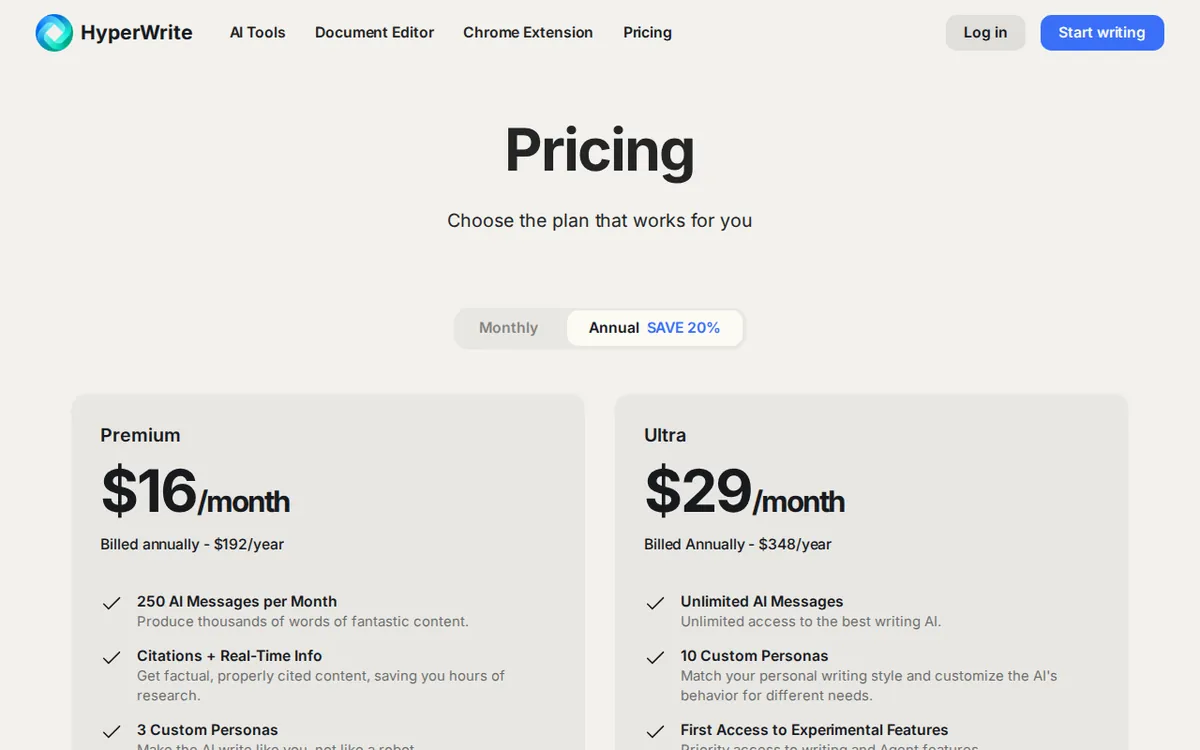
Figure: hyperwriteai.com official pricing page, captured 2026-11-17.
Premium and Ultra: what each plan includes
There are two paid plans. Both are subscriptions that renew until you cancel. Both can be billed monthly or yearly.
Premium
- Monthly billing: US$19.99.
- Annual billing: US$192 for the year, which the page presents as an average of US$16 a month.
- 250 advanced AI messages per month. A message is one request to the assistant.
- 3 custom writing Personas. A Persona is a saved writing style the AI imitates, such as your formal voice versus your casual one.
- Live web search with citations, so answers can point to sources.
- About a hundred preset tools for common writing jobs.
- Unlimited TypeAhead, the predictive typing feature that suggests how to finish your sentence as you write.
Ultra
- Monthly billing: US$44.99.
- Annual billing: US$348 for the year, presented as an average of US$29 a month.
- Unlimited AI messages.
- 10 custom Personas.
- Unlimited TypeAhead.
- Experimental features.
- Priority access to the browser agent, which the product calls the Personal Assistant Agent.
The gap between the two plans is easy to state. Premium caps you at 250 advanced messages a month. Ultra removes the cap, adds seven more Personas, and puts you first in line for the agent and the experimental tools. Everything else Premium offers, Ultra offers too.
Prices vary by country; we checked from Taiwan.
Monthly vs. annual: the number on the card isn’t the bill
Each plan card leads with the lower monthly average. Premium’s average is US$16. Ultra’s is US$29. Those figures are real, but you only get them if you commit to the whole year up front.
For Premium, that means one payment of US$192. For Ultra, it means one payment of US$348. The monthly rates for the same plans are US$19.99 and US$44.99. The data we collected gives no other yearly price, so there is no middle option such as a quarterly plan.
The Ultra jump is the one to watch. Its monthly price sits well above Premium’s, and the annual lump sum is a bigger commitment to make on a tool you haven’t used much. The headline average makes the plan look gentler than the checkout screen will.
The cheapest way up
The cheapest upgrade path has three steps:
- Start on free Starter and see how far the credits go.
- If you hit the wall, move to Premium on monthly billing at US$19.99.
- Only switch to annual billing after a couple of months, once you know you still open the tool every week.
You pay a higher monthly rate for that flexibility. In return you can leave without having paid for a year you didn’t use. For a tool this new to most people, that is the safer trade.
Skip Ultra at first unless you already know you need the browser agent. It is the one feature Premium lacks entirely, and it is the main reason Ultra exists.
When paying is not worth it
Paying is a poor deal in these cases:
- Starter already covers you. If your credits last the month, an upgrade buys you nothing you use.
- You only want autocomplete. Premium and Ultra both give unlimited TypeAhead, but if that’s all you need, test whether the free plan’s basic features already include enough of it. The page doesn’t say.
- You won’t use the agent. Ultra’s main extras are agent priority and experimental features. If you’re not automating browser tasks, you’re paying for a lane you won’t drive in.
- You need one Persona. Premium gives you 3. Ultra gives you 10. Unless you write in many distinct voices, the extra seven are shelf space.
- You’d pay annually on day one. A year’s payment on a tool you haven’t tested is the riskiest way to buy.
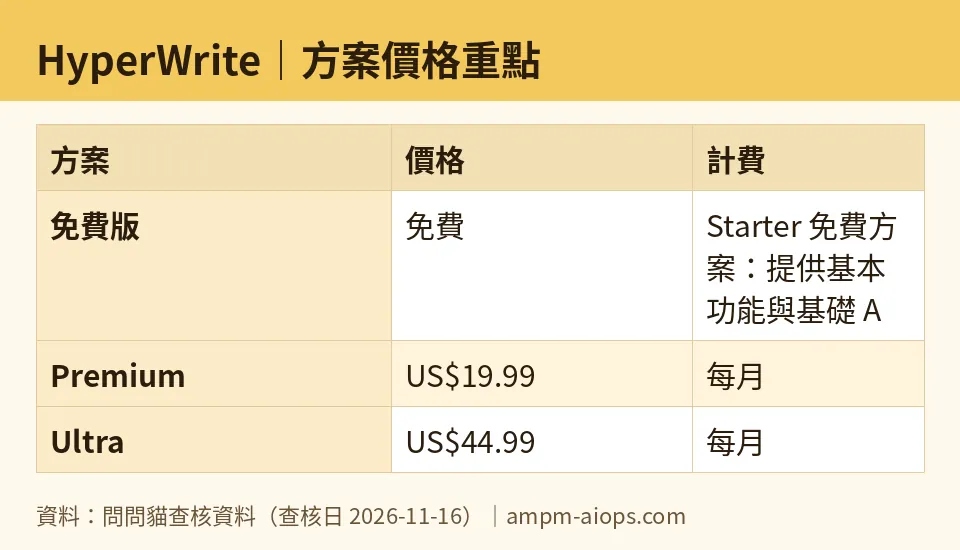
Figure: compiled by AMPM from its verified data (last verified 2026-11-16).
🔍 AMPM exclusive check
Here is what we did, and where the limits are.
We read the official pricing page on 2026-11-16 and confirmed the monthly and annual figures above: US$19.99 and US$192 a year for Premium, US$44.99 and US$348 a year for Ultra. The plan features listed above match what the page shows.
What the page does not spell out is the free tier. It lists basic features and basic credits for Starter with no numbers. We could not find a figure on the official site or elsewhere, so we have nothing to report.
Also read this plainly: HyperWrite entered our database as a newer candidate tool, and this is a single round of checking. We have not yet cross-checked it three ways by hand. A Hacker News thread was logged as a third-party source, but we’re not leaning on it for any number here. Free-plan limits and commercial-use terms should be confirmed on the official site before you rely on them for paid client work.
☀️ AMO, the budget-minded cat

AMO asks two questions of every tool: is the free plan enough, and is paying worth it?
On the first, the honest answer is that nobody can say yet. Starter is free and has basic AI credits, but HyperWrite doesn’t publish the count. AMO’s advice is to treat the free plan as a one-week test, not a long-term home. If the credits last, stay free and spend nothing.
On the second, AMO would look at Premium first. At US$19.99 a month, you get 250 advanced messages, 3 Personas, web citations and unlimited TypeAhead. That is enough for most solo writers. The annual route brings the average down to US$16 a month, but it means paying US$192 at once. AMO says: don’t. Pay monthly for the first stretch. Switch to annual only after you’ve used it steadily.
Ultra is a harder sell. At US$44.99 a month, or US$348 for a year, you’re paying for unlimited messages, 10 Personas, and priority on the browser agent. AMO would ask one question: will you use the agent every week? If not, 250 messages a month is probably plenty, and Premium wins.
The budget rule is short. Free first, Premium monthly second, annual third, Ultra only with a clear reason.
Verdict: who should use it, who should skip it
Use the free Starter plan if you write a little each week, want to hear your own voice reflected back, and are fine with an unpublished credit limit. It costs nothing to find out.
Pick Premium if you hit the free limit and want a cap you can see: 250 advanced messages a month, 3 Personas, web citations, and typing suggestions with no ceiling. Start at US$19.99 monthly. Move to the US$192 annual plan only when you’re sure.
Pick Ultra if you want the browser agent with priority access, you’d actually hit a message cap, or you juggle many writing voices. Otherwise it’s more plan than most people need.
Skip paid plans if the free tier covers your week, or if you’d be buying a full year before trying the product.
One last caution. The headline monthly figures are annual averages, and the free-tier numbers are unpublished. Verify both on the pricing page before you pay.
Written: 2026-11-17 Price last verified: 2026-11-16 Tool last health-checked: 2026-11-16
🔗 Related on AMPM
📎 Sources
All prices and quotas in this article come from AMPM’s verified dataset for HyperWrite (last verified 2026-11-16); primary sources:
🐾 Meet the cats: AMO and PIMI
AMPM is a Taiwan-based AI-tool pricing watchdog. Our motto: ask before you subscribe. Two cats argue every tool from two sides:
- ☀️ AMO — the budget-minded cat. Always asks: is the free tier enough, and is paying actually worth it?
- 🌙 PIMI — the performance-minded cat. Cares about whether it works well, fast, and gets your job done.
When they are done arguing, you know whether to pay. Every number is checked by us, with the verification date at the end.
🐾 Our sister sites also checked
Read next
- HyperWrite Full breakdown: pricing, features and real-world limits
- HyperWrite Is the free quota enough?
- HyperWrite Alternatives
- Free plan limits for every AI tool we track
