[Pricing] Humata Pricing 2026: Is the Free Plan Really Just a Trial?
- Free tier: Yes
- Cheapest paid plan: US$1.99/mo and up
- Free quota: Free: cumulative upload limit of 60 pages, up to 10 question‑answer …
- Last checked: 2026-11-19
Article last updated: 2026-11-18



Humata is an AI assistant that reads long documents and research papers, then answers your questions about them. You upload a PDF, ask something, and it replies with answers drawn from the file.
My angle is simple. The free plan reads like a plan, but it is built like a trial. The cheapest paid step costs very little, and the page-based billing above it is where you need to pay attention.
The free plan: a bucket, not a monthly allowance
The free plan has two limits. You can upload up to 60 pages in total, and you get up to 10 answered questions.

Illustration: The free capacity for uploads and questions is a strict lifetime limit that never refills.
Look at the word “total.” That is a lifetime-style cap, not a monthly one. A “page” here is one page of the documents you upload, and Humata meters its plans in pages. Free users get a fixed bucket, and once it is empty it is empty.
Sixty pages is one short report or a couple of papers. Ten questions go quickly if you ask follow-ups. A single paper can eat half of them in one sitting.
The official pricing page does not say the free allowance refills each month. We found no reset language, and we did not see a reset. Treat the free plan as a way to test the tool on one or two real documents, not as a monthly freebie. Prices and allowances may also vary by country, and we checked from Taiwan.
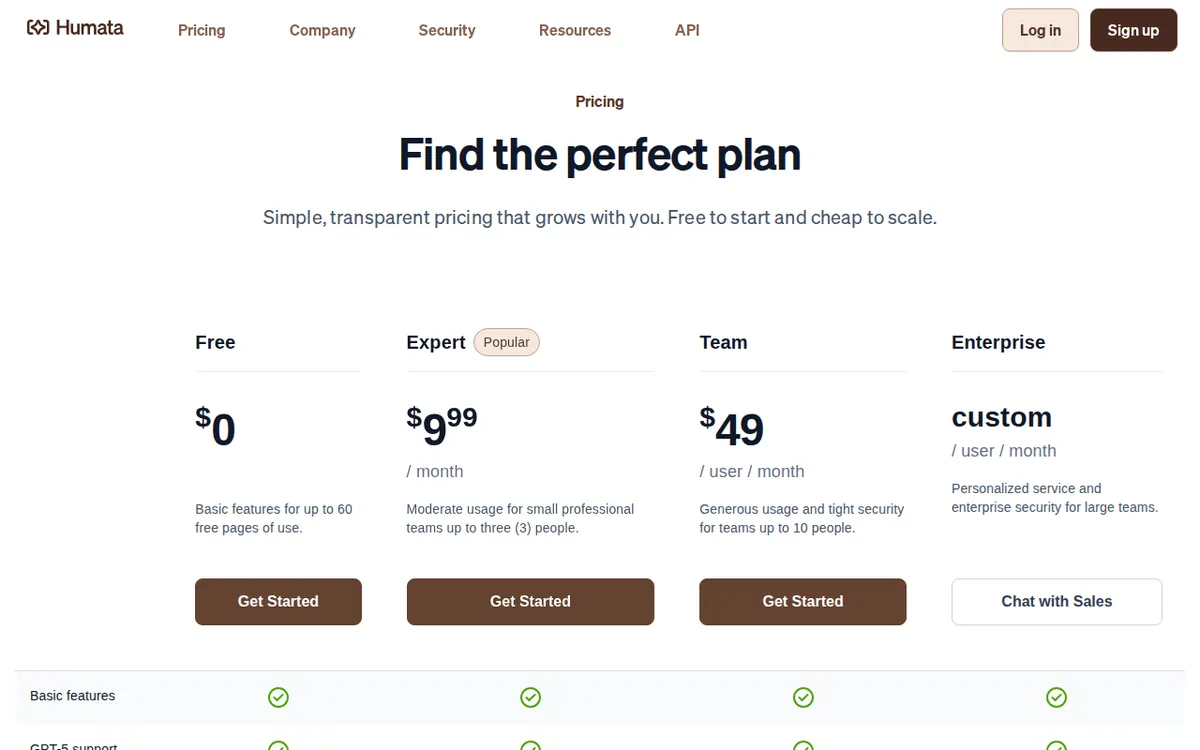
Figure: humata.ai official pricing page, captured 2026-11-18.
The paid ladder, plan by plan
Humata has three paid plans, and all three are listed as monthly subscriptions. The data has no yearly price for any of them, so we can’t say whether paying yearly saves money. Check the pricing page if you want to pay annually.
Student: US$1.99 per month, per seat. A “seat” is one user account. This plan includes a 200-page free allowance. After that, extra pages cost US$0.02 each. Some older versions of the plan showed US$0.01 per page, so don’t be surprised if you see that number in old reviews or screenshots. The data doesn’t say whether the 200 pages reset every month. It also doesn’t say whether you must prove student status. Confirm both before you pay.
Expert: US$9.99 per month. This plan includes 3 seats and a monthly allowance of 500 pages. Extra pages cost US$0.02 each. It also adds two features: questions across multiple documents at once, and advanced customer support. Cross-file questions are the main reason to move up. If you compare a stack of papers or contracts, asking one question across all of them saves a lot of tab-hopping.
Team: US$49 per month, per seat. This plan includes 10 seats and 5,000 pages of free allowance. Extra pages cost US$0.01 each. It adds OCR, folders, and department-level permissions. OCR is text recognition for scanned pages, so a photographed or scanned PDF becomes readable. Folders and permissions let you control who sees which documents.
One thing reads oddly. The Team plan is listed as per seat, yet it also says 10 seats are included. We can’t tell from our data whether the US$49 is per person or covers the 10-seat bundle. Read the pricing page carefully, or ask Humata, before you budget for a team.
When paying is not worth it
Don’t pay if you only need an answer from one document, once. Use the free 60 pages and 10 questions and be done.
Don’t pay for Student if you rarely upload anything. The US$1.99 is small, but you are paying for a page allowance you may not use. If you do go over it, pages cost US$0.02 each, and that rate is the same as Expert’s.
Don’t jump to Expert just for the 3 seats unless three people will really use the account. Don’t jump to Team unless you need scanned-document reading or folder permissions. Those are the Team-only features in our data, and they are what the price is for.
A cheaper-looking plan is not always cheaper per page. Team’s extra pages cost US$0.01, half the Student and Expert rate. But you only benefit if you are large enough to need the plan in the first place.
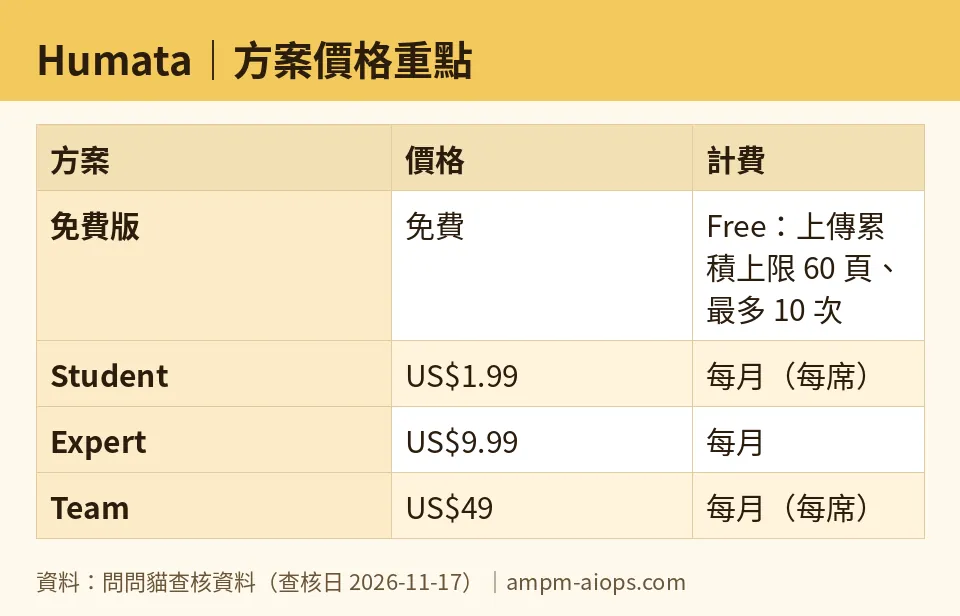
Figure: compiled by AMPM from its verified data (last verified 2026-11-17).
🔍 AMPM exclusive check
Here is what we verified, and where the gaps are.
Every price and quota in this article matched the official pricing page when we read it on 2026-11-15, 2026-11-16, and 2026-11-17. Nothing changed in that window.
Three things the vendor page does not spell out clearly:
- The free allowance has no stated reset. It is a cumulative cap of 60 pages and 10 answered questions. We found no monthly refill language on the pricing page. Plan for a one-time trial.
- Student’s per-page rate has a history. The current figure is US$0.02. Some older versions of the page show US$0.01.
- The seat wording is ambiguous. Team is listed per seat, but also includes 10 seats. We could not settle that from the page.
Also be clear about how deep this check goes. Humata is a newer entry on our watchlist. We have read the official site and pricing page, plus one third-party discussion thread. We have not yet cross-checked it by hand across three independent sources. The free allowance and any commercial-use terms should be confirmed on the official page before you rely on them.
☀️ AMO, the budget-minded cat

AMO asks two questions. Is free enough? Is paying worth it?
On free: almost never, if you read documents regularly. The free plan gives you 60 pages in total and 10 answered questions. That is a taste, not a workflow. One long paper can use up the page cap. A few follow-ups use up the question cap. AMO would use it exactly once, on the single document that matters, and then decide.
On paying: the Student plan at US$1.99 per month is the cheapest step. It comes with a 200-page free allowance, over three times the free cap. Extra pages cost US$0.02 each, so heavy readers should watch the meter. If you read a few papers a month, this is the cheapest way to keep going without a real commitment. It is billed monthly, so you can stop whenever you like.
AMO would not go to Expert at US$9.99 per month unless a real need appears. That need is asking one question across several documents at once, or sharing the account among 3 people. The 500-page monthly allowance is generous, but it is only worth paying for if you will use it.
Team at US$49 is not a budget cat’s plan. It makes sense for an office with scanned files and permission needs, not for one person with a reading list.
AMO’s rule: use the free pages once, try Student for a month, and skip everything above it until the work demands it.
Verdict: who should use it, who should skip it
Use the free plan if you want to test Humata on one real document before deciding. Treat it as a trial. Do not count on it refilling.
Pay for Student if you read a few long documents a month and want a very cheap step up. Check the page allowance and the student-status rules first.
Pay for Expert if you need to ask questions across multiple files, or you share an account among up to 3 people.
Pay for Team if you work with scanned documents, or need folders and department permissions for a group.
Skip it if you only need one answer from one document, or if you want a free tool that renews every month. We found no sign that the free plan does.
Written: 2026-11-18 Price last verified: 2026-11-17 Tool last health-checked: 2026-11-18
🔗 Related on AMPM
📎 Sources
All prices and quotas in this article come from AMPM’s verified dataset for Humata (last verified 2026-11-17); primary sources:
🐾 Meet the cats: AMO and PIMI
AMPM is a Taiwan-based AI-tool pricing watchdog. Our motto: ask before you subscribe. Two cats argue every tool from two sides:
- ☀️ AMO — the budget-minded cat. Always asks: is the free tier enough, and is paying actually worth it?
- 🌙 PIMI — the performance-minded cat. Cares about whether it works well, fast, and gets your job done.
When they are done arguing, you know whether to pay. Every number is checked by us, with the verification date at the end.
🐾 Our sister sites also checked
Read next
- Humata Full breakdown: pricing, features and real-world limits
- Humata Is the free quota enough?
- Humata Alternatives
- Free plan limits for every AI tool we track
