[How-to] GetResponse Free Plan: Building Your First Campaign Without Paying
- Free tier: Yes
- Cheapest paid plan: US$19/mo and up
- Free quota: Free plan limit: 500 contacts, a monthly sending quota of 2,500 …
- Last checked: 2026-11-19
Article last updated: 2026-11-06



Starting an email list sounds simple until you open a pricing page and see five plans, three billing cycles, and a counter that says “1,000 contacts.” Most beginners freeze there. This guide walks you through what you can actually build on GetResponse’s free tier — the email marketing suite that pairs a drag-and-drop builder with an AI writing assistant — and what forces you to pay. GetResponse has been around for years, so its free plan is not a throwaway demo. But it has edges, and you will hit them.
What the free tier gives you before you spend a cent
GetResponse’s Free plan caps you at 500 contacts and 2,500 email sends per month. A “contact” here is anyone you store — subscriber, lead, customer. The 2,500 sends are shared across your whole list, so if you have 500 contacts, you can mail the entire list five times in a month. That is enough for a weekly newsletter plus a welcome sequence.
The plan also bundles a 30-day trial of paid features. During those 30 days, paid tools like the advanced automation builder and the AI email generator unlock inside your account. When the window closes, those tools lock again — you keep the free-tier basics, not the trial extras. Nothing charges automatically at the end, but the downgrade can catch you mid-project.
What actually works on free, long term: one landing page, basic forms, the drag-and-drop newsletter editor, and simple autoresponders (an email that fires automatically when someone subscribes). If your goal is collecting emails and sending a welcome message, the free plan carries you.
What does not: behavioral tagging, sales funnels that branch on what a reader clicks, course hosting, and webinars. Those sit on paid tiers.
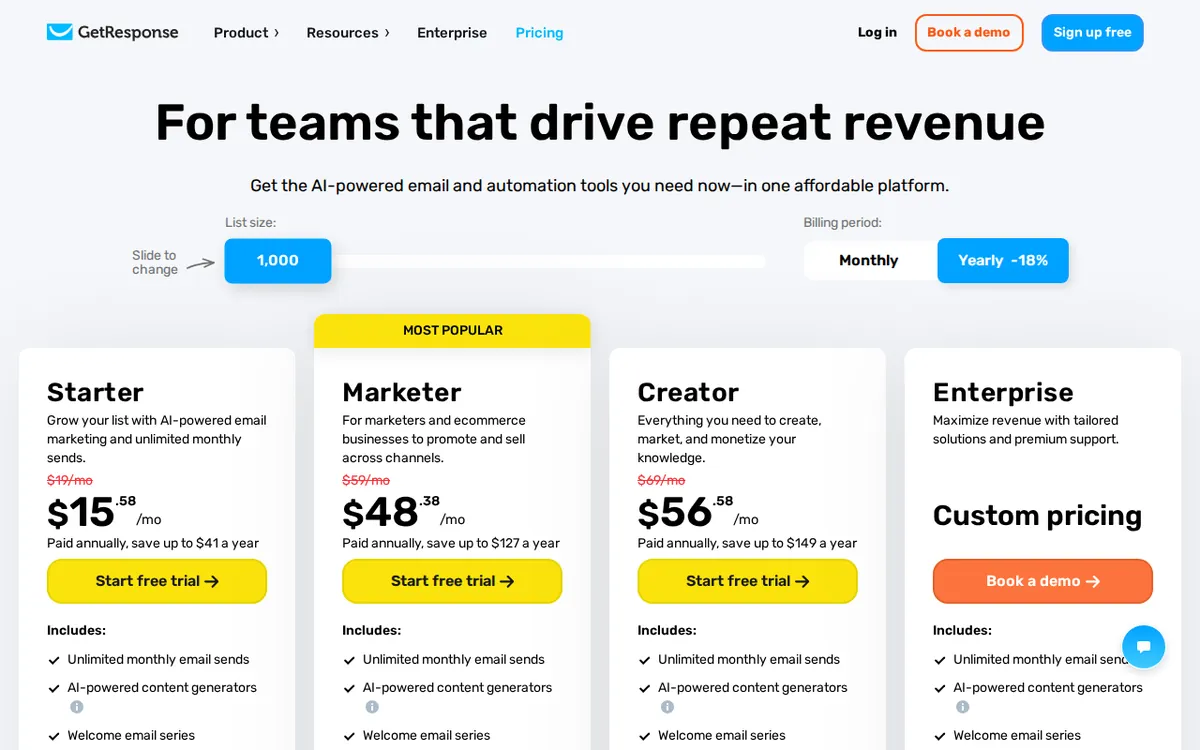
Figure: getresponse.com official pricing page, captured 2026-11-06.
The 30-day trial is the real on-ramp — use it like one
Most beginners poke around during the trial and accomplish nothing. Do the opposite. In week one, import your existing contacts and build your signup form. In week two, write and schedule a three-email welcome series using the AI generator while it is still unlocked. In week three, set up one automation — even a simple “welcome, wait two days, send tip” chain — and let it run. By week four you know whether email marketing is for you, before any card gets charged.
Here is the trap. If you build a five-step automation during the trial and it is still running on day 31, the workflow pauses because advanced automation is a Marketer-tier feature. Your contacts stop receiving the sequence mid-stream. Either finish the sequence before the trial ends or keep it to a single autoresponder, which stays on free.
Pricing when you outgrow free
Paid plans are all priced at a base of 1,000 contacts, monthly billing:
- Starter — US$19 monthly, or about US$15.58 annually. Unlimited emails, AI email generator, autoresponders, landing pages.
- Marketer — US$59 monthly, or about US$48.38 annually. Adds advanced automation flows, behavioral tagging, and segmentation.
- Creator — US$69 monthly, or about US$56.58 annually. Adds course creation, paid newsletters, and 100-person webinars.
These are as listed on the vendor’s page, checked 2026-11-05. Prices vary by country; we checked from Taiwan. There is no yearly price published as a single figure — the annual numbers above are the vendor’s stated per-month equivalents.
The jump that matters for most small senders is Starter. It removes the 500-contact ceiling and the 2,500-send cap. Marketer and Creator matter only once you need automation logic or course delivery. A beginner rarely needs either in month one.
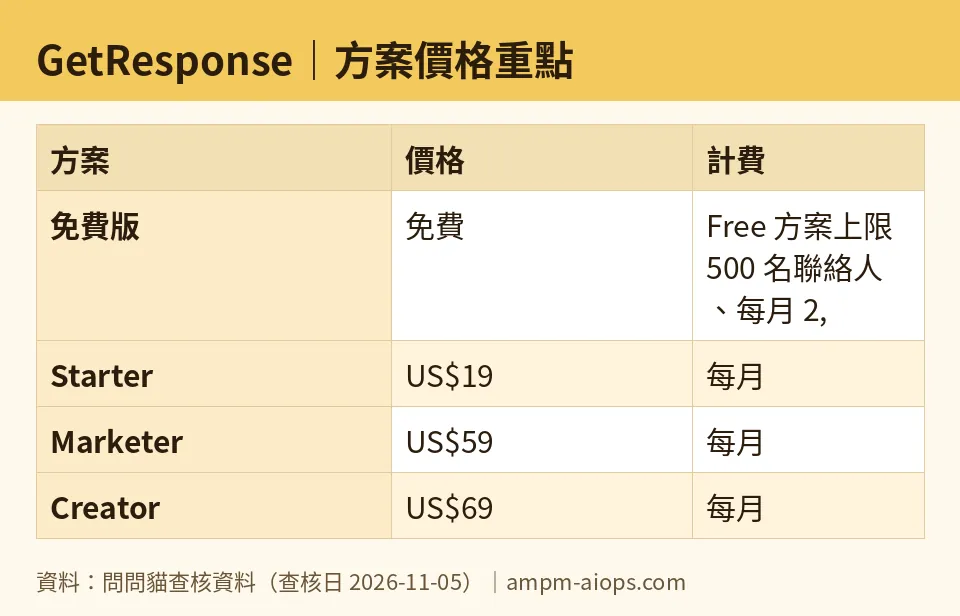
Figure: compiled by AMPM from its verified data (last verified 2026-11-05).
🔍 AMPM exclusive check
Nothing differed from the official page this time; every number below matches it, checked 2026-11-05.
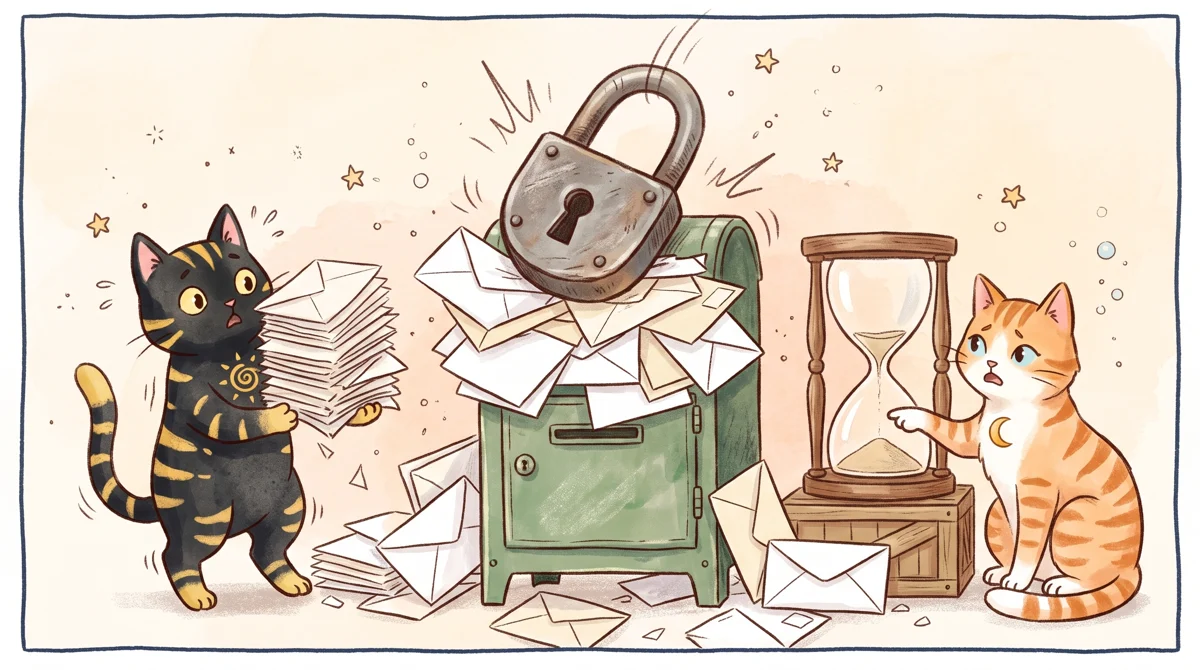
Illustration: When the trial ends, exceeding the free plan capacity causes all advanced features to lock up instantly.
What the vendor page does not spell out in one place is how the trial behaves. The 30-day paid-function trial is attached to the Free plan itself, not something you request separately. When it ends, your account does not cancel — it downgrades. Advanced automations you built stop running, and paid AI features lock. This is stated across help pages but not gathered on the pricing grid. Verify your own account’s trial end date in the dashboard; do not assume you will get a warning email.
Our automated re-checks ran daily from 2026-10-29 through 2026-11-05 and found no change to the price or quota figures. One caveat: this tool was recorded with a single round of source checking, not the full manual cross-check we apply to flagship listings. Treat the free-tier limits and commercial terms as current-as-of the verification date, not permanent.
☀️ AMO, the budget-minded cat

Free is not a trial here — it is a real plan, and that matters. You get 500 contacts and 2,500 sends monthly at no cost, indefinitely. For a solo blogger, a small shop, or anyone testing whether email works for them, that is genuinely enough to run a weekly newsletter to a few hundred people. Do the arithmetic: 500 contacts mailed five times hits the 2,500 cap exactly. Stay under both ceilings and you never see a bill.
The question is whether paying is worth it, and the honest answer is: not until you cross 500 contacts or need branching automation. Starter at US$19 monthly is a real step up, but the moment you clear 500 subscribers you have outgrown free anyway. The 30-day trial lets you taste every paid feature first, which is rare — most tools lock the good stuff behind a card. My advice: build the whole thing on free, use the trial to test one paid feature you think you need, and only then decide. If your list never grows past a few hundred, free stays free. That is the win.
🌙 PIMI, the performance-minded cat
Does it actually work? For core sending, yes. The editor is fast, deliverability on a platform this old is established, and autoresponders fire reliably. The AI email generator — included on Starter but only trial-gated on free — drafts a usable first pass, not finished copy, but it saves the blank-page tax.
Where performance splits from price is automation depth. On free you get autoresponders, which are single-path. Real behavioral automation — send this only if they clicked that — is on Marketer, and that is the feature that separates a newsletter from a marketing machine. The AI generator and landing pages are fine at Starter. Course hosting and 100-person webinars sit at Creator, which is a different job entirely: if you sell teaching, that US$69 monthly tier replaces three separate tools.
Speed is not the bottleneck. The bottleneck is that free caps your list at 500 and your monthly sends at 2,500, which is fine for a personal list and useless for a business with a funnel. Know which one you are running before you commit.
Verdict: who should use it, who should skip it
Use the free plan if you are a solo creator, a small business owner, or anyone building a first list under a few hundred people. The 500-contact, 2,500-send ceiling is a real ceiling, but it is a workable one, and the 30-day paid trial lets you test advanced tools before spending.
Skip free — go straight to Starter at US$19 monthly — if you already have more than 500 contacts or you need unlimited sends. Skip the whole platform if your plan depends on deep behavioral automation from day one: that is the Marketer tier at US$59 monthly, and if you are not ready for that spend, use free to validate demand first.
One rule before you start: check your trial end date in the dashboard. The downgrade is silent.
Written: 2026-11-06 Price last verified: 2026-11-05 Tool last health-checked: 2026-11-06
🔗 Related on AMPM
📎 Sources
All prices and quotas in this article come from AMPM’s verified dataset for GetResponse (last verified 2026-11-05); primary sources:
🐾 Meet the cats: AMO and PIMI
AMPM is a Taiwan-based AI-tool pricing watchdog. Our motto: ask before you subscribe. Two cats argue every tool from two sides:
- ☀️ AMO — the budget-minded cat. Always asks: is the free tier enough, and is paying actually worth it?
- 🌙 PIMI — the performance-minded cat. Cares about whether it works well, fast, and gets your job done.
When they are done arguing, you know whether to pay. Every number is checked by us, with the verification date at the end.
🐾 Our sister sites also checked
Read next
- GetResponse Full breakdown: pricing, features and real-world limits
- GetResponse Is the free quota enough?
- GetResponse Alternatives
- Free plan limits for every AI tool we track
