[Pricing] Is Foxit PDF Editor Worth It? What the 'Monthly' Price Really Commits You To
- Free tier: No
- Cheapest paid plan: US$10.99/mo and up
- Free quota: No perpetual free plan (offers a 14‑day full‑feature free trial, no …
- Last checked: 2026-11-19
Article last updated: 2026-11-18



Foxit PDF Editor has no free plan. It has a free trial, a free reader that only reads, and two paid tiers. The page shows a “per month” price, but that price sits inside a yearly contract. This piece covers what each tier gives you, how the two billing options differ, and when you should not pay at all.
Prices vary by country. We checked from Taiwan, and the figures below are in US$ as listed.
Is there a free plan?
No. Foxit PDF Editor has no permanent free tier.
You get two free things:
- A 14-day free trial. It unlocks all features and does not ask for a credit card. When it ends, you either pay or lose the editing tools.
- Foxit Reader. This is a separate, free app. It opens and reads PDFs. It does not edit them.
So the free route is a short test, not a long-term setup. If you need to edit a PDF once and never again, 14 days may cover it. If you edit PDFs every week, plan on paying.
Use the trial to run your real files through it: scanned contracts, forms, anything messy. Don’t test it on a clean one-page document. Clean files make every editor look good.
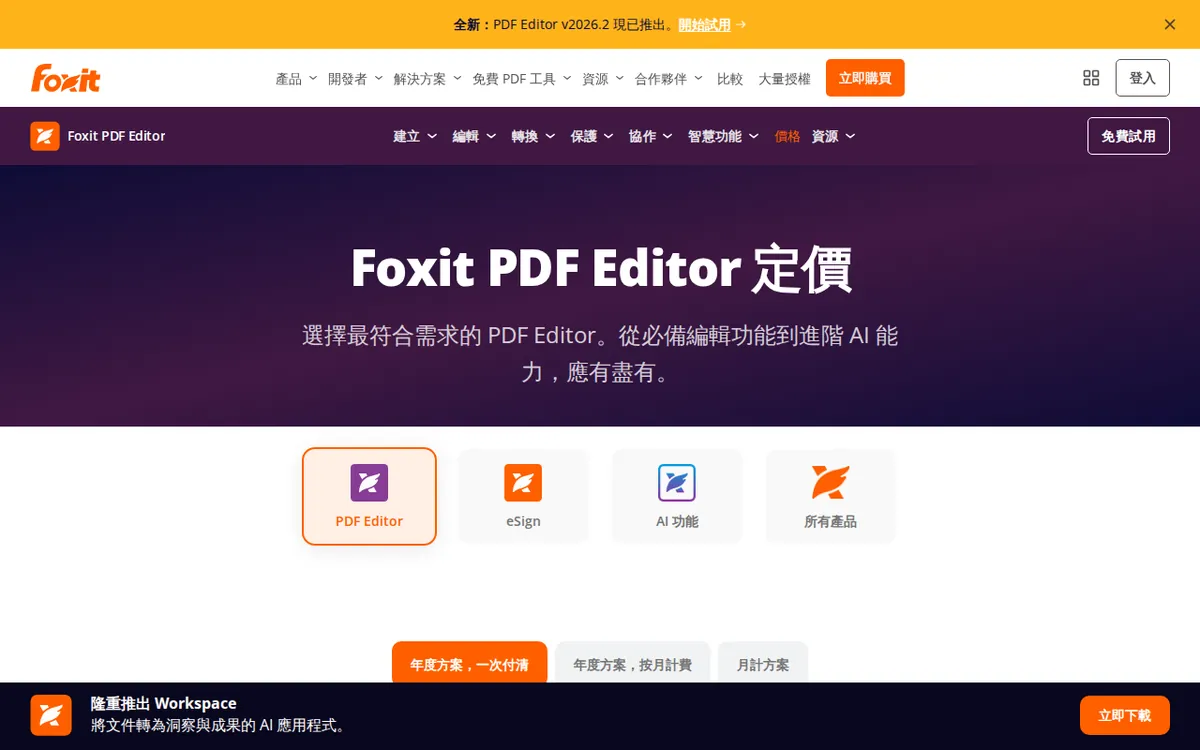
Figure: foxit.com official pricing page, captured 2026-11-18.
What the two paid plans include
Foxit sells two tiers. Both are per person, so a team pays for each user.
PDF Editor: US$10.99 per person per month
- Full editing on desktop and on the web.
- 300 AI credits each month. Credits are the allowance the built-in AI assistant spends when it does a task for you, such as summarizing or answering questions about a document. Our data does not say how many credits a given task uses, so you can’t predict from the number alone how far 300 will stretch. Test it during the trial.
PDF Editor+: US$13.99 per person per month
- Everything in PDF Editor.
- iOS and Android mobile apps.
- AI Smart Redact. Redacting means blacking out sensitive text so it cannot be recovered. Smart Redact finds personal data such as names or ID numbers and hides it automatically, instead of you marking each one by hand.
- 150 eSignatures per year. An eSignature is a legally recognized electronic signature collected through the app.
Our data does not say whether the credits carry over from month to month, or whether Editor+ changes the credit amount. Check the official page for both.
“Monthly” is not month-to-month
Here is the catch behind the number on the page. The US$10.99 and US$13.99 prices are for an annual contract billed monthly. You commit for a year, and you pay in monthly instalments.
Foxit also lists a second way to pay: all at once for the year.
| Plan | Annual contract, billed monthly | Annual contract, paid upfront |
|---|---|---|
| PDF Editor | US$10.99 per person per month | US$129.99 per year |
| PDF Editor+ | US$13.99 per person per month | US$159.99 per year |
Our data has no figure for a flexible month-to-month price with no commitment. If one exists, it was not in what we verified, so don’t assume the lower “monthly” number lets you leave after four weeks.
We are not going to multiply the monthly prices out, because that is a calculation, not a verified figure. If you want to know which option is cheaper over a year, put the monthly price next to the upfront price yourself and decide whether the difference is worth tying up the cash.
The practical rule: pay upfront only if you are sure you’ll use the tool all year. Pay monthly if you want smaller bills. Either way, you are likely committed to the full term. Our data does not cover cancellation or refund terms, so read them before you enter a card number.
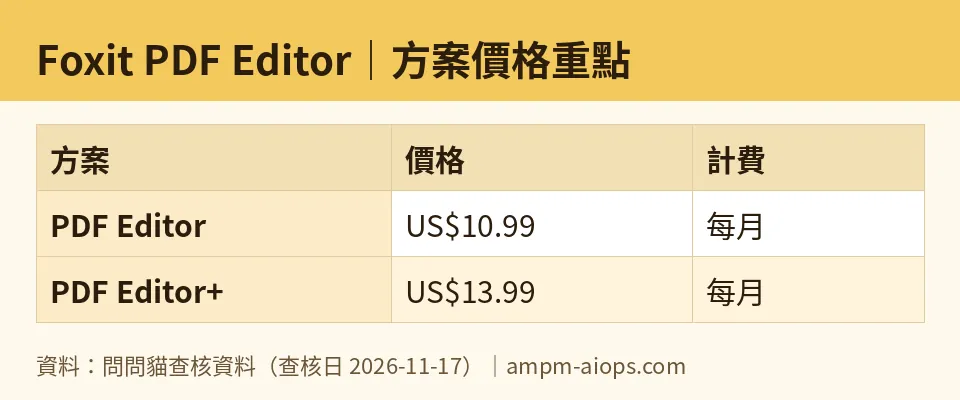
Figure: compiled by AMPM from its verified data (last verified 2026-11-17).
The cheapest way in, and when to upgrade
The cheapest path is simple:
- Start the 14-day trial. It is free and needs no card.
- If the editing works for you, take PDF Editor at US$10.99 per person per month, or US$129.99 for the year upfront.
- Move to PDF Editor+ only if you need something from its short list: mobile apps, automatic redaction, or eSignatures.
The upgrade question is really three questions:
- Do you edit on a phone or tablet? If yes, you need Editor+ for the iOS and Android apps. If you only work at a desk, skip them.
- Do you handle documents with personal data? Think HR files, legal papers, medical forms, client records. Automatic redaction saves time there, and it reduces the chance you miss a name. If you rarely redact, you are paying for a feature you won’t touch.
- Do you send documents for signature? Editor+ includes 150 eSignatures per year. If you sign a handful of documents a year, a free signing tool elsewhere may do the job. If signing is a daily routine, the allowance matters.
If none of the three applies, Editor+ is the wrong tier.
When paying is not worth it
Skip the subscription if:
- You only read PDFs. Foxit Reader is free and does that.
- You edit once or twice a year. A subscription, even billed monthly, sits inside a yearly contract. For rare jobs, finish the work inside the 14-day trial.
- You mainly want the AI assistant. The 300 monthly credits are a fixed allowance, and we can’t tell you what they buy. Judge them on your own documents before committing.
- You are a solo user who needs eSignatures only. You’d be paying for a whole editor to get one feature.
🔍 AMPM exclusive check
What we confirmed: on 2026-11-17, the prices and allowances in this article matched the official Foxit pricing page. The figures are US$10.99 and US$13.99 per person per month, US$129.99 and US$159.99 per year upfront, 300 AI credits per month on PDF Editor, and 150 eSignatures per year on PDF Editor+. Our automated check repeated this comparison each day from 2026-11-01 to 2026-11-17 and found no changes.
What the headline price doesn’t say plainly: the “per month” figures belong to a yearly contract paid monthly. We found no month-to-month price in the data.
What we could not confirm: this tool entered our database recently, and its data has been through one round of review, not a full manual cross-check against several sources. We did not test how fast the 300 credits run out, and we did not read the cancellation terms. Free-trial details and commercial-use terms should be confirmed on the official page before you pay.
☀️ AMO, the budget-minded cat

The question is whether free is enough, and whether paying is worth it.
Free is not enough if you want to edit. There is no permanent free plan. The free Foxit Reader only reads, and the free trial lasts 14 days with no card required. So the free option exists, but it expires.
If you need to edit, the entry price is PDF Editor at US$10.99 per person per month, or US$129.99 for the year if you pay upfront. For that you get full desktop and web editing plus 300 AI credits a month. That is the cheapest paid door in, and for most people it is the only one they need.
Editor+ costs more: US$13.99 per month, or US$159.99 upfront for the year. A budget-minded user should pay that only for a specific reason. Mobile apps, automatic redaction and 150 eSignatures a year are real features. But if you don’t use them, they are money for nothing.
My advice: use the 14-day trial on your real files. If editing is a weekly job, buy PDF Editor. Consider paying upfront only if you’re sure you’ll keep using it all year, because the monthly option is still a year-long commitment. If you edit rarely, finish the job inside the trial and walk away.
Verdict: who should use it, who should skip it
Use it if you edit PDFs regularly and want one tool on desktop and web. Start with PDF Editor. Choose Editor+ only if you need mobile apps, automatic redaction of personal data, or a yearly pool of 150 eSignatures.
Skip it if you only read PDFs, edit a few times a year, or want a free plan that stays free. Foxit Reader covers reading. The trial covers a one-off job.
Before you pay, do three things: run the trial with your own documents, confirm whether your price is monthly under a yearly contract or paid upfront, and read the cancellation terms on the official page.
Written: 2026-11-18 Price last verified: 2026-11-17 Tool last health-checked: 2026-11-17
🔗 Related on AMPM
📎 Sources
All prices and quotas in this article come from AMPM’s verified dataset for Foxit PDF Editor (last verified 2026-11-17); primary sources:
🐾 Meet the cats: AMO and PIMI
AMPM is a Taiwan-based AI-tool pricing watchdog. Our motto: ask before you subscribe. Two cats argue every tool from two sides:
- ☀️ AMO — the budget-minded cat. Always asks: is the free tier enough, and is paying actually worth it?
- 🌙 PIMI — the performance-minded cat. Cares about whether it works well, fast, and gets your job done.
When they are done arguing, you know whether to pay. Every number is checked by us, with the verification date at the end.
🐾 Our sister sites also checked
Read next
- Foxit PDF Editor Full breakdown: pricing, features and real-world limits
- Foxit PDF Editor Is the free quota enough?
- Foxit PDF Editor Alternatives
- Free plan limits for every AI tool we track
