[Pricing] Fly.io Free Tier: What the Free Plan Actually Covers in 2026
- Free tier: Yes
- Cheapest paid plan: US$29/mo and up
- Free quota: The first 10 GB of disk snapshots per month are free, the first 10 …
- Last checked: 2026-11-19
Article last updated: 2026-11-19



Fly.io sells itself as a place to run your app close to users, in containers spread across the world. The pricing page is where that promise gets complicated. The free tier is real, but it does not include a free machine to run your code on. That single fact changes how you should read every number below.
This is a breakdown of the free tier and both paid plans, with the cheapest upgrade path and the point where paying stops making sense. Prices vary by country; we checked from Taiwan.
What the free tier actually includes
Fly.io’s free tier is a list of specific allowances, not a free server. The first 10GB of disk snapshots per month are free. The first 10 single-domain SSL certificates are free. Inbound traffic is free. You also get a shared IPv4 address and Anycast IPv6.
That is the whole free list. Compute and storage run on pay-as-you-go: no monthly subscription, billed by actual use. The smallest always-on machine starts at about US$2.19 per month. New users no longer get an unlimited free VM allowance.
Read that again, because it is the part most people miss. The free tier covers snapshots, certificates, inbound traffic and network addresses. It does not cover the machine your app runs on. If you deploy an app and leave it running, you are on the meter from the first minute.
For a global reader, the practical shape of this: you can hold snapshots, terminate SSL for up to 10 single domains, and receive inbound traffic without paying. The moment you want a container serving requests around the clock, you are a paying customer at usage rates, starting around US$2.19 per month for the smallest always-on machine.
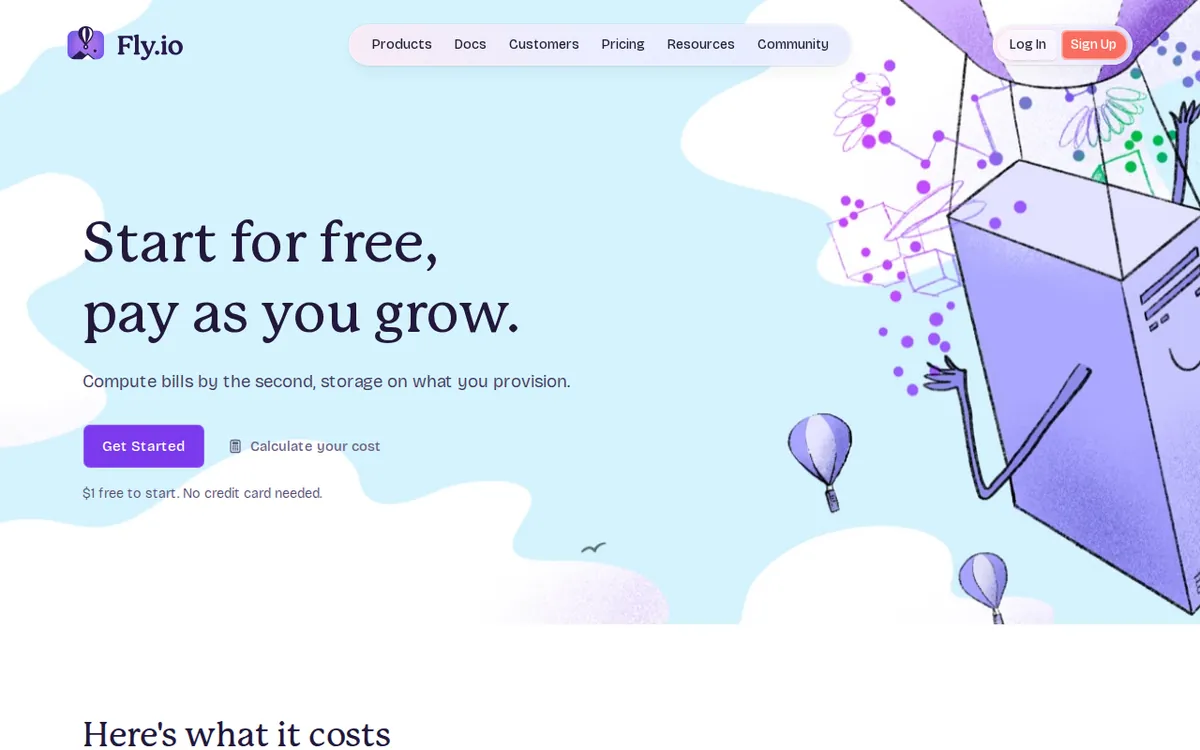
Figure: fly.io official pricing page, captured 2026-11-19.
The two paid plans are support, not infrastructure
Here is where Fly.io’s pricing page differs from most SaaS pages you have read. The two paid plans do not buy you more compute, more storage or more traffic. They buy you support.
Standard Support is US$29 per month, billed monthly. It includes a 36-hour response SLA and technical architecture consultation. Platform compute, disk and traffic are still billed by actual usage on top of that.
Premium Support is US$199 per month, billed monthly. It includes faster response and architecture reviews. Infrastructure usage is billed separately here too.
So the ladder is not free → US$29 → US$199 for more capacity. It is free → usage billing for capacity, and separately US$29 or US$199 for a human to answer you faster. A team can run a serious workload on Fly.io and never touch either support plan. A team can also pay US$199 a month and still owe usage charges on top.
There is no annual billing option in the data. Both plans are listed as monthly only, so there is no yearly discount to compare against. If you see a yearly figure quoted elsewhere, it is not from the official pricing page.
The cheapest upgrade path
The cheapest way to pay Fly.io is not a plan. It is usage. Deploy the smallest always-on machine at about US$2.19 per month, keep your snapshots under the free 10GB, keep your single-domain certificates under 10, and you are paying usage rates with no subscription.
The first real upgrade decision is the US$29 Standard Support plan. Ask what you are buying: a 36-hour response SLA and architecture consultation. If your app is a side project, a hobby deployment or an internal tool, a 36-hour response window is not worth US$29 a month. If you are running production traffic for a business and a 36-hour wait on a platform issue is unacceptable, US$29 is cheap insurance.
The US$199 Premium Support plan is a different conversation. Faster response and architecture reviews are for teams where downtime has a real cost and where someone needs to review the design before it ships. For most individual developers and small teams, this plan is not the right first upgrade.
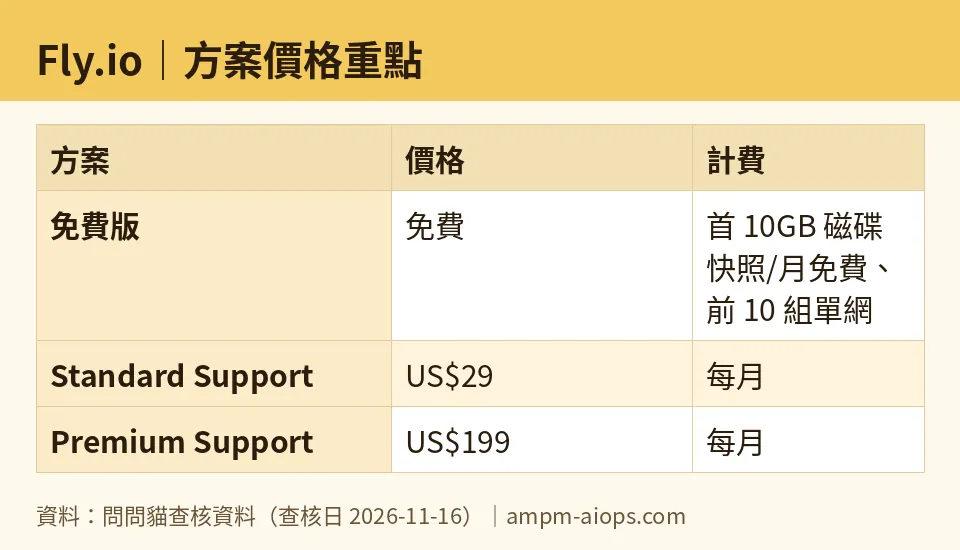
Figure: compiled by AMPM from its verified data (last verified 2026-11-16).
🔍 AMPM exclusive check
Nothing differed from the official page this time; every number below matches it, checked 2026-11-16. The free tier figures, the US$2.19 starting machine price, and the US$29 and US$199 support prices all match what the pricing page showed on that date.
One thing worth stating plainly, because the vendor page does not spell it out in one sentence: the free tier and the paid plans do not overlap in what they cover. The free tier is infrastructure allowances. The paid plans are support contracts. Paying US$29 does not raise your free snapshot limit or add free machines. It adds a response SLA. That distinction is easy to miss when you scan a pricing table, and it is the single most useful thing to understand before you enter a card number.
☀️ AMO, the budget-minded cat

AMO asks one question: is free enough, and is paying worth it?
On the free side, the answer is narrower than the marketing suggests. You get 10GB of disk snapshots per month, 10 single-domain SSL certificates, free inbound traffic, a shared IPv4 and Anycast IPv6. That is a useful set for someone who wants to stage snapshots, terminate SSL for a handful of domains, and receive traffic without a bill. But there is no free machine. The smallest always-on machine is about US$2.19 per month, and new users do not get an unlimited free VM allowance anymore.
So the honest budget answer: free is enough only if you are not running a persistent app. If you are, your floor is about US$2.19 per month in usage, not zero.
Is the US$29 Standard Support plan worth it for a budget user? Almost never. A 36-hour response SLA is a business tool, not a hobby tool. If you are watching every dollar, skip it until a production incident actually costs you more than US$29. The US$199 Premium Support plan is further out of reach for a budget user, and it does not add capacity, so it does not solve a budget problem at all.
The budget trap to avoid: assuming the free tier means a free app. It does not. Budget for the US$2.19 floor before you deploy anything you intend to keep running.
🌙 PIMI, the performance-minded cat

PIMI asks whether it actually works well, fast, and does the job.
The platform’s pitch is global distribution: containers running close to users, with Anycast IPv6 and a shared IPv4 included. That is a real architectural advantage for latency-sensitive apps, and it is the reason people pick Fly.io over a single-region host. The free inbound traffic and free SSL for the first 10 single domains remove two common line items from a small deployment.
The performance question is not about the free tier. It is about whether the support plans match the workload. Standard Support at US$29 per month gives a 36-hour response SLA. For a production app, 36 hours is a long time to wait when something is down. Premium Support at US$199 per month gives faster response and architecture reviews, which is the plan that actually matches a team running serious traffic. Neither plan changes how fast your containers run; they change how fast a human responds when something breaks.
The catch PIMI flags: the smallest always-on machine at about US$2.19 per month is a starting point, not a performance tier. If your app needs more compute, you pay usage rates for it, and the support plans sit on top. Budget for both the machine and, if you are running production, the support tier that matches your tolerance for downtime.
Verdict: who should use it, who should skip it
Use Fly.io’s free tier if you need snapshots under 10GB, SSL for up to 10 single domains, free inbound traffic and network addresses, and you are not running a persistent app. It is a genuine free allowance for those specific pieces.
Skip the free tier as your only plan if you intend to run an app around the clock. The smallest always-on machine starts at about US$2.19 per month, and new users do not get an unlimited free VM allowance. Budget for usage from day one.
Pay for Standard Support at US$29 per month only if a 36-hour response SLA matters to your business. Pay for Premium Support at US$199 per month only if you need faster response and architecture reviews on production infrastructure. Neither plan adds capacity, so do not buy either one expecting more compute.
Written: 2026-11-19 Price last verified: 2026-11-16 Tool last health-checked: 2026-11-19
🔗 Related on AMPM
📎 Sources
All prices and quotas in this article come from AMPM’s verified dataset for Fly.io (last verified 2026-11-16); primary sources:
🐾 Meet the cats: AMO and PIMI
AMPM is a Taiwan-based AI-tool pricing watchdog. Our motto: ask before you subscribe. Two cats argue every tool from two sides:
- ☀️ AMO — the budget-minded cat. Always asks: is the free tier enough, and is paying actually worth it?
- 🌙 PIMI — the performance-minded cat. Cares about whether it works well, fast, and gets your job done.
When they are done arguing, you know whether to pay. Every number is checked by us, with the verification date at the end.
🐾 Our sister sites also checked
Read next
- Fly.io Full breakdown: pricing, features and real-world limits
- Fly.io Is the free quota enough?
- Fly.io Alternatives
- Free plan limits for every AI tool we track
