Cursor Free Tier 2026: Official Page Stopped Naming Numbers — What Remains
- Free tier: Yes
- Cheapest paid plan: US$8/mo and up
- Free quota: Hobby: 2000 times of completion + 50 times of slow progress …
- Last checked: 2026-11-19
Article last updated: 2026-10-07



Cursor is one of the most-used AI code editors among professional developers, and its free tier is the first thing most people try before paying anything. But if you go looking for the exact free tier limits on Cursor’s own pricing page today, you won’t find them. The specific numbers that used to be spelled out — 2,000 code completions and 50 “slow” premium requests per month — are gone from the official page. What’s left is a vaguer phrase: “limited” usage. That’s the starting point for this review.
What happened to the old free-tier numbers
As of our last direct check on 2026-07-26, Cursor’s own site no longer lists the free “Hobby” tier’s quota as a hard number. It used to say, in effect, that free users got 2,000 completions (the inline code suggestions Cursor shows as you type) plus 50 slow premium requests — “premium requests” being calls to Cursor’s more capable AI models, as opposed to the faster but more limited models used for basic autocomplete. “Slow” means those premium requests get queued behind paying users’ requests rather than answered instantly.

Illustration: While the official page cloaks free allowances in vague fog, the investigative cats dig up archived records to uncover the hidden limits.
That 2,000/50 figure still circulates, but now only through third-party and community sources, not the vendor itself. Because we can no longer confirm it on the official page, we’re keeping the number on record but downgrading our confidence in it to medium. If you’ve seen “2,000 completions, 50 premium requests” repeated in blog posts or forums, know that it traces back to an older version of Cursor’s pricing page, not what’s published today.

Figure: cursor.com official pricing page, captured 2026-10-07.
What you actually get for free today
What Cursor’s site does confirm, as of our 2026-10-05 verification: free users get access to “Agent” requests — Cursor’s mode where the AI can plan and execute multi-step coding tasks on its own, not just suggest the next line — but those are explicitly “limited.” Free users also get access to Composer, Cursor’s own frontier AI model built for multi-file editing. No credit card is required to start. That’s the complete, current, officially-stated picture of the free tier: access to the tools, with limits that Cursor no longer quantifies in public.
Four paid tiers, four different audiences
Once you’re ready to pay, Cursor has expanded its paid lineup to four plans, all billed monthly as subscriptions (a recurring charge, not a one-time purchase):
- Plus — US$8/month. Cursor’s own description centers this on a shared AI usage pool: it includes Cursor itself, Grok chat and voice, image generation and Build, and Grok API access — but note this plan runs on Grok models only.
- Premium — US$30/month, the plan Cursor’s page flags as most-chosen. It includes everything in Plus at four times the usage, plus the latest Grok models, cloud-based agents and automation, code hosting and AI code review — with third-party models billed separately at API list price.
- Ultra — US$200/month, aimed at what Cursor calls “agent power users” — heavy, continuous use of Cursor’s AI agents.
- Teams — from US$30 per person per month (a “seat” is one licensed user account on a team plan). Teams adds centralized billing and account management, usage analytics, team privacy settings, and SSO on top of the individual-plan features, with usage running 4 to 50 times Plus depending on the seats.
That’s a wide spread: US$8 to US$200 a month for individuals, and team seats starting from US$30 each. Nothing in Cursor’s published materials states an annual price for any of these — they’re month-to-month subscriptions as far as we can confirm.
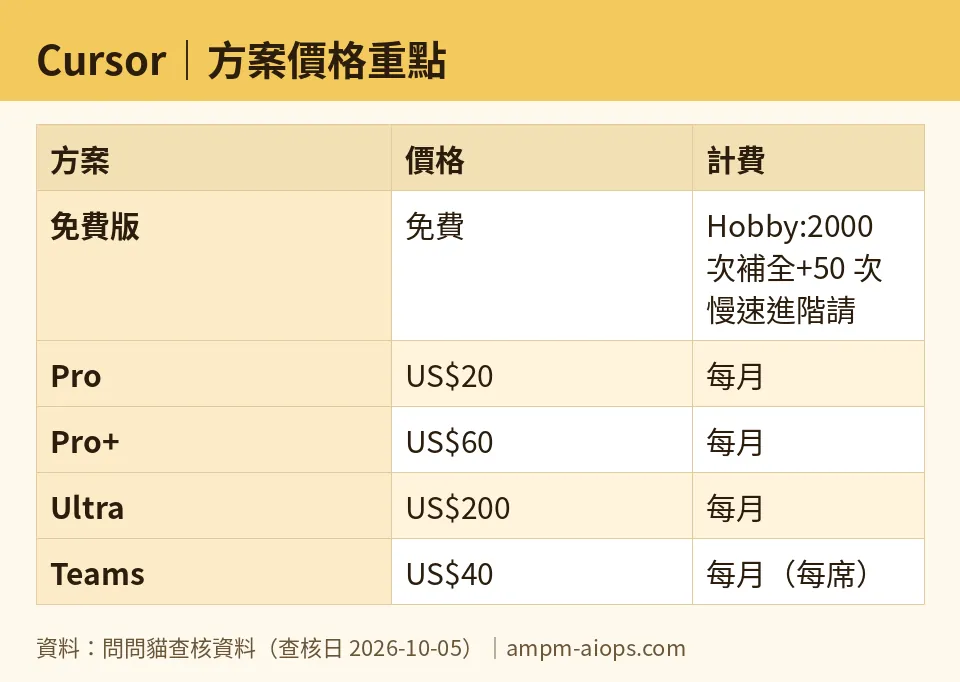
Figure: compiled by AMPM from its verified data (last verified 2026-10-05).
🔍 AMPM exclusive check
Here’s what we found that Cursor’s own pricing page doesn’t spell out: the disappearance of the specific free-tier numbers isn’t a one-time glitch — it’s held steady across five separate checks we ran on Cursor’s official site: 2026-07-25, 2026-09-08, 2026-09-24, 2026-10-02, and 2026-10-05. Every time, the free tier was described only as “limited” for Agent requests, with no completion count or premium-request count published. The 2,000-completions-plus-50-premium-requests figure that still gets quoted around the web traces back to before that July check, and Cursor has not restored it to the page in the two and a half months since. If you’re comparing Cursor’s free tier to a competitor using that 2,000/50 number, you’re comparing against a figure Cursor itself no longer backs on its own site.
☀️ AMO, the budget-minded cat

I went looking for a reason to stay free, and Cursor didn’t make that easy. You get limited Agent and chat requests with no credit card needed — that part is real and confirmed as of 2026-10-18. But “limited” with no published ceiling means you can’t actually plan around it. You won’t know you’ve hit a wall until you hit it. Compare that to the paid Plus tier at US$8/month, which at least gives you a named set of benefits: a shared AI usage pool across Cursor, Grok chat and voice, image generation and Build, and Grok API access — though Plus runs on Grok models only. For a working developer, US$8/month is a small price for predictability, and it’s the cheapest of the four paid individual tiers by a wide margin — Premium is US$30, Ultra is US$200. If you’re coding occasionally and don’t mind unpredictable cutoffs, free still works. If Cursor is part of your actual job, I’d rather pay US$8 and know where I stand than guess at an unpublished “limited” quota.
🌙 PIMI, the performance-minded cat

The real question isn’t the price tag, it’s whether the free tier can actually carry serious work, and the honest answer is: not fully. Free gives you Agent requests and chat, but Agent is explicitly capped, and without a published number, you can’t judge whether that cap survives a real coding session. If you want extended usage beyond the free cap, US$8/month for Plus gets you a shared AI pool with Grok chat and voice, image generation and Build, and Grok API access — on Grok models only. Power users who lean on Cursor’s agents constantly are Cursor’s own target for Ultra at US$200/month — the tier Cursor pitches as earliest access to all products and models. Premium at US$30/month, which Cursor marks as its most popular plan with four times Plus’s usage plus cloud agents, automation, code hosting and AI code review, sits in between for people who’ve outgrown Plus’s caps but don’t need Ultra’s. For teams, Teams starts from US$30 per person per month, with usage running 4 to 50 times Plus depending on the seats.
Verdict: who should use it, who should skip it
Use the free tier if you’re trying Cursor for the first time or coding lightly — it’s genuinely free, needs no credit card, and gives real access to Agent and chat requests. Skip relying on it for daily professional work, because Cursor itself won’t tell you the free ceiling anymore, and that’s a real downgrade in transparency from the version of this page we could check in July. For actual daily use, Plus at US$8/month is the entry point that comes with named, confirmed features rather than an unquantified “limited.” Heavy agent users should look at Premium (US$30/month) or Ultra (US$200/month) depending on how much headroom they need beyond Plus. Teams should budget per seat carefully — seats start from US$30 per person, with usage running anywhere from 4 to 50 times Plus depending on the seats, so which tier you land on depends on whether your team actually uses Cursor’s heaviest features or just the basics.
Written: 2026-10-07 Price last verified: 2026-10-05 Tool last health-checked: 2026-10-07
🔗 Related on AMPM
📎 Sources
All prices and quotas in this article come from AMPM’s verified dataset for Cursor (last verified 2026-10-05); primary sources:
🐾 Meet the cats: AMO and PIMI
AMPM is an independent AI-tool pricing watchdog tracking official prices worldwide. Our motto: ask before you subscribe. Two cats argue every tool from two sides:
- ☀️ AMO — the budget-minded cat. Always asks: is the free tier enough, and is paying actually worth it?
- 🌙 PIMI — the performance-minded cat. Cares about whether it works well, fast, and gets your job done.
When they are done arguing, you know whether to pay. Every number is checked by us, with the verification date at the end.
🐾 Our sister sites also checked
Read next
- Cursor Full breakdown: pricing, features and real-world limits
- Cursor Is the free quota enough?
- Cursor Alternatives
- Free plan limits for every AI tool we track
More verified articles on this tool
- [News] Cursor Pricing Just Changed: Does the Cheap Plan Cover What You Actually Use?
- Cursor Cloud Agents Without a Repo: Start From Scratch, Then Save It as a Repo Afterwards
- Cursor Self-Hosted Machines 2026-09-02: Run Agents on Your Hardware + Browser Computer Use
