[How-to] Contentstack Free Tier: Build Your First Site Before the Custom Domain Wall
- Free tier: Yes
- Cheapest paid plan: US$29/mo and up
- Free quota: Free: permanently free; includes 3 users, 1 Production Stack, 100K API …
- Last checked: 2026-11-19
Article last updated: 2026-11-09



Headless CMS sounds like a developer-only tool. It is not. Contentstack wraps a visual editor and an AI workflow layer around the same content API that big enterprises use, and the free tier is permanent — not a trial that expires. That makes it a real option for a beginner who wants to build one working site, learn how structured content works, and decide later whether paying makes sense.
This guide walks you through what the free plan actually gives you, how to get a first project live, where beginners get stuck, and the one limit that decides whether you ever need to pay.
What the free tier actually hands you
Contentstack’s free plan is permanent. No countdown, no card required to start. Here is the full list of what you get, straight from the pricing page:
- 3 users
- 1 Production Stack
- 100K API calls per month
- 100 GB bandwidth
- 10 Content Types
- 1,000 Entries
- 1,000 Assets
- Visual Editor
- Basic AI workflows through Agent OS
Two terms need plain definitions. A “stack” is your project container — one stack holds one site’s content, settings, and team. “API calls” are requests your site makes to pull content from Contentstack; every page load that fetches fresh content counts.
The Visual Editor is the part that matters most for a beginner. It lets you edit content in a preview of the actual page instead of typing into a form. Agent OS is the AI layer — basic workflows only on free, not the full automation set.
What you do not get: a custom domain. That single omission is the whole story of this plan.
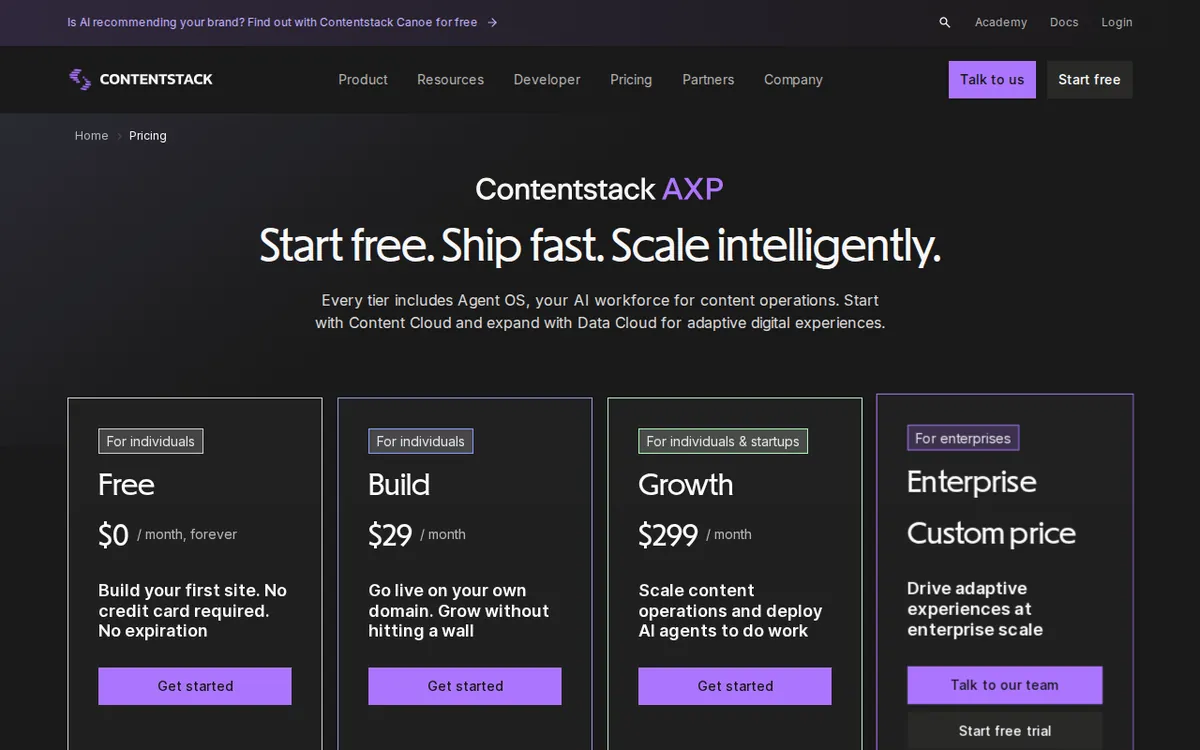
Figure: contentstack.com official pricing page, captured 2026-11-09.
Getting your first project live, step by step
Step 1: Create your account and stack. Sign up, name your stack, pick a region. You land in the dashboard with one Production Stack already provisioned. That is your only stack on free — do not delete it.
Step 2: Model your content. Go to Content Types and build your first one. A blog post is the standard starter: title, slug, body, author, publish date. You have 10 Content Types total, so plan them before you build. Ten sounds like a lot until you want a separate type for authors, categories, tags, and homepage sections. Beginners burn through them fast.
Step 3: Add entries. Entries are the actual content records — one blog post is one entry. You get 1,000. That is roughly three years of posting daily, so it will not be your first wall.
Step 4: Upload assets. Images, PDFs, video files. 1,000 assets and 100 GB bandwidth. Bandwidth is what gets consumed when visitors load your media, so a heavy image site can eat 100 GB faster than you expect.
Step 5: Connect a front end. This is where headless CMS differs from WordPress. Contentstack stores content; it does not render your site. You build the front end separately — Next.js, Astro, plain HTML, whatever you know — and pull content through the API. Contentstack publishes SDKs and starter guides for common frameworks.
Step 6: Publish and preview. Use the Visual Editor to check how entries look in context. Publish when ready.
Step 7: Deploy. Here is the blocker. Your site will live on a Contentstack-provided subdomain. You cannot point your own domain at it on the free plan. For a learning project or internal tool, that is fine. For anything public-facing with your own brand, it is not.
Common blockers and how to fix them
“My API calls ran out.” 100K per month sounds generous until you build a site that fetches content on every page view without caching. Fix: cache your API responses. Most frameworks have built-in caching or incremental static regeneration. A cached site can serve thousands of visitors on a handful of calls.
“I hit the Content Type limit.” Ten types go quickly. Fix: consolidate. Instead of separate types for “news” and “blog,” use one type with a category field. You lose some structure but keep room to grow.
“My images are eating bandwidth.” Fix: compress before upload and serve responsive sizes. Contentstack does not auto-optimize for you on free.
“I want my own domain.” This is the one you cannot fix without paying. The Build plan at US$29/month includes 1 custom domain, plus 250K API calls, 250 GB bandwidth, 20 Content Types, 2,500 entries and assets, and 1M AI credits per month. AI credits are the unit Contentstack uses to meter Agent OS usage.
“I need more than 3 users.” Free caps at 3. Build also caps at 3. Growth at US$299/month gives you 10 users, with extra seats at US$25 per user per month.
Prices vary by country; we checked from Taiwan.
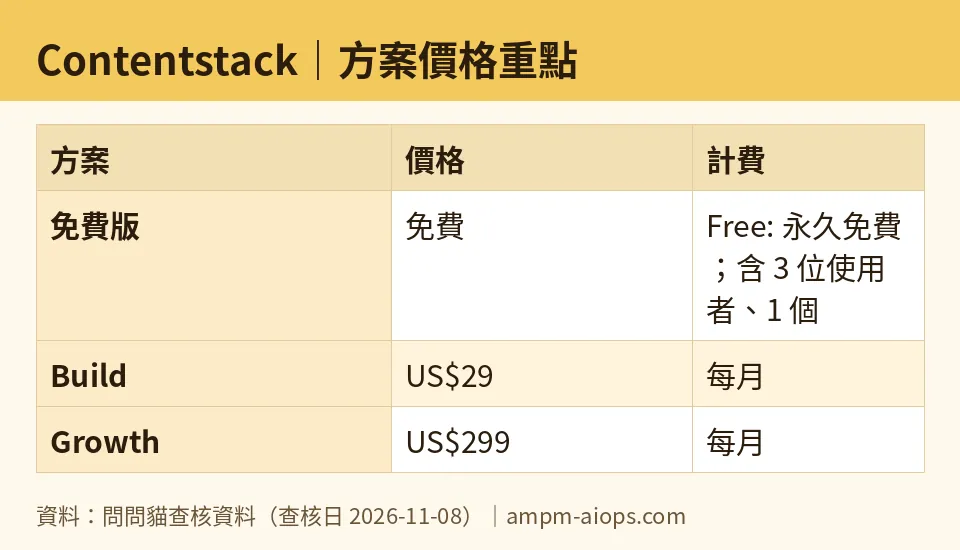
Figure: compiled by AMPM from its verified data (last verified 2026-11-08).
🔍 AMPM exclusive check
Nothing differed from the official page this time; every number below matches it, checked 2026-11-08.
One thing worth flagging plainly: this tool entered our database as an automatically-ingested candidate. The data has been through one verification round, not the three-way manual cross-check we run on fully reviewed tools. The free tier figures and commercial terms matched the official pricing page on 2026-11-08, and our automated checks ran clean from 2026-10-24 through 2026-11-08 with no changes detected. But if you are making a purchasing decision, confirm the current terms on Contentstack’s own pricing page before you commit. We are telling you this because we would rather you know the depth of our check than assume it is deeper than it is.
☀️ AMO, the budget-minded cat

The free tier is genuinely free forever, and that changes the math. Most CMS free plans are trials wearing a costume. This one is not. Three users, 1,000 entries, 1,000 assets, 100K API calls a month — for a solo builder or a two-person side project, that is enough to run a real site for a long time.
The question is whether you ever need to pay. And the answer comes down to one thing: the custom domain. If your project lives on a Contentstack subdomain and you are fine with that, you may never pay a cent. Nothing else in the free tier is likely to stop a beginner first. Entries run out at 1,000, which is years of content. API calls run out only if you skip caching, which is a fixable mistake, not a plan limit.
Compare the jump: free to Build is US$29/month. What does that buy? 150K more API calls, 150 GB more bandwidth, 10 more Content Types, 1,500 more entries and assets, 1M AI credits, and the custom domain. If you do not need the domain, you are paying US$29 for headroom you probably will not use. If you do need the domain, US$29 is the floor and there is no cheaper path.
Growth at US$299/month is a different animal. Ten users, 1M API calls, 1 TB bandwidth, 20K entries, 10K assets, custom roles and workflows, 24/5 email support. Extra seats cost US$25 each per month. For a beginner, this is not a plan you graduate to — it is a plan a company buys.
Bottom line for the budget cat: start free, stay free until the domain forces your hand, and treat US$29 as the real entry price for anything public.
🌙 PIMI, the performance-minded cat
Does it work well? For a headless CMS, yes. The Visual Editor is the standout — editing in a live preview instead of a form is a real productivity gain, and it is included on free. Agent OS gives you basic AI workflows without paying, which is unusual at this tier.
The performance question is really about the API. 100K calls per month on free, 250K on Build, 1M on Growth. If your site fetches content on every request with no caching, you will burn through free calls on modest traffic. With caching, the same 100K goes much further. This is not a Contentstack flaw — it is how headless CMS pricing works everywhere. The tool is fast; your architecture decides whether you stay inside the quota.
Bandwidth is the quieter constraint. 100 GB on free, 250 GB on Build, 1 TB on Growth. Media-heavy sites hit this before they hit API limits. Compress and serve responsive images.
The AI credits matter if you plan to lean on Agent OS. Free gives you basic workflows with no stated credit allowance. Build includes 1M AI credits per month. Growth’s credit allowance is not listed in our data — we will not guess at it. If AI workflow volume is central to your plan, that gap is worth a direct question to Contentstack before you buy.
One structural note: 3 users on both free and Build. If your team grows past three, you jump straight to Growth at US$299/month. There is no middle step. That is a steep cliff for a small team that just needs a fourth seat.
Verdict: who should use it, who should skip it
Use it if: you are a solo builder or small team who wants to learn structured content, you can live on a Contentstack subdomain for now, and you want a permanent free tier rather than a trial. The Visual Editor and basic AI workflows make the free plan more capable than most.
Skip it if: you need a custom domain from day one and US$29/month is not in the budget — there is no free workaround. Also skip if you need more than 3 users soon, because the next step is US$299/month, not a small bump. And skip if you want a CMS that renders your site for you; Contentstack is headless, and you bring your own front end.
Written: 2026-11-09 Price last verified: 2026-11-08 Tool last health-checked: 2026-11-09
🔗 Related on AMPM
📎 Sources
All prices and quotas in this article come from AMPM’s verified dataset for Contentstack (last verified 2026-11-08); primary sources:
🐾 Meet the cats: AMO and PIMI
AMPM is a Taiwan-based AI-tool pricing watchdog. Our motto: ask before you subscribe. Two cats argue every tool from two sides:
- ☀️ AMO — the budget-minded cat. Always asks: is the free tier enough, and is paying actually worth it?
- 🌙 PIMI — the performance-minded cat. Cares about whether it works well, fast, and gets your job done.
When they are done arguing, you know whether to pay. Every number is checked by us, with the verification date at the end.
🐾 Our sister sites also checked
Read next
- Contentstack Full breakdown: pricing, features and real-world limits
- Contentstack Is the free quota enough?
- Contentstack Alternatives
- Free plan limits for every AI tool we track
