[Use cases] Claude Pricing by Reader Type: Student, Freelancer or Small Team, Who Pays for What?
- Free tier: Yes
- Cheapest paid plan: US$20/mo and up
- Free quota: The quota is calculated based on a rolling 5-hour usage window (not …
- Last checked: 2026-11-19
Article last updated: 2026-11-14



Claude has six paid options and a free plan, and most of them are built for someone who isn’t you. This piece skips the feature list. It takes three readers (a student, a freelancer, a small team) and asks one question for each: which plan fits, and roughly what does it cost each month?
One thing before we start. Prices vary by country, and we checked from Taiwan. Listed prices also exclude tax, and Anthropic can change plans at its discretion.
The student: start free, upgrade only when the limit bites
The free plan is broader than people expect. It includes chat on web, iOS, Android and desktop, code generation, data visualizations, writing and editing, web search, memory across conversations, file creation and code execution, and extended thinking for harder problems. It also connects to Slack and Google Workspace and supports remote MCP connectors (a standard way to plug Claude into other tools).
The catch is the meter. Free usage runs on a rolling 5-hour window. It is not a fixed number of messages that resets at midnight. In our check, ordinary chat gave roughly 10 to 20 messages per window. Claude Code, the paid coding tool that works on your project files, is not included.
For essays, study notes, reading dense papers and the occasional script, that is usually enough. You hit the wall when you work in long sessions: a thesis crunch, a big dataset, a day of debugging.
Which plan: free first. If you keep running out mid-task, Pro is the next step.
Rough monthly cost: free. With Pro, it is US$20 on monthly billing. Pro also has a yearly option of US$200 paid upfront, which the pricing page shows as US$17 a month. That only makes sense if you know you’ll use it year-round, not just in exam season.
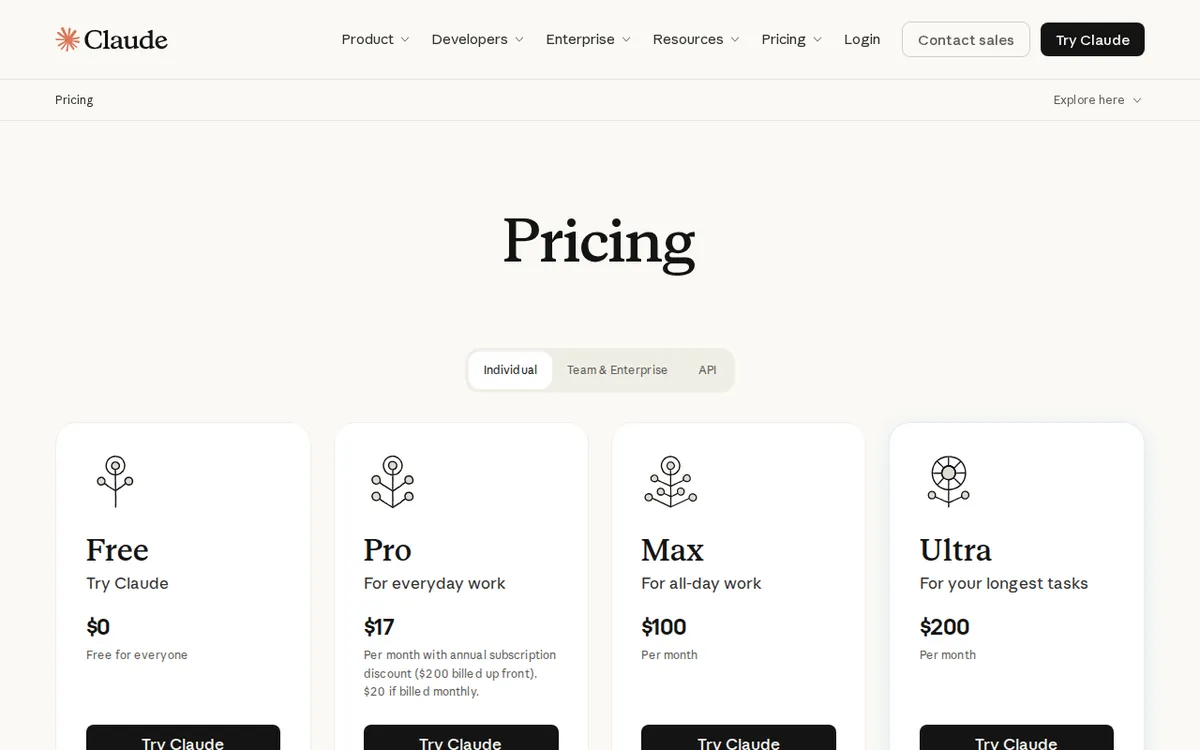
Figure: claude.com official pricing page, captured 2026-11-14.
The freelancer: Pro is the default, Max is for people who live in it
For solo client work, the free plan has a problem beyond the meter. Our data marks it as not cleared for commercial use. Read Anthropic’s terms yourself before billing a client for work done on it. That alone nudges most freelancers toward a paid plan.
Pro is US$20 a month. It is the plan labeled for everyday productivity, and it is “everything in Free, plus” the following:
- More usage than free.
- Claude Code.
- Claude Cowork.
- Claude Design.
- Claude Science.
- Unlimited projects, which are workspaces that keep chats and files together.
- Research.
- Access to more Claude models.
- Claude for Microsoft 365.
Above Pro there are two tiers, for people who hit Pro’s ceiling:
- Max: US$100 a month, five times Pro’s usage, every 5 hours and every week.
- Ultra: US$200 a month, ten times Pro’s weekly usage, with no 5-hour limit for verified accounts. This is the tier that used to be called Max 20x: the price is the same, but the name changed and the stated multiple went from twenty times to ten times per week.
Both add higher output limits on every task, early access to advanced features, and priority access when traffic is high.
The honest advice: stay on Pro until you can name the specific moment it let you down. Max costs five times what Pro does, and it only pays off if you’re running long coding or research sessions most days. Ultra is for people whose income depends on Claude being available all day.
Which plan: Pro. Max if Pro’s limit interrupts paid work weekly.
Rough monthly cost: US$20 for Pro on monthly billing. US$100 for Max or US$200 for Ultra.
The small team: Team plans, with a headcount rule
Team plans are priced per seat. A seat is one paid user account. They require a team of 2 to 150 people, so a solo operator can’t use them.
| Plan | Monthly billing, per seat | Annual billing, per seat | Usage |
|---|---|---|---|
| Team Standard | US$25 | US$20 | More than Pro |
| Team Premium | US$125 | US$100 | 5x Standard seats |
Both include Claude Code, Cowork, Design and Science, plus connections to Microsoft 365 and @Claude. They also add enterprise search across your organization, central billing and admin, single sign-on (one company login for everyone), admin controls for connectors, and desktop deployment for the whole company. By default, your content is not used for model training. You can mix Standard and Premium seats, so only your heaviest users need the expensive ones.
The cost scales with headcount, so do the multiplication for your own team. The useful trick is the mix. Put most people on Standard and give Premium to the one or two who live in Claude all day.
Which plan: Team Standard for everyone, Premium for power users only.
Rough monthly cost: US$25 per seat on monthly billing, US$20 per seat if you commit to annual.
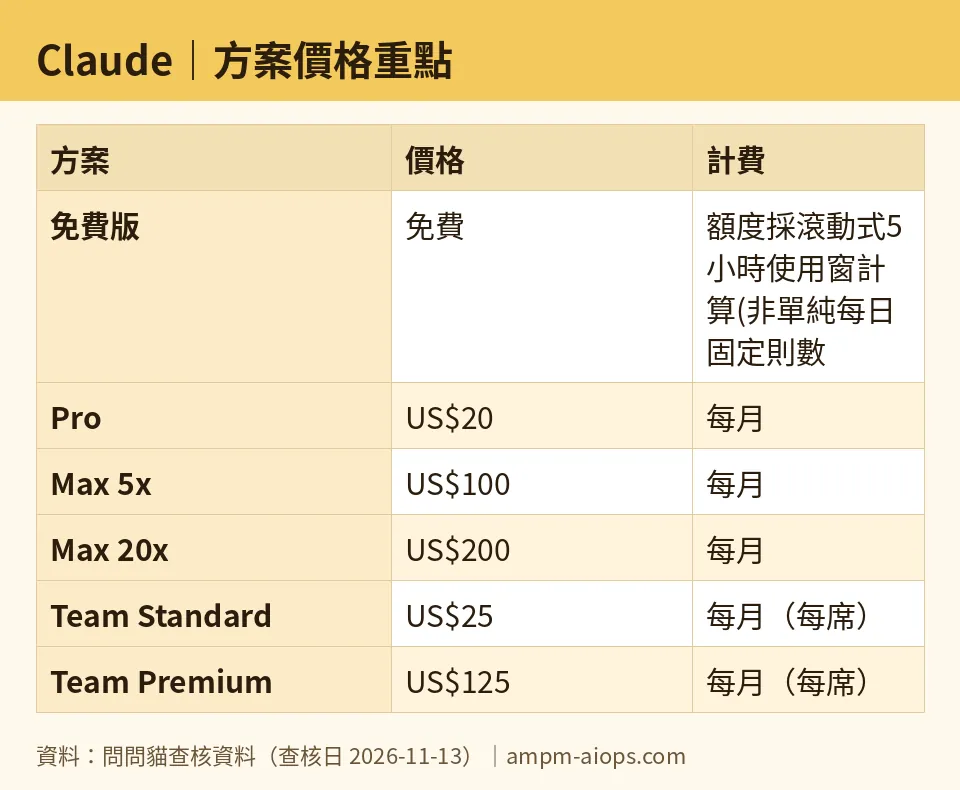
Figure: compiled by AMPM from its verified data (last verified 2026-11-13).
🔍 AMPM exclusive check
We check this pricing daily, and every check from 2026-09-12 through 2026-11-13 matched the official pricing page with no changes. Here is where the page needs careful reading.

Illustration: The surface entry price looks just like the personal plan, but lifting the tablecloth reveals a full-year commitment and extra metered pipes underneath.
The Enterprise listing. Enterprise appears as “US$20” per seat per month. That is the same headline number as Pro, but it is a different deal. It is annual billing only, and usage is charged on top. Team plans are described as including usage. Enterprise is not. So the US$20 is a starting seat fee, not an all-in cost. Our own earlier data missed this plan entirely, and we found it on 2026-07-26.
Enterprise is not a bigger Team plan for a small shop. It adds admin-set usage caps per user and per organization, finer role permissions, SCIM (automatic user provisioning from your identity system), audit logs, a compliance API, custom data retention, IP allowlisting, and an optional HIPAA-ready setup. If you need none of that, skip it.
The free quota. The rolling 5-hour window is the part people misread. A free account does not get a fresh batch each morning. The 10 to 20 messages is our observed range for ordinary chat, not a number the vendor guarantees.
Yearly pricing. The data has a yearly price for Pro (US$200) and annual per-seat prices for the Team plans. It has no yearly price for Max or Ultra, so we aren’t quoting one.
☀️ AMO, the budget-minded cat

Is free enough? For a student, usually yes. The free plan includes web search, memory across conversations, file creation, code execution and extended thinking. Many paid tools in this category gate those. The real cost of free is the rolling 5-hour window, roughly 10 to 20 ordinary messages in our check. If your work comes in short bursts, you’ll rarely notice. If you work in marathon sessions, you’ll hit it often.
Is paying worth it? Only at the right step. Pro at US$20 a month adds Claude Code, Research, more models and unlimited projects. For a freelancer, it also removes the commercial-use question that hangs over the free plan. If you can commit for the year, the US$200 prepaid option works out to the US$17 a month the page shows. That is a saving, but only if you’d actually keep the subscription for twelve months.
Max and Ultra are where I’d be strict. Max is US$100 a month and Ultra is US$200 a month. Neither is a casual upgrade. Treat them as a business expense that must earn its keep in billable hours.
For teams, the annual discount is real: US$25 drops to US$20 per Standard seat, and US$125 drops to US$100 per Premium seat. Since you can mix seat types, don’t buy Premium for everyone. Buy it for the people who keep hitting the limit.
My rule: free until it blocks you, Pro when it does, Max only with a paying reason.
🌙 PIMI, the performance-minded cat

Does it do the job? Claude’s strength is long documents and writing quality, and the paid tier adds Claude Code for engineering work. That is the pitch, and the plan structure backs it up. Everything that makes it a working tool, such as Claude Code, Cowork, Design, Science and Research, sits behind the paid line.
The free plan is a capable chat assistant, but it is a metered one. Usage runs on a rolling 5-hour window, and Claude Code is excluded. If your job is to ship code or turn around documents under a deadline, a meter that can run out mid-task is a performance problem, not just a budget one.
Pro fixes the basics. Max and Ultra are about how much you can do and how quickly you get access. Max gives you five times Pro’s usage; Ultra gives you ten times Pro’s weekly usage, with no 5-hour limit for verified accounts. Both come with priority access when traffic is high. That last point matters most. If you work at peak hours, queue time costs you more than the subscription does.
For teams, the plan to look at is Premium. It gives each seat five times the usage of a Standard seat. Standard already has more usage than Pro. Give Premium to your heaviest users and keep everyone else on Standard.
The Enterprise tier adds control, not speed. Admin usage caps, audit logs and compliance tooling matter if you’re regulated. They won’t make a small team’s answers better.
Verdict: who should use it, who should skip it
Students: use the free plan. Move to Pro only if the 5-hour window keeps cutting off real work. Cost: free, or US$20 a month on Pro.
Freelancers: use Pro. It is the plan that covers Claude Code and removes the free plan’s commercial-use doubt. Look at Max (US$100 a month) only after Pro has clearly limited paid work.
Small teams of 2 to 150: use Team Standard at US$25 per seat monthly, or US$20 per seat on annual billing. Add Premium seats (US$125 monthly, US$100 annual) for the heavy users.
Skip Enterprise unless you need SCIM, audit logs, HIPAA options or admin-set usage caps. Its US$20 seat price is annual only, with usage billed on top, so it is not the cheap option it looks like.
Skip Ultra unless Claude is open all day and Max has already failed you.
Written: 2026-11-14 Price last verified: 2026-11-13 Tool last health-checked: 2026-11-13
🔗 Related on AMPM
📎 Sources
All prices and quotas in this article come from AMPM’s verified dataset for Claude (last verified 2026-11-13); primary sources:
🐾 Meet the cats: AMO and PIMI
AMPM is a Taiwan-based AI-tool pricing watchdog. Our motto: ask before you subscribe. Two cats argue every tool from two sides:
- ☀️ AMO — the budget-minded cat. Always asks: is the free tier enough, and is paying actually worth it?
- 🌙 PIMI — the performance-minded cat. Cares about whether it works well, fast, and gets your job done.
When they are done arguing, you know whether to pay. Every number is checked by us, with the verification date at the end.
🐾 Our sister sites also checked
Read next
- Claude Full breakdown: pricing, features and real-world limits
- Claude Is the free quota enough?
- Claude Alternatives
- Free plan limits for every AI tool we track
More verified articles on this tool
- [News] Claude Haiku 5.5 Pricing: How Big the Cut Is, and Is the Free Tier Still Worth It?
- [How-to] Claude free tier limits explained: is it enough to get started?
- [Verified] Claude's Free Tier Includes More Than You'd Think. The Real Wall Is Elsewhere
