[How-to] Caspio Pricing: Build Your First App Before the Builder Limit Bites
- Free tier: No
- Cheapest paid plan: US$300/mo and up
- Free quota: No permanent free plan (offers a 14‑day full‑feature free trial)
- Last checked: 2026-11-19
Article last updated: 2026-11-06



Caspio sells itself on a simple promise: you pay for the people who build the app, not the people who use it. That is a real difference from most no-code tools, which charge per seat and punish you for success. But the promise hides a catch that matters more for beginners than for enterprises. The limits that stop you are not user counts. They are builder seats and DataPages.
This guide is for someone who has never opened Caspio and wants to know what they can actually build, what will block them, and whether the entry plan makes sense before they commit.
What Caspio Actually Is, in Plain Terms
Caspio is a hosted relational database with a no-code layer on top. You store records in tables, link them together, and build web forms, reports and dashboards that read and write to those tables. The output is a working business app — an intake form, a case tracker, an inventory log — without writing server code.
Two words matter throughout this article. A builder (Caspio calls them App Authors) is a person with an account who can create and edit apps. An end user is anyone who opens the finished app to submit or read data. Caspio does not count end users against you on either paid plan. That is the whole pitch.
A DataPage is a single deployed interface — one form, one report, one dashboard view. Each one counts against your plan’s cap. This is the number beginners underestimate.
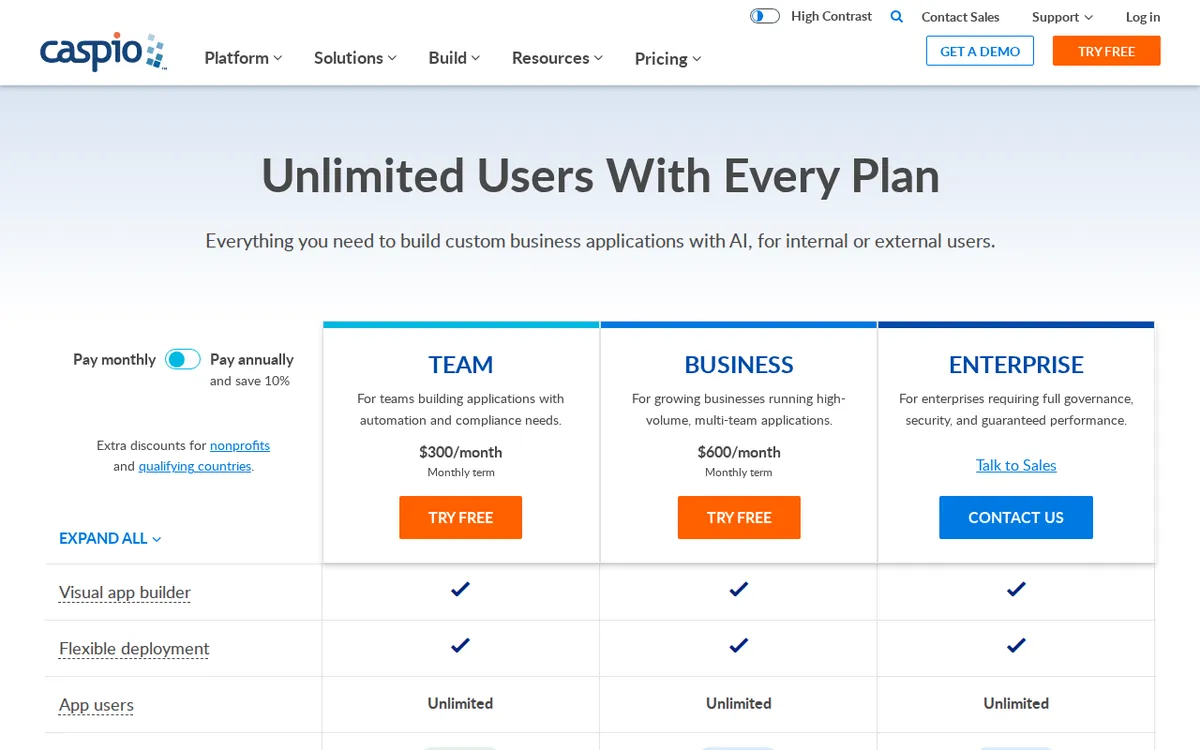
Figure: caspio.com official pricing page, captured 2026-11-06.
The Plans, and Where the Walls Sit
There is no permanent free plan. Caspio offers a 14-day full-feature free trial instead. After that you are on a paid subscription.
The Team plan is US$300/month billed monthly, or US$270/month billed annually. It includes unlimited end users, 5 App Authors, 100 DataPages, 250,000 database records, 50 GB of storage, and SAML Out third-party SSO.
The Business plan is US$600/month billed monthly, or US$540/month billed annually. It includes unlimited end users, unlimited builders, 200 DataPages, 1,000,000 records, 100 GB of storage, a custom domain name, and enterprise-grade SAML-in SSO.
Prices vary by country; we checked from Taiwan. No annual total is published in the data we hold, so we are not going to multiply anything out for you.
Read those two plans again and notice what doubles and what does not. Going from Team to Business doubles your money and doubles your DataPages from 100 to 200. It removes the builder cap entirely. It quadruples records. For a beginner, the jump from 5 builders to unlimited is meaningless — you are one person. The jump from 100 to 200 DataPages might be the only upgrade reason you ever have.
A Beginner’s First Build, Step by Step
Start with the 14-day trial. Do not plan around it lasting; plan around finishing one real app inside it.
Step one: pick a process, not a project. Choose something with a clear input and a clear output — a support ticket queue, a vendor list, an equipment checkout log. Skip anything with complex permissions on day one.
Step two: build the table first. In Caspio, tables come before interfaces. Define your fields, set the data types, and add a lookup table if two things relate (customers and orders, for example). Getting this right early saves you from rebuilding every DataPage later.
Step three: build one DataPage, then copy it. This is the single most useful habit for staying under the cap. A submission form and a search report can often be built from the same underlying structure. Every separate DataPage you deploy is a permanent line item against your 100 or 200.
Step four: test with a real end user. Because end users are unlimited, add a colleague as a user, not a builder. Confirm they can submit and read without seeing admin screens. This is where most first builds break.
Step five: check your record count before you import anything. Bulk imports burn through 250,000 records faster than people expect if you are pulling historical data. Import a sample first.
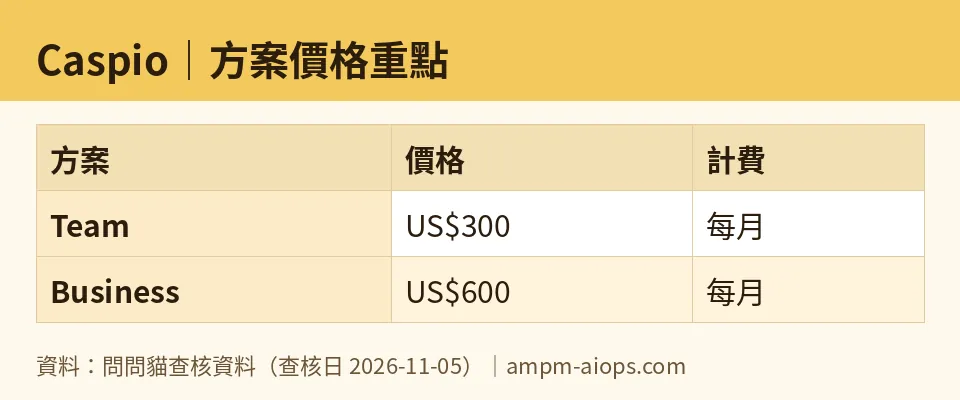
Figure: compiled by AMPM from its verified data (last verified 2026-11-05).
Common Blockers and How to Get Past Them
You ran out of DataPages. This happens to almost everyone. The fix is consolidation, not upgrading. Merge a separate edit form into your details page. Replace three filtered reports with one report plus a search field. Audit every deployed page and delete the ones nobody opens.
You need a second builder. On Team you have 5 App Authors. If your colleague only needs to enter data, make them an end user instead. Only give builder access to people who genuinely edit app structure.
You hit the record ceiling. At 250,000 records on Team, archive old rows to a separate table or export them out. The Business plan’s 1,000,000 records is the upgrade path if archiving is not workable.
The trial ended and you are not ready. There is no free tier to fall back on. Either finish inside 14 days or budget for US$300/month. Decide this before you start building, not after.
🔍 AMPM exclusive check
Nothing differed from the official page this time; every number below matches it, checked 2026-11-05. Our verification history shows daily automated re-checks from 2026-10-27 through 2026-11-05 with no changes to prices or quotas.
One thing worth stating plainly, because the vendor page does not spell it out: the gap between Team and Business is not a smooth ladder. Team gives you 5 builders and 100 DataPages. Business gives you unlimited builders and 200 DataPages. There is no middle step. If you outgrow 100 DataPages but only have two builders, your only option is to double your spend. That is a structural fact of the plan lineup, not a hidden fee — but it is the thing that catches teams in year two.
☀️ AMO, the budget-minded cat

The first question is whether free is enough. It is not, because there is no free tier. The 14-day trial is a demo, not a home. So the real question is whether US$300/month is justified, and for a solo builder the honest answer is: only if this app is replacing something you already pay for.
Run the math on what you are replacing. If Caspio replaces a subscription you pay monthly, compare directly. If it replaces a spreadsheet, you are paying US$300/month for a spreadsheet with better forms, and you should say that out loud before signing.
The annual billing option drops Team to US$270/month. That is a real saving, but it locks you in for a year on a tool you may not have finished evaluating. Do not take the annual rate during your first month.
For a small team, the unlimited end users are genuinely valuable. Ten people using your app costs the same as one. That is where the budget case holds up. But watch the builder count: 5 App Authors on Team sounds generous until you realize your IT contractor, your ops lead and your part-time admin all want edit rights.
My verdict for the budget-minded: skip it unless you have a named process, a named replacement cost, and fewer than five people who need to build. Otherwise the trial will end and you will be paying US$300/month for something you half-finished.
🌙 PIMI, the performance-minded cat

Does it work? Yes, and the architecture is the reason. A real relational database underneath means your app handles linked data properly instead of faking it with flat tables. Reports stay fast as records grow because you are querying an actual database, not a spreadsheet.
The performance ceiling is not speed. It is DataPages. At 100 on Team, a serious internal tool with separate views for submission, editing, admin, reporting and export will eat that budget quickly. You will feel the cap before you feel any slowdown.
Records are the other number to watch. 250,000 on Team and 1,000,000 on Business. For most internal apps that is plenty. For anything ingesting machine data or high-volume transactions, it is not, and you will be archiving constantly.
The unlimited end users matter for performance too, in a good way. You can open the app to your whole organization without a per-head cost, which means you can actually test at real scale during the trial instead of guessing.
What I would want before committing: proof that your DataPage count stays under 100 after consolidation. Build your messiest app first, count the pages, then decide. If you clear that bar, Caspio does the job well. If you do not, no amount of speed saves you from the upgrade.
Verdict: who should use it, who should skip it
Use Caspio if you have a defined internal process, a team larger than your builder count, and a real cost you are replacing. The unlimited end-user model is the reason to be here, and the Team plan at US$300/month delivers it.
Skip it if you are a solo builder prototyping an idea. There is no free tier to grow into, the 14-day trial is not enough runway for an undecided project, and US$300/month is a lot to pay while you figure out what you are building.
Skip it too if your app needs more than 100 DataPages and you have fewer than five builders. The only path up is Business at US$600/month, and you would be paying double for capacity you do not need.
Written: 2026-11-06 Price last verified: 2026-11-05 Tool last health-checked: 2026-11-06
🔗 Related on AMPM
📎 Sources
All prices and quotas in this article come from AMPM’s verified dataset for Caspio (last verified 2026-11-05); primary sources:
🐾 Meet the cats: AMO and PIMI
AMPM is a Taiwan-based AI-tool pricing watchdog. Our motto: ask before you subscribe. Two cats argue every tool from two sides:
- ☀️ AMO — the budget-minded cat. Always asks: is the free tier enough, and is paying actually worth it?
- 🌙 PIMI — the performance-minded cat. Cares about whether it works well, fast, and gets your job done.
When they are done arguing, you know whether to pay. Every number is checked by us, with the verification date at the end.
🐾 Our sister sites also checked
Read next
- Caspio Full breakdown: pricing, features and real-world limits
- Caspio Is the free quota enough?
- Caspio Alternatives
- Free plan limits for every AI tool we track
