[Pricing] Canary Mail Price: The Monthly Figure That Is Really a Yearly Bill
- Free tier: Yes
- Cheapest paid plan: US$3/mo and up
- Free quota: The Free plan supports up to 2 devices, basic inbox, simple read …
- Last checked: 2026-11-19
Article last updated: 2026-11-19



Canary Mail is an email app built around privacy. It has two paid plans, and both show a per-month price. Neither can be bought monthly. This piece looks at what the free plan covers, what each paid plan adds, and where paying makes no sense.
Prices vary by country; we checked from Taiwan.
What the free plan gives you
Canary Mail has a free plan. It is a real mail client, not a countdown trial. Here is what the official page lists:
- Up to 2 devices
- A basic inbox
- Simple read receipts (a signal that tells you when someone opened your message)
- Snooze (hides a message until you want to deal with it)
- Pin (keeps important messages at the top)
Here is what it leaves out: the AI Copilot and advanced encryption. Those two are the reasons Canary Mail markets itself as a privacy and AI mail app. So the free plan is a clean, ordinary inbox. The headline features sit behind payment.
If all you want is a tidy inbox on a phone and a laptop, the free plan covers that. Two devices is the ceiling. A third device means paying.
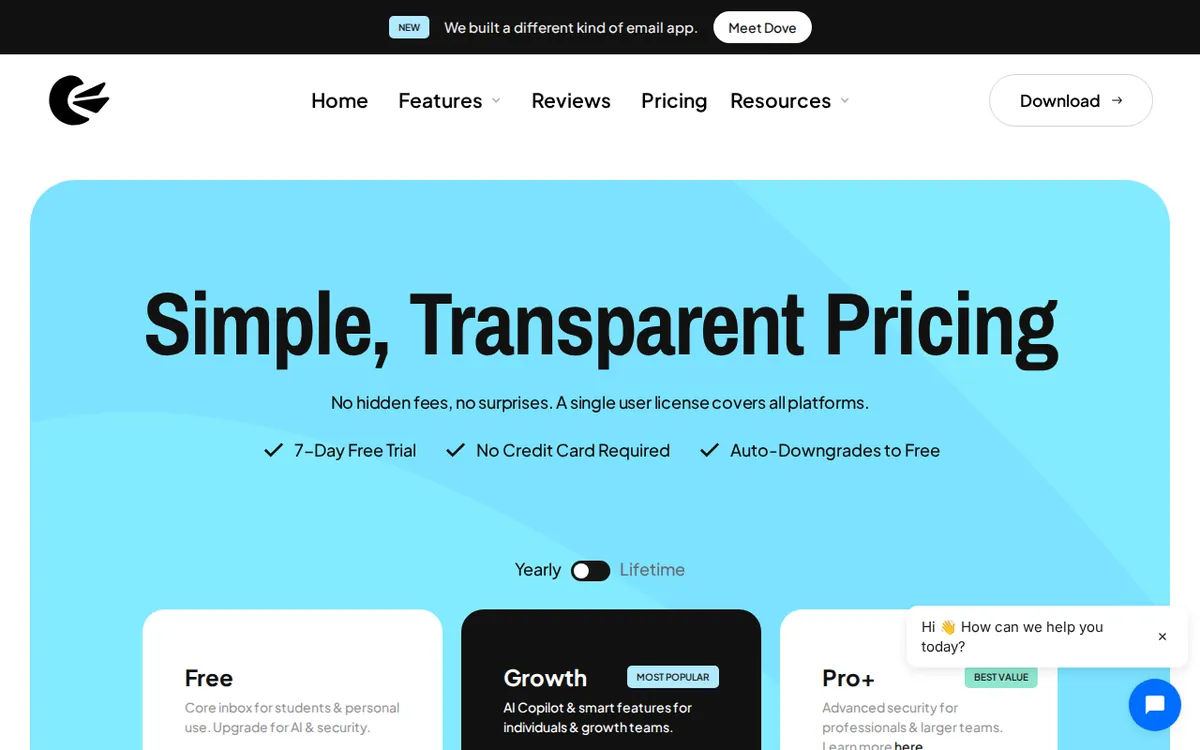
Figure: canarymail.io official pricing page, captured 2026-11-19.
The “monthly” price that is not monthly
This is the catch. The pricing page shows monthly figures. The official FAQ says there is no monthly billing. You pay once a year.
Growth is shown as US$3 a month. The actual list price is US$36 a year. The monthly number is that yearly price split into twelve for display.
Pro+ is shown as US$10 a month. The actual list price is US$100 a year. The data we hold describes that as roughly US$8.33 to US$10 a month, depending on how you read the page. The lower figure is what the yearly price works out to. The higher one is what the page displays.
So if you see “US$3” or “US$10” and think you can try it for a month and walk away, you can’t. The plan names even carry “(Yearly)” in them. You commit to a year up front.
Growth also has a one-time purchase option, called Lifetime, which gives you a license without a subscription. The data does not include its price. We are not going to guess one. Check the pricing page.
What each paid plan adds
Growth (US$36 a year) raises the device limit from 2 to 5. It adds the AI Copilot, which is an AI assistant that helps write emails and summarize them. You also get smart scheduling and read notifications.
Pro+ (US$100 a year) keeps 5 devices and everything in Growth. It then adds four things:
- PGP encryption. PGP is a long-standing method for scrambling email so only the intended recipient can read it.
- SecureSend, which is HIPAA-compatible. HIPAA is the US rule for protecting health information.
- Phishing protection.
- Scam detection.
The cheapest way up from free is Growth. It is the only step that unlocks the AI features and the extra devices. Pro+ is a different kind of upgrade. It is for people who need encryption or must handle health-related data.
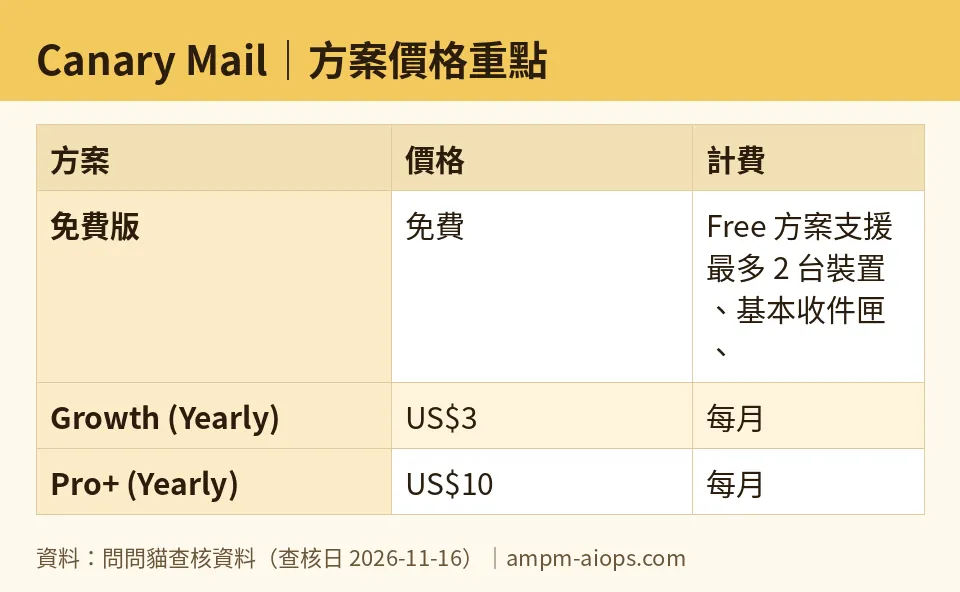
Figure: compiled by AMPM from its verified data (last verified 2026-11-16).
🔍 AMPM exclusive check
Two things here go beyond the headline numbers.
First, the display and the billing do not match. The page shows monthly prices. The FAQ says monthly billing does not exist. The prices are US$36 a year for Growth and US$100 a year for Pro+. We read both the display and the FAQ, and they point in different directions. If you skim the page, you could easily think you are signing up month to month.
Second, a limit on our own work. This tool was added to our database as a newcomer. Its data has been through one round of checks only. It has not been cross-checked by three separate human reviews, which is our usual standard. Daily automated checks through 2026-11-16 found no changes in the prices or quotas. Still, treat the free-plan limits and any terms for commercial use as things to confirm on the official page before you pay. The Lifetime price is also missing from our data.
☀️ AMO, the budget-minded cat

Is free enough? For some people, yes. You get 2 devices, a basic inbox, simple read receipts, Snooze and Pin, and you pay nothing. If you use one phone and one laptop and you only need a calm inbox, stop here.
Is paying worth it? The cheapest step is Growth at US$36 a year. That buys you three more devices (5 total), AI help with writing and summaries, smart scheduling and read notifications. The question is whether you would actually use those. If you write a lot of email and want drafts and summaries, the price is low for what you get. If you rarely reach for an AI assistant, you are paying for a feature that sits unused.
The warning I care about most is the billing format. There is no monthly option. If you are unsure, you cannot pay a small amount for one month and cancel. Your first payment is the full yearly price. That makes a bad guess more expensive.
Pro+ at US$100 a year is a hard sell for most budgets. You pay it only if you need PGP, SecureSend or the scam detection. If you do not, Growth gives you the AI features for much less on the list price.
One more option to weigh: the Lifetime license. It exists, but I cannot tell you its price from our data. If you plan to use Canary Mail for years, look at that number before choosing a subscription.
My rule: stay free until you hit the 2-device limit or you truly want the AI Copilot. Then pay for Growth, and only if you are comfortable paying US$36 at once.
🌙 PIMI, the performance-minded cat

Does it do the job? Let me be direct about what our data can and cannot say. We have the feature lists. We do not have speed tests or sync benchmarks, so I will not claim it is fast or slow.
On features, the tiers are clear. Free is a plain inbox with the small tools that make mail manageable: Snooze, Pin and simple read receipts. It will do the basics on 2 devices. It will not write or summarize anything for you.
Growth is where the app starts to behave like the product described on its homepage. The AI Copilot helps you write emails and summarizes them. Smart scheduling and read notifications support follow-up work. Five devices means your phone, tablet and a couple of computers can all be covered. At US$36 a year, this is the plan that matches the “AI mail client” label.
Pro+ at US$100 a year is for a different job. PGP encryption protects message content from anyone but the recipient. SecureSend is HIPAA-compatible, which matters if you send health information. Phishing and scam detection add a safety layer. If your work involves sensitive messages, these are the features that justify the price. If it does not, they are extra.
One practical note. PGP only helps if the other side can handle it. Encrypting a message to someone who cannot read it does not get you far. Factor that in before paying for it.
For performance, my advice is to start with the free plan and test it on your real mailbox. It costs nothing to see how the app handles your volume. Then decide on Growth.
Verdict: who should use it, who should skip it
Use the free plan if you have one or two devices and want a simple, tidy inbox with Snooze and Pin. You lose nothing by trying it.
Pay for Growth (US$36 a year) if you want AI drafting and summaries, need up to 5 devices, and are fine paying for a full year at once. It is the cheapest way into the paid features.
Pay for Pro+ (US$100 a year) if you need PGP encryption, HIPAA-compatible sending, or scam and phishing detection. If you don’t need those, Growth is enough.
Skip paying if you want a month-to-month trial. There is no monthly billing. Also skip it if you never use AI writing tools, or if you stay under the 2-device limit.
Check before you buy: the Lifetime license price (not in our data), and the current free-plan limits on the official page.
Written: 2026-11-19 Price last verified: 2026-11-16 Tool last health-checked: 2026-11-19
🔗 Related on AMPM
📎 Sources
All prices and quotas in this article come from AMPM’s verified dataset for Canary Mail (last verified 2026-11-16); primary sources:
🐾 Meet the cats: AMO and PIMI
AMPM is a Taiwan-based AI-tool pricing watchdog. Our motto: ask before you subscribe. Two cats argue every tool from two sides:
- ☀️ AMO — the budget-minded cat. Always asks: is the free tier enough, and is paying actually worth it?
- 🌙 PIMI — the performance-minded cat. Cares about whether it works well, fast, and gets your job done.
When they are done arguing, you know whether to pay. Every number is checked by us, with the verification date at the end.
🐾 Our sister sites also checked
Read next
- Canary Mail Full breakdown: pricing, features and real-world limits
- Canary Mail Is the free quota enough?
- Canary Mail Alternatives
- Free plan limits for every AI tool we track
