[Pricing] AWeber Pricing for Small Lists: Which Cap Pushes You to Pay First?
- Free tier: Yes
- Cheapest paid plan: US$15/mo and up
- Free quota: Maximum 500 subscribers, up to 3,000 emails per month, 1 automation …
- Last checked: 2026-11-19
Article last updated: 2026-11-18



AWeber has been selling email newsletter software for a long time, and it now adds some AI writing help. Most pricing pages ask you to compare plan names. This one is easier to read if you start from your own list. The free plan is built around one question: how many subscribers do you have, and how many automated emails do you need? Answer that, and the upgrade decision mostly makes itself.
Here is the full ladder, what each rung adds, and where paying is a waste.
What the free plan actually covers
AWeber’s free tier has five limits:
- Up to 500 subscribers (the people on your email list)
- Up to 3,000 emails sent per month
- 1 automation workflow (a set of emails that sends itself when someone signs up or clicks)
- 1 landing page (a standalone sign-up page)
- Basic AI help with subject lines
That is enough to run a real newsletter, not a demo. You can collect sign-ups on a page, send a welcome sequence, and write subject lines with some AI help.
The limits bite in a specific order. The 3,000-email cap and the 500-subscriber cap are linked. Multiply your list size by the number of sends you do each month. If that product stays under 3,000, you are fine on volume. A list near 500 sending several times a month will hit the email cap before it hits anything else.
The single automation is the other early squeeze. One workflow covers a welcome series. It does not cover a welcome series plus a re-engagement sequence plus a product-specific follow-up.
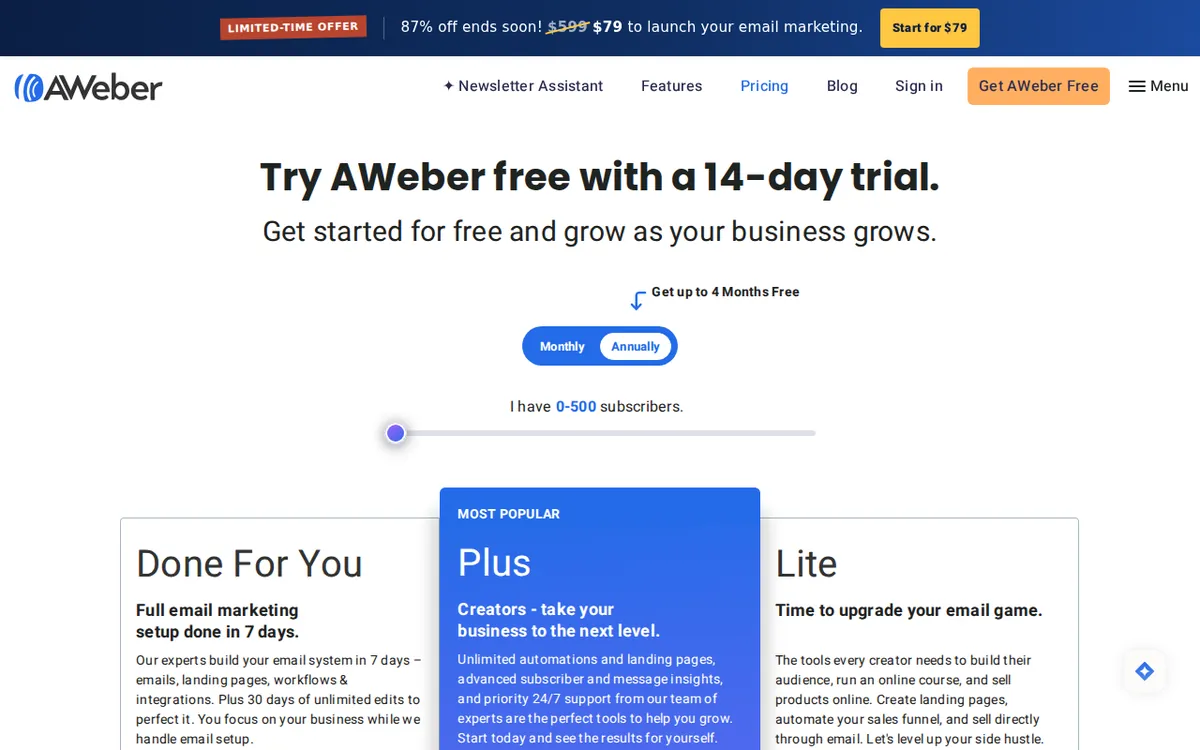
Figure: aweber.com official pricing page, captured 2026-11-18.
The paid ladder: Lite and Plus
AWeber lists two paid plans. Prices scale with your subscriber count, and the numbers below are for the 500-subscriber tier. Prices vary by country; we checked from Taiwan.

Illustration: Some plans have a tiny gap between payment options, while others show a massive difference in cost.
Lite costs US$15 per month on monthly billing. Billed annually, it averages about US$12.49 per month. It adds:
- Email sending volume of 10 times your subscriber count
- 3 automation workflows
- Unlimited landing pages
- A 1.0% transaction fee (AWeber’s cut when you take payments through its tools)
Plus costs US$30 per month on monthly billing. Billed annually, it averages about US$19.99 per month. It adds:
- Unlimited automation workflows
- Removal of the AWeber branding watermark
- Advanced segmentation (splitting your list into groups by behavior or traits)
- Click performance tracking
- A lower transaction fee of 0.6%
One thing the data does not give us: a yearly total for either plan. Our records only show the per-month average on annual billing, so we will not calculate one. Check the checkout page for the exact amount you would be charged up front.
Monthly versus annual: what the gap looks like
On Lite, monthly billing is US$15 and the annual average is about US$12.49 per month. On Plus, monthly is US$30 and the annual average is about US$19.99 per month.
The discount is bigger on Plus. That is the part that stands out. If you are sure you want Plus, annual billing makes a larger difference there than on Lite. The catch is commitment. Paying annually locks you in, and the data does not say what happens to refunds or mid-term plan changes. Read those terms before you pay for a year.
If you are not sure yet, start monthly on Lite. The extra cost per month is small next to the cost of being stuck in a plan you outgrow or never needed.
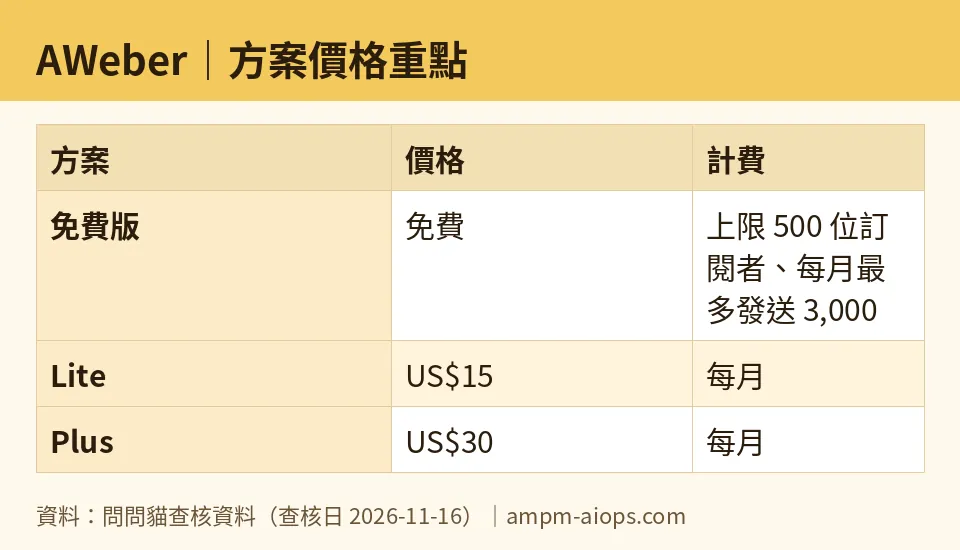
Figure: compiled by AMPM from its verified data (last verified 2026-11-16).
Cheapest upgrade path
The cheapest way up is free to Lite. You pay US$15 per month, or about US$12.49 per month on annual billing, and you get three automations, unlimited landing pages, and more sending room.
Plus is not an upgrade to take lightly. It is for people who need things Lite lacks: unlimited workflows, no AWeber watermark, segmentation, and click tracking. If none of those is a daily need, skip Plus.
The transaction fee deserves a quick look if you sell anything. It falls from 1.0% on Lite to 0.6% on Plus. We do not have the exact scope of that fee from our data, so confirm on AWeber’s pricing page which payments it applies to. If you sell a lot, the fee gap may matter more than the sticker price gap.
When paying is not worth it
Stay free if all of these are true:
- Your list is under 500 subscribers and not growing fast
- Your monthly sends stay under 3,000 emails
- One automation and one landing page cover your needs
- You do not need segmentation or click tracking
Paying early gets you headroom you may not use. A free plan with a hard cap is not a bad deal if you are well under the cap.
Upgrade when a cap actually blocks you: a second automation you need now, a list close to 500, or sends close to 3,000. Do not upgrade because the plan names sound serious.
🔍 AMPM exclusive check
Our records match AWeber’s official pricing page as of 2026-11-16. Every price and limit in this article, including the free-tier caps and the Lite and Plus figures, matched what the page showed. Our automated check has found no change since we first logged the tool on 2026-11-02.
Three gaps are worth knowing about. First, AWeber is a new entry in our database, and its data has had one round of checking. It has not been cross-checked by hand against independent sources. Second, our records cover only the 500-subscriber tier, so we do not have prices for bigger lists. Third, our records do not say whether the free plan carries AWeber branding in sent emails. Plus advertises removing it, so the question matters if you are staying free. Check a test send before you commit to a design.
☀️ AMO, the budget-minded cat

AMO sits on the windowsill with one question: is free enough, and if not, is paying worth it?
For free, the answer is yes more often than the pricing page suggests. 500 subscribers, 3,000 emails a month, one automation and one landing page is a real setup. A hobby newsletter, a small shop’s announcement list or a new creator’s first audience all fit. AMO says: don’t pay until a limit stops you.
For paying, AMO starts with Lite. US$15 a month on monthly billing is the cheapest trial of what paid gets you. Annual billing averages about US$12.49 a month, which is cheaper per month but ties up cash and commits you for the year. AMO would not go annual until the tool has proven itself for a few months.
Plus is where AMO gets cautious. At US$30 a month on monthly billing, or about US$19.99 a month on annual, it costs roughly double Lite on monthly billing. What you get is unlimited automations, no watermark, segmentation and click tracking. That is worth it for a seller or a business that sends to different audience groups. It is not worth it for a plain newsletter. AMO’s rule: pay for Plus only when you can name the feature you are buying.
Verdict: who should use it, who should skip it
Use the free plan if you are starting out, your list is under 500, and one automation is enough. Do the list-times-sends math first.
Move to Lite if you need more than one automation, unlimited landing pages, or more sending room. It is the cheapest honest upgrade, and monthly billing keeps the risk low.
Pick Plus if you need segmentation, click tracking, unlimited workflows or no AWeber branding, and you plan to stay long enough for annual billing to pay off. The lower 0.6% transaction fee is a bonus if you sell through the platform.
Skip AWeber if you have a tiny, casual list and would never touch a second automation, or if your list is far above 500 and you have not seen pricing for your tier. Our data does not cover larger tiers, so get that quote before you decide.
Written: 2026-11-18 Price last verified: 2026-11-16 Tool last health-checked: 2026-11-18
🔗 Related on AMPM
📎 Sources
All prices and quotas in this article come from AMPM’s verified dataset for AWeber (last verified 2026-11-16); primary sources:
🐾 Meet the cats: AMO and PIMI
AMPM is a Taiwan-based AI-tool pricing watchdog. Our motto: ask before you subscribe. Two cats argue every tool from two sides:
- ☀️ AMO — the budget-minded cat. Always asks: is the free tier enough, and is paying actually worth it?
- 🌙 PIMI — the performance-minded cat. Cares about whether it works well, fast, and gets your job done.
When they are done arguing, you know whether to pay. Every number is checked by us, with the verification date at the end.
🐾 Our sister sites also checked
Read next
- AWeber Full breakdown: pricing, features and real-world limits
- AWeber Is the free quota enough?
- AWeber Alternatives
- Free plan limits for every AI tool we track
