[How-to] Appwrite Free Tier: What Your First App Can Ship Before Limits Hit
- Free tier: Yes
- Cheapest paid plan: US$25/mo and up
- Free quota: Free plan provides 75,000 monthly active users (MAU), 2 GB of storage, …
- Last checked: 2026-11-19
Article last updated: 2026-11-05



You want a backend for your app — user logins, a database, file storage — without renting a server or wiring up five services. Appwrite is one of the few open-source options that hands you all of that in a single box, and its free tier is generous enough that most beginners never touch a credit card.
This is a how-to. The goal: get you from zero to a working app on Appwrite’s free plan, understand what that free plan actually covers, and know the exact moment you’d need to pay. One thing up front: prices vary by country, and we checked from Taiwan. Every number below comes from Appwrite’s own pricing page, verified 2026-11-04.
What Appwrite gives you before you pay anything
Appwrite is a backend-as-a-service platform — think of it as the server side of your app, pre-built. You get authentication (user sign-up and login), a database, file storage, and cloud functions (small pieces of code that run on demand) through one dashboard and one SDK.
The free tier includes 75,000 monthly active users (MAU — the count of distinct users who log in during a month), 2 GB of storage, and 5 GB of bandwidth. Those are real numbers, not a trial. There’s no time limit on the free plan.
There’s also a self-hosted version. Appwrite is open source, so you can run the whole thing on your own machine or server with no license fee. That path has no MAU cap at all — the trade-off is you maintain the infrastructure yourself.
For a beginner, the hosted free tier is the right starting point. Self-hosting is a later decision.
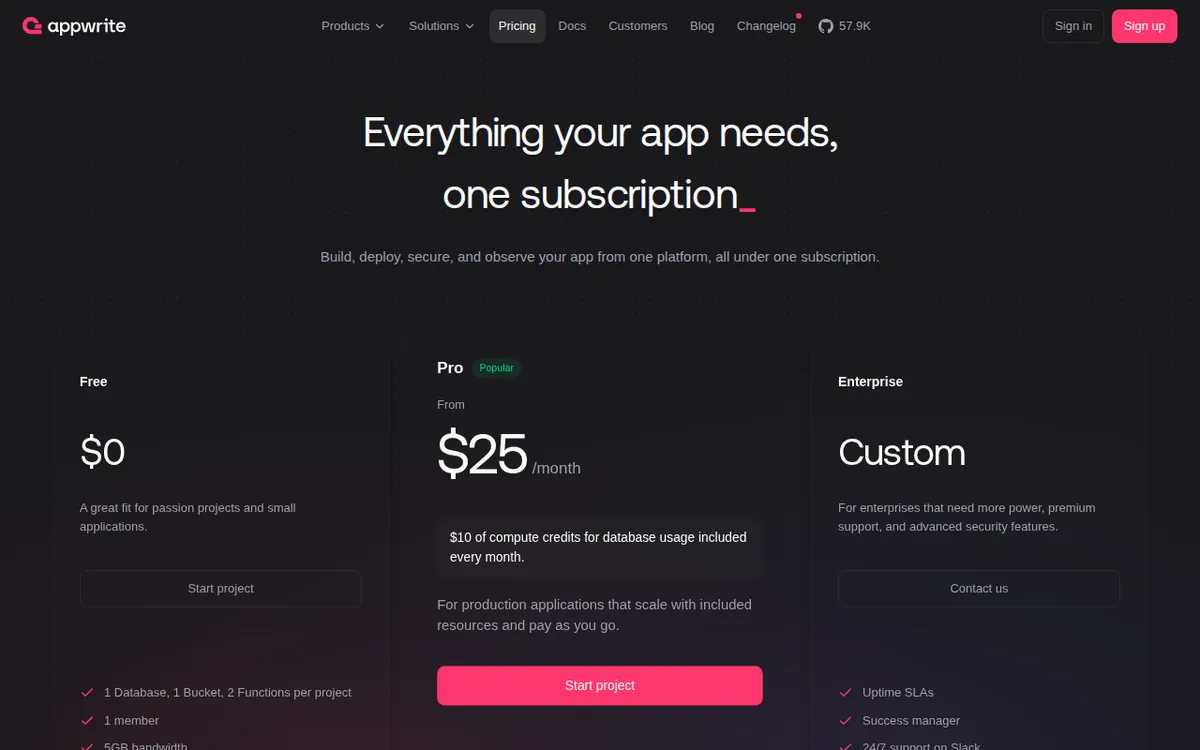
Figure: appwrite.io official pricing page, captured 2026-11-05.
Step 1: Set up your first project
Create an account at appwrite.io, then create a project. Appwrite bills per project on paid plans, so it helps to think in projects from day one — one project per app is the clean way to organize it.
Inside the project you’ll pick a region for your data. Pick the one closest to your users. This matters more than beginners expect: bandwidth is metered, and a far-away region means slower responses and more retries.
Then add a platform. Appwrite asks what kind of client you’re building — web, iOS, Android, Flutter, React Native. This step registers your app so the SDK can talk to the backend. Skip it and your first API call fails with a permissions error. That’s the single most common blocker for new users.
Step 2: Wire up authentication first
Authentication is the feature that eats the most time when you build it yourself, and it’s the one Appwrite makes trivial. Enable the login methods you want — email and password, magic URL, OAuth providers like Google or GitHub.
Then add the Appwrite SDK to your app and call the account creation method. A working sign-up and login flow is usually under an hour of work.
Why start here? Because every other feature depends on knowing who the user is. Database permissions, file access, function triggers — they all key off the authenticated user. Build auth first and the rest slots in cleanly.
Step 3: Add a database and storage
Create a database, then a collection (Appwrite’s word for a table), then define your attributes — the fields each record holds. Set permissions per collection: who can read, who can write. The default is locked down, which is correct. Open it up deliberately, not by accident.
For files, create a storage bucket and upload through the SDK. The 2 GB free storage covers profile pictures, documents, and small media comfortably. The 5 GB bandwidth is the number to watch if you serve images or video to many users — every download counts against it.
Step 4: Know exactly when you’d pay
The Pro plan is US$25 per month, billed per project. It includes 200,000 MAU, 2TB of bandwidth, and US$10 per month in database compute credit. Past 200,000 MAU, Appwrite charges US$3 per additional 1,000 MAU.
Read that again as a beginner: you’d need to grow past 75,000 monthly active users before the free tier stops covering you. That is a real product with real traffic. Most side projects and early-stage apps never get there. If you do hit it, that’s a good problem, and the jump to Pro is a business decision, not a hobby one.
🔍 AMPM exclusive check
Nothing differed from the official page this time; every number below matches it, checked 2026-11-04.
One thing the pricing page doesn’t spell out: the free tier and the Pro plan are both counted in MAU, but the Pro plan is billed per project, not per account. If you run three apps, that’s three separate Pro charges if each one grows past the free limit — the free tier’s 75,000 MAU applies per project too. Beginners planning a portfolio of small apps should map that out before assuming one payment covers everything.
☀️ AMO, the budget-minded cat

Here’s the budget question: is free actually enough, or is it a trap that snaps shut the moment you get traction?
For Appwrite, free is genuinely enough for a long time. 75,000 MAU is not a teaser number. Compare it to what you’d pay to replicate this stack yourself — a database host, an auth provider, a file storage service, a functions runner — and the free tier is doing the work of several paid subscriptions at once. The self-hosted option goes further: no license fee, no MAU ceiling, forever, if you’re willing to run the server.
The catch is bandwidth, not users. 5 GB sounds like a lot until you serve video. A single 10 MB file downloaded 500 times is 5 GB gone. If your app is text and small images, you’ll likely never notice. If it’s media-heavy, you’ll hit the bandwidth wall long before the MAU wall — and the fix is the US$25 Pro plan, which jumps bandwidth to 2TB.
So the honest budget read: start free, watch your bandwidth dashboard, and treat the US$25 as the price of a media-heavy app, not a growing one. For a text-based app with steady users, free can carry you a long way.
🌙 PIMI, the performance-minded cat
Does it actually work well? For a beginner building a normal app — logins, records, files — yes. The SDKs are consistent across platforms, the dashboard is clear, and the auth flow that takes a weekend to build by hand takes an afternoon here.
Where performance-minded users should pay attention: region choice and cold starts. Pick a region far from your users and every request pays a latency tax. Cloud functions can cold-start — the first call after idle time is slower while the runtime spins up. Neither is a dealbreaker, but both are things you control, so control them.
The Pro plan’s 2TB bandwidth and US$10 monthly database compute credit matter once you’re serving real traffic. The compute credit is the piece to understand: heavy database queries draw on it, and it’s a monthly allowance, not a permanent pool. If your app does a lot of reads and writes, track that number before you assume US$25 is the whole bill.
Verdict on speed: fast enough for production apps at small and mid scale. Not a toy. The free tier runs the same infrastructure as the paid one — you’re limited by quota, not by a throttled engine.
Verdict: who should use it, who should skip it
Use Appwrite if you’re building an app and want auth, database, and storage without stitching together three vendors. The free tier’s 75,000 MAU, 2 GB storage, and 5 GB bandwidth will carry a real project, and the self-hosted path removes the ceiling entirely if you’ll run the server.
Skip it if your app is media-heavy from day one — 5 GB of bandwidth will go fast, and you’ll be looking at the US$25 Pro plan sooner than you’d like. Skip it too if you want a fully managed experience with zero infrastructure thinking at any scale; Appwrite still expects you to understand regions, permissions, and quotas.
For a beginner shipping a first app, the sequence is simple: create a project, register your platform, build auth, add a database, watch your bandwidth. Pay nothing until 75,000 monthly users or 5 GB of traffic says otherwise.
Written: 2026-11-05 Price last verified: 2026-11-04 Tool last health-checked: 2026-11-05
🔗 Related on AMPM
📎 Sources
All prices and quotas in this article come from AMPM’s verified dataset for Appwrite (last verified 2026-11-04); primary sources:
🐾 Meet the cats: AMO and PIMI
AMPM is a Taiwan-based AI-tool pricing watchdog. Our motto: ask before you subscribe. Two cats argue every tool from two sides:
- ☀️ AMO — the budget-minded cat. Always asks: is the free tier enough, and is paying actually worth it?
- 🌙 PIMI — the performance-minded cat. Cares about whether it works well, fast, and gets your job done.
When they are done arguing, you know whether to pay. Every number is checked by us, with the verification date at the end.
🐾 Our sister sites also checked
Read next
- Appwrite Full breakdown: pricing, features and real-world limits
- Appwrite Is the free quota enough?
- Appwrite Alternatives
- Free plan limits for every AI tool we track
