[Pricing] Ahrefs Limits by Plan: What the Cheapest Tier Quietly Rations
- Free tier: Yes
- Cheapest paid plan: US$29/mo and up
- Free quota: Ahrefs Webmaster Tools (AWT): Free limited use of Site Explorer and …
- Last checked: 2026-11-19
Article last updated: 2026-11-17



Ahrefs is a big SEO database. It shows who links to a site, which keywords bring it traffic, and how a page ranks. Most pricing pages tell you what each plan adds. This one is more useful read the other way: what does each plan ration, and when does the rationing stop mattering?
There is a free route, four paid plans, and one rule that changes the math. Only the top two plans are free of the point-counting system. Everyone below pays for lookups in credits.
Prices vary by country, and we checked from Taiwan. All figures here are the US$ prices on the official page.
The free route: Webmaster Tools, for your own site only
Ahrefs has a free tier called Ahrefs Webmaster Tools, or AWT. It gives you limited versions of two tools: Site Explorer and Site Audit.
Site Explorer shows a site’s backlinks (links from other sites pointing to it) and its keyword performance. Site Audit crawls a site and flags technical problems.
The catch is in one clause: you must verify that you own the site. That means proving control of the domain. You can’t point AWT at a competitor, a client prospect or a site you’re thinking of buying. It looks at your own property only.
The official page calls the features “limited.” Our data does not list the exact caps, so we won’t invent any. Check the page for the current limits.
If you run one website and want to know who links to it and what’s broken on it, free may be all you need. Many small publishers never need to go further.
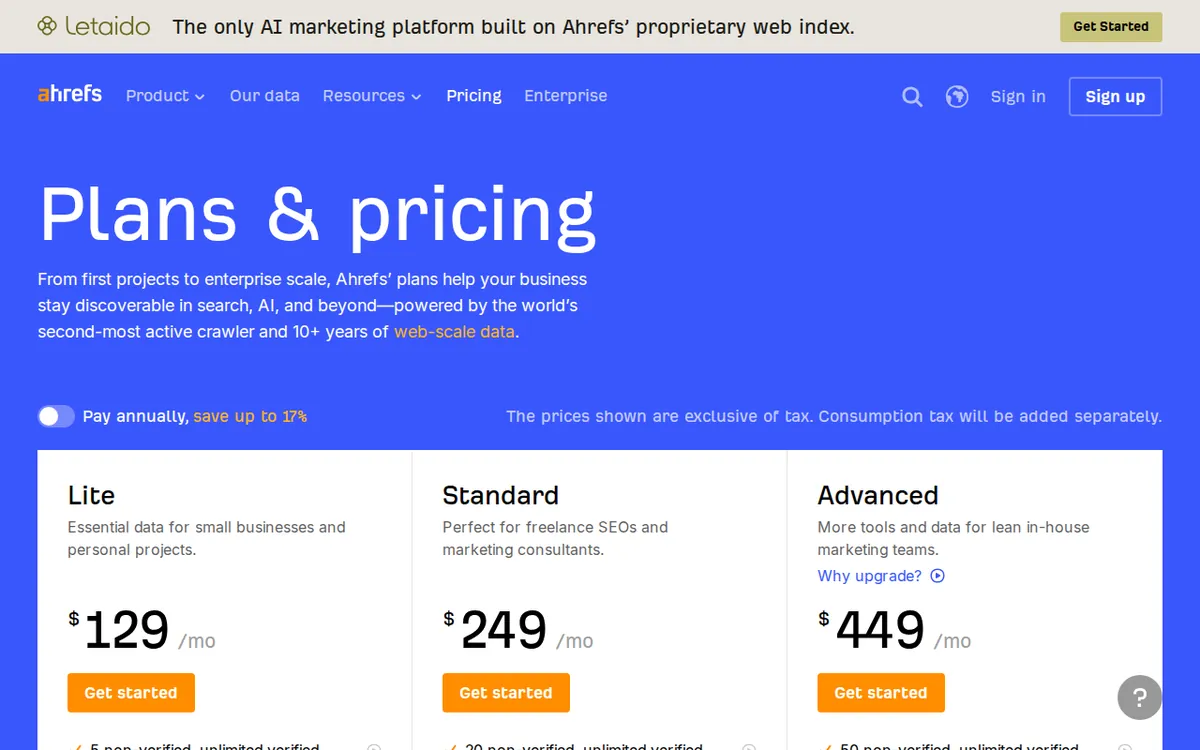
Figure: ahrefs.com official pricing page, captured 2026-11-17.
The paid ladder: four plans, all listed monthly
| Plan | Price | Users | Projects | Tracked keywords |
|---|---|---|---|---|
| Starter | US$29/month | 1 only | not listed | not listed |
| Lite | US$129/month | 1, plus up to 2 added | 5 | 750 |
| Standard | US$249/month | 1, extras at US$60/month each | 20 | 2,000 |
| Advanced | US$449/month | 1, extras at US$80/month each | 50 | 5,000 |
All four are billed monthly in our data. We found no annual price, so we can’t tell you whether a yearly option exists or what it would save. If you plan to commit for a year, ask Ahrefs directly.
Two terms here need a plain explanation. A seat is one person’s login. A project is a site you set up in the tool so it can track rankings and run audits over time.
Starter: the cheapest way to look at other people’s sites
Starter costs US$29 a month. It is monthly only. It is built for one person, and you cannot add seats.
It includes 200 analysis credits. Credits are the points Ahrefs deducts when you run lookups. With them you can check basic backlink and keyword performance on any website. That is the key difference from free: Starter lets you look at competitors, not just yourself.
The ration is the problem. Two hundred credits is a fixed pool. How fast each lookup burns it is the part we could not pin down (see the exclusive check below).
Lite: where the team features start
Lite costs US$129 a month. It includes one user, and you can add up to two more seats at US$40 a month each. You get 5 projects, tracking for 750 keywords and 1,000 credits a month.
Lite is also where API and MCP support appears. An API is a way for other software to pull data from a tool automatically. MCP is a connector that lets AI assistants use that data. If you want either, Starter is out.
Standard: credits stop being the limit
Standard costs US$249 a month. Ahrefs positions it as the default plan for most marketing teams. It gives you 20 projects, tracking for 2,000 keywords, unlimited analysis credits and 2 years of historical data. Extra users cost US$60 a month each.
The unlimited credits are the real change. Below this tier, you watch a meter. At this tier, you don’t.
Advanced: more room, longer memory
Advanced costs US$449 a month. It has 50 projects, tracking for 5,000 keywords, unlimited analysis credits and 5 years of historical data. It also adds advanced reporting tools. Extra users cost US$80 a month each.
The extra history matters for agencies and analysts who need to show long trends. Most small teams won’t miss it.
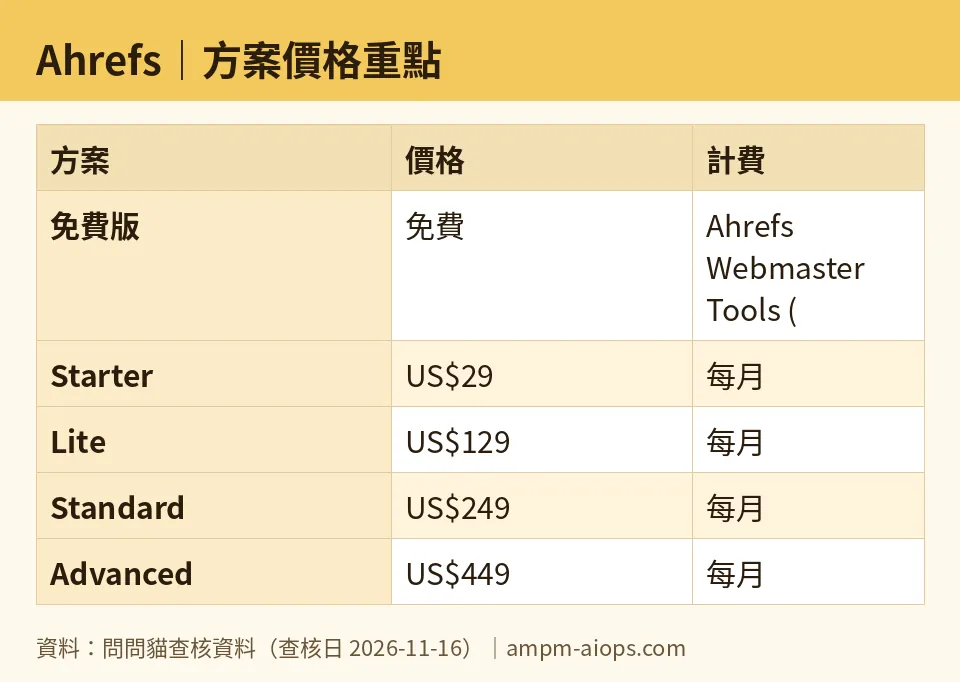
Figure: compiled by AMPM from its verified data (last verified 2026-11-16).
🔍 AMPM exclusive check
We can report three things, and one we can’t.
First, the prices match. Our automated check re-read the official pricing page each day from 2026-11-13 to 2026-11-16. The numbers for all four plans did not change. The last check was on 2026-11-16.
Second, a gap. The official page says Starter includes 200 analysis credits. In the data we hold, it does not spell out how many credits each kind of lookup costs. That is the rule that decides whether 200 lasts a week or a month. The Chinese edition of this piece flagged the same gap. We cannot give you a per-action cost, so we won’t.
Third, our sourcing is thin. This tool entered our database as a challenger candidate. Its data has had one round of checks, and it has not yet been cross-checked by hand against several sources. Treat the free tier’s exact limits and the commercial-use terms as “confirm on the official page before you rely on them.”
What we could not verify: any annual price. None appears in our data.
☀️ AMO, the budget-minded cat

AMO’s question is simple: is free enough, and if not, is paying worth it?
Start with free. If you own the site you care about, Webmaster Tools gives you limited Site Explorer and Site Audit at no cost. For a personal site, a small blog or a side project, that can cover the basics. Pay nothing until you hit a wall.
The wall is usually competitors. Free won’t show you anyone else’s backlinks. When you need that, Starter at US$29 a month is the cheapest door. It is monthly only, so you can pay for a month, do your research, and leave. That suits a one-off job like a competitor review before a relaunch.
But AMO would warn you about the 200 credits. It is a small pool, and the per-lookup cost isn’t written down in our data. Run one focused session, not a daily habit.
The next step, Lite at US$129 a month, is a big jump. You get 5 projects, 750 tracked keywords and 1,000 credits a month. You would only pay it if you track rankings across several sites, need the API, or want to add up to two teammates at US$40 a month each.
Standard at US$249 and Advanced at US$449 are team-budget decisions. For a solo budget watcher, the answer is almost always: stay on free, or rent Starter for a month.
Verdict: who should use it, who should skip it
Use free (Webmaster Tools) if you own one or a few sites and want to see your own links and technical errors. It costs nothing and asks only that you prove ownership.
Use Starter if you need to look at other people’s sites, you work alone and the job is short. It is the cheapest paid entry and is monthly only. Cancel when the job is done.
Use Lite if you track keywords across a handful of sites, need API or MCP access, or want up to two extra seats.
Use Standard if a team does SEO as a daily job and you don’t want to count credits. It adds unlimited analysis credits, 20 projects and 2 years of history.
Use Advanced if you handle many sites, need 5 years of history or need the advanced reporting tools.
Skip paying if you only care about your own site. Free covers the core use case, and the paid tiers add mostly things you won’t open.
Skip Starter as a long-term home if you run lookups all day. A fixed credit pool and no way to add seats make it a short-term tool.
Before you buy anything, open the pricing page and look for two things: how credits are deducted, and whether a yearly price exists. Our data has neither.
Written: 2026-11-17 Price last verified: 2026-11-16 Tool last health-checked: 2026-11-17
🔗 Related on AMPM
📎 Sources
All prices and quotas in this article come from AMPM’s verified dataset for Ahrefs (last verified 2026-11-16); primary sources:
🐾 Meet the cats: AMO and PIMI
AMPM is a Taiwan-based AI-tool pricing watchdog. Our motto: ask before you subscribe. Two cats argue every tool from two sides:
- ☀️ AMO — the budget-minded cat. Always asks: is the free tier enough, and is paying actually worth it?
- 🌙 PIMI — the performance-minded cat. Cares about whether it works well, fast, and gets your job done.
When they are done arguing, you know whether to pay. Every number is checked by us, with the verification date at the end.
🐾 Our sister sites also checked
Read next
- Ahrefs Full breakdown: pricing, features and real-world limits
- Ahrefs Is the free quota enough?
- Ahrefs Alternatives
- Free plan limits for every AI tool we track
