[How-to] Agorapulse free vs paid: Which Plan Should You Test First?
- Free tier: No
- Cheapest paid plan: US$99/mo and up
- Free quota: No permanent free plan (the old free plan has been retired), offering …
- Last checked: 2026-11-19
Article last updated: 2026-10-30



Agorapulse has no free plan. If you search for one, you will find old pages that mention it, but it has been retired. What you get now is a trial. This guide shows how to use that trial well and how to pick a paid plan without paying for features you will not touch.
My angle: you have one shot at a 30-day trial, so you should walk in with a plan. Here is the plan.
What “free” means at Agorapulse now
Agorapulse is a social media management tool. It lets you schedule posts across several networks, read all your messages and comments in one place (the “unified inbox”), and draft captions with a built-in AI writing assistant.
The free offer is a 30-day free trial with all features unlocked. It does not ask for a credit card.
That is the whole free tier. There is no forever-free plan to fall back on. When the 30 days end, you either pay or leave.
Prices vary by country, and we checked from Taiwan. The US$ figures below are the ones listed on the official pricing page.
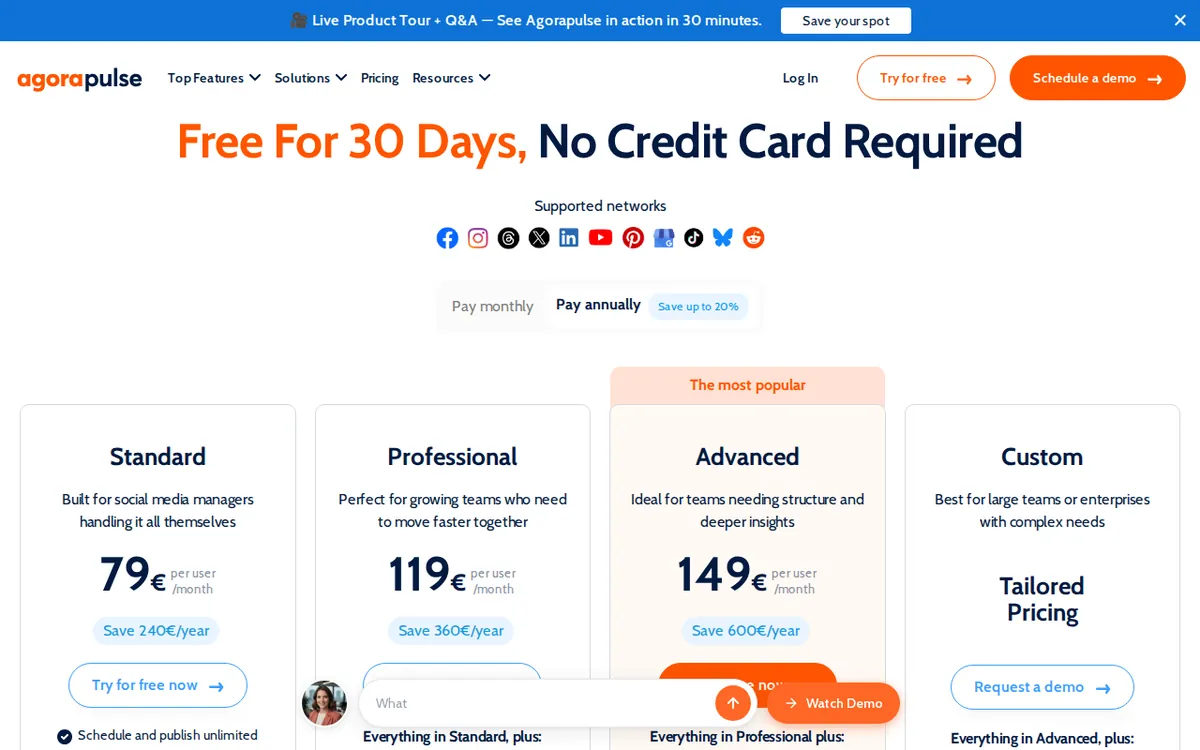
Figure: agorapulse.com official pricing page, captured 2026-10-30.
How to run the trial: five steps
1. Decide what you are testing before you sign up. Write down the one or two jobs you need done. Examples: “schedule a week of posts for all our accounts,” or “stop missing comments on our ads.” A trial with no goal ends with a shrug.
2. Sign up. No card needed. You can start without payment details. That also means nothing will bill you by surprise, which is a plus. Put a reminder in your calendar for a few days before the trial ends so you decide on purpose.
3. Connect your real accounts first. Every paid plan covers 10 social accounts. Connect the ones you actually run. A trial on dummy accounts tells you little about how the inbox behaves under real traffic.
4. Use the trial for the features that cost extra. Because the trial unlocks everything, this is your chance to test the top-tier tools before you pay for them. Try approval flows, CSV bulk scheduling, comment filtering and reporting. Then decide which of these you really used.
5. Pick the plan that matches what you used, not what you tried. If you only touched scheduling and the inbox, the cheapest plan is probably enough.
The three paid plans in plain terms
All three plans are priced per seat. A seat is one person with a login. If three teammates need access, you pay the per-seat price for each of them. Each plan includes 10 social accounts.
| Plan | Monthly billing | Annual billing (monthly average) | What it adds |
|---|---|---|---|
| Standard | US$99 per seat | US$79 | Unified inbox, scheduling, basic performance reports, AI writing assistant |
| Professional | US$149 per seat | US$119 | Team approval flows, post assignment, ad comment management, Canva integration |
| Advanced | US$199 per seat | US$149 | Bulk scheduling by CSV, automatic comment filtering, ROI analysis, Zapier connection |
A few terms, briefly. A CSV is a plain spreadsheet file you upload to schedule many posts at once. ROI is return on investment, meaning what you earned against what you spent. Zapier is a service that links apps together so one can trigger another.
One note on the annual column: the data we hold gives a monthly average for annual billing. It does not give a yearly total, so we are not going to guess one. Check the checkout page for the actual amount charged.
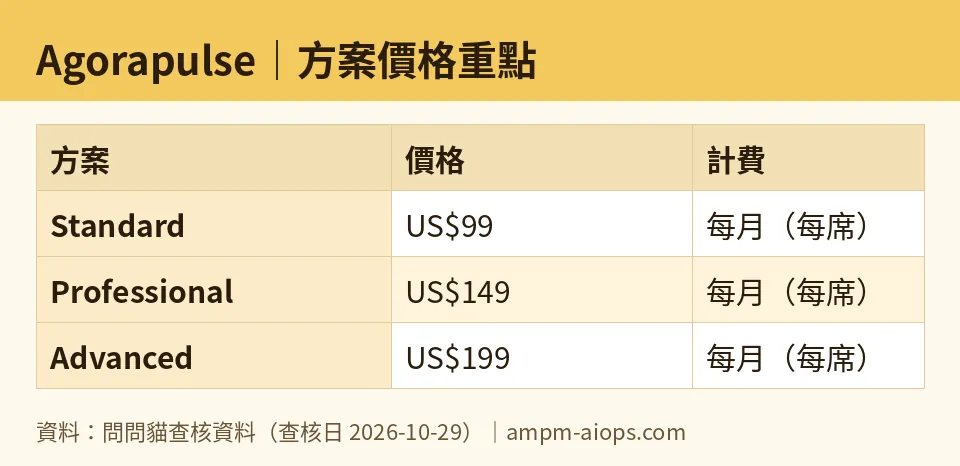
Figure: compiled by AMPM from its verified data (last verified 2026-10-29).
🔍 AMPM exclusive check
Here is what we checked and what we did not.
What matched. Our price check ran daily from 2026-10-26 to 2026-10-29. Every plan price and the trial terms matched the official pricing page each time. Nothing differed from the official page this time; every number above matches it, checked 2026-10-29.
One trap worth seeing. Two different plans land on the same number. Professional on monthly billing is US$149 per seat. Advanced on annual billing averages US$149 per seat per month. Same figure, very different products. Professional gives you team workflow. Advanced gives you bulk scheduling, comment protection, ROI reporting and Zapier. If you only compare the headline numbers, you might pick the wrong one. The catch is the commitment: the Advanced figure is a monthly average that assumes you pay annually, while the Professional figure is month to month.
What we could not confirm. This tool entered our database as a candidate, and the data has been through one round of checking. It has not yet been cross-checked by hand against three sources. We have not verified what happens to your scheduled posts and saved data once the trial ends. We also have not verified commercial-use terms. Read those on the official site before you rely on it for client work.
☀️ AMO, the budget-minded cat

Is free enough? There is no free to be enough. The question is whether 30 days of full access is enough to decide. For most small teams, yes, if you use it hard.
The cheapest way in is Standard. On monthly billing it is US$99 per seat. On annual billing the average is US$79 per seat. That gets you the inbox, scheduling, basic reports and the AI writing assistant, across 10 social accounts.
Is paying worth it? Only if the inbox or the scheduling saves you real hours. At these prices, a solo operator who posts to two or three accounts may find cheaper tools do the same job. Agorapulse charges for the whole bundle, so you pay for 10 accounts’ worth of capacity even if you manage three.
The seat price is where budgets break. Add a second person on Standard and you pay the per-seat price twice. Add three and the bill grows with each head. Before you pick a plan, count how many people truly need to log in. Someone who only reads reports might not need a seat.
My money rule: start the trial, test the extras, then buy the lowest plan that covers what you used. Move up from Standard to Professional only if you need approvals or post assignment. That is US$149 per seat monthly versus US$99. Move to Advanced only if CSV bulk scheduling or ROI reporting is a daily need. And if you are sure you will stay, annual billing lowers the monthly average on every tier.
If you cannot name a feature you would miss, do not upgrade.
🌙 PIMI, the performance-minded cat

Does it work well? The trial is the only way to find out, so I care about what you test, not what the brochure says.
Because all features are open for 30 days, run a real week of work through it. Schedule posts across your accounts. Let the inbox collect actual comments and messages. Judge speed and friction by how your team feels on day five, not day one.
Three tests I would run:
- Inbox under load. Does one place for all messages really replace checking each network? This is the core promise. Standard, Professional and Advanced all include it.
- AI writing assistant. Every plan has it. Draft ten captions and see how many you would publish with light edits. If you rewrite most of them, the assistant is not a reason to pay.
- Workflow tools. Professional adds approval flows, post assignment, ad comment management and a Canva link. If you have a reviewer or a client who signs off, test whether approvals fit how you work. Advanced adds automatic comment filtering, CSV bulk scheduling, ROI analysis and Zapier. Upload a real CSV. Set a filter rule. See whether the ROI numbers answer a question your boss actually asks.
Performance caveat: we have not benchmarked speed or uptime. Our data covers pricing and plan contents, not how fast the app runs. Judge that yourself during the trial.
If the features you reach for daily sit in Advanced, pay for Advanced. If they sit in Standard, stop there.
Common blockers and fixes
“I can’t find the free plan.” It was retired. Use the 30-day trial.
“I’m worried about being charged.” The trial does not ask for a credit card. Still, set that calendar reminder.
“I only manage a few accounts.” Every plan covers 10. You will not use the headroom, so weigh that against cheaper tools.
“Which plan is right for my team?” Count seats first. Then list the extra features you used in the trial. Match the plan to that list.
“Annual or monthly?” Annual billing shows a lower monthly average on every plan. Our data has no yearly total, so confirm the charge at checkout. If you have not finished the trial, stay on monthly until you are sure.
Verdict: who should use it, who should skip it
Use it if you manage several social accounts, you need one inbox for comments and messages, and you want scheduling and AI-assisted captions in the same tool. Teams that need approvals should look hard at Professional. Teams that need bulk uploads, comment filtering or ROI reports should test Advanced.
Skip it if you want a permanent free plan, you run one or two accounts, or you are a one-person shop watching every dollar. The per-seat pricing and the 10-account bundle favor teams, not solo creators.
Best move for everyone else: start the trial with a goal, test the top-tier features while they are open, and buy the lowest plan that covers what you used.
Written: 2026-10-30 Price last verified: 2026-10-29 Tool last health-checked: 2026-10-30
🔗 Related on AMPM
📎 Sources
All prices and quotas in this article come from AMPM’s verified dataset for Agorapulse (last verified 2026-10-29); primary sources:
🐾 Meet the cats: AMO and PIMI
AMPM is a Taiwan-based AI-tool pricing watchdog. Our motto: ask before you subscribe. Two cats argue every tool from two sides:
- ☀️ AMO — the budget-minded cat. Always asks: is the free tier enough, and is paying actually worth it?
- 🌙 PIMI — the performance-minded cat. Cares about whether it works well, fast, and gets your job done.
When they are done arguing, you know whether to pay. Every number is checked by us, with the verification date at the end.
🐾 Our sister sites also checked
Read next
- Agorapulse Full breakdown: pricing, features and real-world limits
- Agorapulse Is the free quota enough?
- Agorapulse Alternatives
- Free plan limits for every AI tool we track
